Quicken Basic crashes when attempting to do One Step Update - started in June

Attempting to update data via One Step (or any connection with on-line Quicken) - the program crashes (non-responsive in Task Manager).
I've worked through some of the troubleshooting steps: signed in as new user, reinstalled the program, etc. still hangs up when attempting OSU. An issue with the June patch?
Using HP desktop & Win-10.
Answers
-
Hello @Steve-Ohio,
Thanks for the details! You mentioned you've already reinstalled the program—just to confirm, did you also manually delete the Quicken folder under Program Files (x86) before reinstalling?
If not, here’s a quick walkthrough:
- Uninstall Quicken (if you haven’t already, full steps here).
- Before reinstalling, open File Explorer and navigate to:
This PC > Local Disk (C:) > Program Files (x86) - Locate and delete the “Quicken” folder (this won't affect your actual data files).
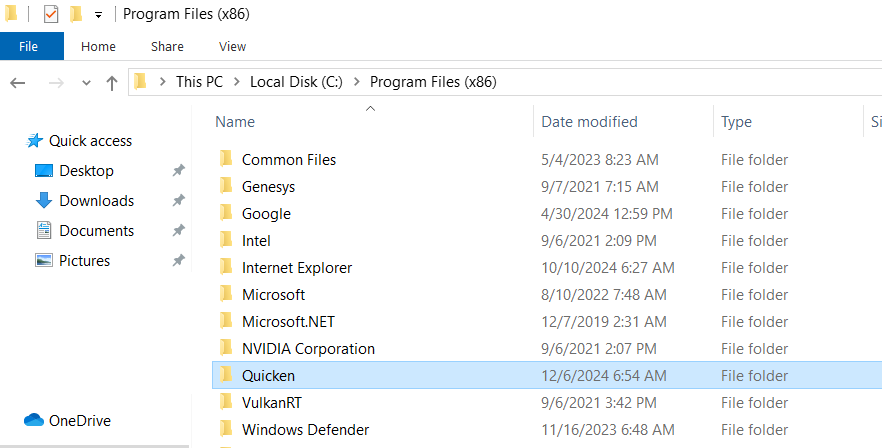
- Then proceed with reinstalling Quicken (instructions here).
This extra step often clears out any leftover files that can cause the program to hang or crash.
Let us know if that helps!
-Quicken Anja
Make sure to sign up for the email digest to see a round up of your top posts.0 -
Thanks for the suggestion, but it didn't work.
- I uninstalled Quicken using the System Uninstall process
- I looked for the Program (x86) folder - not there on C drive
- I reinstalled Quicken via new download from Quicken page
- I tried a One Step Update - program crashed during "processing data" step
Other ideas?
0 -
If you haven't done so already, please do the following actions: (Well, you can skip step 1)
- Even if you are on the latest software level already, download and install the latest Manual Patch file from https://www.quicken.com/support/update-and-patch-20182019-release-quicken-windows-subscription-product to ensure your Quicken software is up to date and correctly installed.
- Reboot Windows. Let Windows fully wake up and do whatever it wants to do after booting up … 15 minutes or so.
- Start Quicken. Do not run One Step Update.
- Run BOTH Validate and Supervalidate to attempt to repair your Quicken data file.
- If nothing helps, try to restore your Quicken data file from an Automatic or Manual backup taken just prior to the problems first occurring.
Validate and Supervalidate instructions
First save a backup file prior to performing these steps
Validate:
• Click File
• Select Validate and Repair File...
• Select Validate File
• If the data file contains investment accounts also select "Rebuild investing lots".
• If you suspect that a damaged Quotes Price History causes your problems, also select "Correct investing price history" functions "Delete" or "Repair and Rebuild".
• Click OK
• Review the Data Log. Anything interesting in there, worthwhile posting here?
• Close Quicken, leave it closed for about 30 secs
• Reopen Quicken and see if the issue persists.Super Validate:
• Click File
• Press and hold both CTRL and Shift keys while you click Validate and Repair File...
• Select Supervalidate File
• Click OK
• Review the Data Log. Anything interesting in there, worthwhile posting here?
• Close Quicken, leave it closed for about 30 secs
• Reopen Quicken and see if the issue persists.0 -
Thanks for the suggestion, but it didn't work.
I uninstalled Quicken using the System Uninstall process
I looked for the Program (x86) folder - not there on C drive
I reinstalled Quicken via new download from Quicken page
I tried a One Step Update - program crashed during "processing data" step
In case you want to perform the uninstall / reinstall process again … The folder C:\Program Files (x86) does exist on every system. Windows won't work without it.
You must not have been looking in the right place or for the correct folder name. If you have someone in your family or circle of friends who is more familiar with Windows than you are, please ask that person for help.0 -
Thank you for following up with those details.
Please review and follow the instructions found in this support article to see if any of these instructions help resolve the issue.
Let us know how it goes!
-Quicken Anja
Make sure to sign up for the email digest to see a round up of your top posts.0 -
Did both Validate and Super Validate per instructions. Still having same crash problem. Other suggestions?
Log of SUpervalidation follows:
—————[Thu Jul 17 07:21:53 2025]File: "D:\Quicken Data\Quicken Working File\Hill-2018-04-03 Restored"
QDF:
Validating your data.
Quicken repaired ACCT_3b73 account. No action required.QEL:
No read errors.QEL:
All internal consistency checks passed.[Thu Jul 17 07:22:42 2025]
Maximum security reference: 28, number of securities: 28.
Correcting invalid category type for category: ACCT_3b73
Invalid category type corrected
All security references are within the normal range.Super validation has completed.
0 -
Thanks for following up!
Just to confirm—were you also able to follow the other steps outlined in the support article I linked previously?
Let us know which of those steps you’ve already completed so we can better advise on what to try next.
Thank you!-Quicken Anja
Make sure to sign up for the email digest to see a round up of your top posts.0 -
I followed all the steps - still have the crashing problem.
A summary of the results is attached.
0

