Will importing a 2014 file mess up my current Quicken Classic data?

Hi,
I'm on Quicken Classic R62.21.
I used Q99 through Q2014 for many years. When I bought Quicken Classic, I started fresh for 2025. I'm glad not to have all the old accounts and memorized transactions popping up.
I would, however, like to be able to look through that old Q2014 data. Per this article, I can directly import and convert the Q2014 file, presumably into an empty Quicken Classic file. My question is, will that affect my current Quicken Classic data and experience in any way? Are there some global settings that get merged across all files, or can I keep that old data completely separate, which is what I want?
Thanks.
Best Answers
-
Hello @sd_mark,
Great question — you can absolutely import your old 2014 file without affecting your current data, as long as you open it as a separate file.
Here’s how to do that safely:
- Go to File > Open Quicken File, then browse to and open the old
.QDFfile. - Quicken will convert it and create a new version — your current file stays untouched.
- To switch between files later, use File > Open Recent or File > Open Quicken File again.
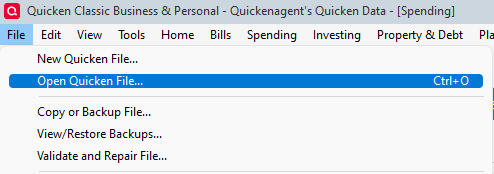
Each file keeps its own accounts, transactions, and settings (like categories, renaming rules, preferences, etc.), so there’s no merging or bleed-over unless you explicitly export/import between them.
Let me know if you need help locating the converted file or switching back afterward.
-Quicken Jasmine
Make sure to sign up for the email digest to see a round-up of your top posts.
0 - Go to File > Open Quicken File, then browse to and open the old
-
@sd_mark you pay for the right to use the software, but you don't actually own the software. Quicken allows you to continue to use the software after your subscription expires at a diminished functionality. You will still have access to your data file.
Opening up archived data files is no different than opening your current data file. As for being asked to sign on with your Quicken ID repeatedly, I can't explain why, but I think it has something to do with being able to verify your identity.
0

Answers
-
Hello @sd_mark,
Great question — you can absolutely import your old 2014 file without affecting your current data, as long as you open it as a separate file.
Here’s how to do that safely:
- Go to File > Open Quicken File, then browse to and open the old
.QDFfile. - Quicken will convert it and create a new version — your current file stays untouched.
- To switch between files later, use File > Open Recent or File > Open Quicken File again.
Each file keeps its own accounts, transactions, and settings (like categories, renaming rules, preferences, etc.), so there’s no merging or bleed-over unless you explicitly export/import between them.
Let me know if you need help locating the converted file or switching back afterward.
-Quicken Jasmine
Make sure to sign up for the email digest to see a round-up of your top posts.
0 - Go to File > Open Quicken File, then browse to and open the old
-
Thank you. It looks like it worked. It is confusing to have to log in to my Quicken account just to open local files with a program that I own. Do I lose the ability to open old files, or any files, if my Quicken subscription expires or the Quicken account no longer exists?
0 -
Hi @sd-mark,
Hence, the purpose of dual -booting computers. Beta-testing as well as testing newer versions with keeping your data safe.
If you know how to add other Hard Drives to Tower Computers.
thecreator-bTesting Quicken Subscription Beta B63.19 (Nov. 2023) Installed 24/7.
in Windows 10 Pro 64-Bit Build 19045.3693 Quicken Classic Business & Personal0 -
@thecreator-b Thank you for beta-testing.
I have extra computers, physical and virtual, so I wouldn't need to dual boot. The reason to import old files into the current version is the convenience of not having to log in to a second computer when I occasionally need to look at old data. Well that and now I need to run the current version of QB on a secondary computer because the primary is in the shop.
So what's the deal with having to log in online every time I open a local file for the first time?
0 -
@sd_mark when you open a Quicken data file for the first time, signing in with your Quicken ID serves a few key purposes:
Security & Access Control
Your Quicken ID acts as a secure gateway to your data. It ensures that only authorized users can access sensitive financial information, especially if the file uses online services like transaction downloads or bill pay.Product Registration
Even if you don’t use online banking features, signing in registers your software and confirms your membership status. This helps Quicken verify your subscription and enable features tied to your account.Syncing & Cloud Services
If you use Quicken Mobile or Web, your Quicken ID links the desktop file to your cloud account. This allows syncing across devices and ensures consistency in your financial data.Once you've signed in, you typically won’t need to do it again unless:
- You open the file on a different computer
- You haven’t signed in for over 90 days
- You change your Quicken ID credentials
If you’re managing multiple files (like tracking someone else’s finances), each file can be associated with the same Quicken ID, but they’ll need to be signed in individually the first time.
0 -
@CaliQkn Thanks for those thoughts.
From the perspective of an old-school user and software developer, it's a pretty intrusive design. The logon should only be required and requested at the moment it's needed. Registration is a software-level thing; it certainly isn't needed five times in an hour as I open old files. Sure if I want to activate the cloud connection, or maybe if the file previously used cloud connection, the login makes sense, but for opening archived files, it's unnecessary and unwanted.
I do own this software, right? If my subscription expires or I delete my Quicken account, I can still use the local functionality at the last installed version?
0 -
@sd_mark you pay for the right to use the software, but you don't actually own the software. Quicken allows you to continue to use the software after your subscription expires at a diminished functionality. You will still have access to your data file.
Opening up archived data files is no different than opening your current data file. As for being asked to sign on with your Quicken ID repeatedly, I can't explain why, but I think it has something to do with being able to verify your identity.
0 -
Thanks for the replies. Marking a couple as answers.
0 -
@sd_mark You asked early on about any global preferences getting applied or merged across all files. While Jasmine indicated no to that question, you may find on occasion some such cross pollination. I haven't seen a list of such factors, but we have seen it happen. So just be aware of the possibility. I would agree with Jasmine's statement that it is not necessarily by intent. They intend all such parameters to be at the individual file level. Window size is one item that comes to my mind as handled at the program level rather than the file level.
0 -
You are very welcome. Please don't hesitate to reach out with any further questions or concerns!
-Quicken Jasmine
Make sure to sign up for the email digest to see a round-up of your top posts.
0