Unable to close account, says I have downloaded transactions that need approving... but are none.

I have ML account which is dormant. I would like to close it (or delete it) but QW says that I have downloaded transactions that need to be accepted before I can close the account. However I cannot find any such un-accepted transactions. Please help.
Best Answer
-
Hello @Marc S,
Thank you for letting us know you're seeing this problem. To help troubleshoot, I recommend that you start by turning automatic entry on (or off, depending on whether you currently have it turned on).
To do that, first backup your Quicken file. Then, click on the account to view the account register, and click the gear icon near the upper right. Select Edit account details.
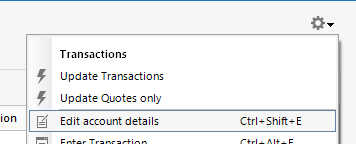
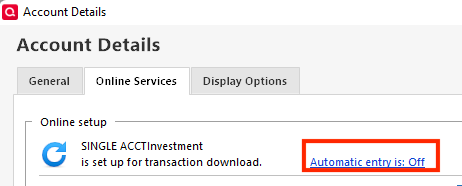
In the Account Details window that comes up, click on the Online Services tab. You should see a blue link that says Automatic entry is:. Click on that blue link.
The Automatic Transaction Entry window should come up. If you have automatic entry on, select No to turn it off. If you have automatic entry off, select Yes to turn it on. Once you have selected the appropriate option, click OK. Review the next pop up, then click OK. Close your Quicken program. Wait about 10 seconds, then re-open Quicken. Test to see if the issue is resolved.
Please let me know how it goes!
Quicken Kristina
Make sure to sign up for the email digest to see a round up of your top posts.
2

Answers
-
It's a bad idea to delete accounts. Close it and hide it.
0 -
I have hidden it. I cannot close it for the same reasons listed above. I will edit my question to reflect that.
Merrill and QW have agreed to a new authentication method which requires me to "re-authorize" access to the account. Since Merrill sees that the account is dormant, it will not allow me to log in to it… and therefore I am hit with a "notice - action required" message each time I update my accounts.
In short, I just cannot get this thing to go away!
0 -
Hello @Marc S,
Thank you for letting us know you're seeing this problem. To help troubleshoot, I recommend that you start by turning automatic entry on (or off, depending on whether you currently have it turned on).
To do that, first backup your Quicken file. Then, click on the account to view the account register, and click the gear icon near the upper right. Select Edit account details.
In the Account Details window that comes up, click on the Online Services tab. You should see a blue link that says Automatic entry is:. Click on that blue link.
The Automatic Transaction Entry window should come up. If you have automatic entry on, select No to turn it off. If you have automatic entry off, select Yes to turn it on. Once you have selected the appropriate option, click OK. Review the next pop up, then click OK. Close your Quicken program. Wait about 10 seconds, then re-open Quicken. Test to see if the issue is resolved.
Please let me know how it goes!
Quicken Kristina
Make sure to sign up for the email digest to see a round up of your top posts.
2 -
Quicken Kristina, thank you! That did it!!
As a side note, once that issue was resolved… other Accounts (active ones) began to update normally again.
0 -
Thank you for the follow-up,
I'm glad to hear that the issue is resolved!
If you need further assistance, please feel free to reach out!
Quicken Kristina
Make sure to sign up for the email digest to see a round up of your top posts.
0
