FDP-105 after reauthorizing Merrill Lynch accounts

This discussion was created from comments split from:
Merrill Lynch transitioning from Direct Connect to 'a new connection method' not working
.
Comments
-
I'm having a similar issue updating Merrill to the "new connection method" – the Merrill site successfully opens and I go through the authorization process successfully, and it says that my accounts are authorized. When I go back to Quicken it also says that my account is now authorized – but then it comes up with an FDP-105 error message and doesn't actually complete the account updated.
I have tried it a bunch of times and it's the same each time.
To add insult to injury, when I try to report the problem to Quicken, I get a message that "HTTPlog.txt" is larger than the maximum size allowed, and I'm unable to exit that error dialog, I have to force-quit the application to recover.
0 -
Hello @Dave in SF,
Thank you for letting us know you're seeing this issue. To help troubleshoot, please provide more information. When did you first notice this issue? When you try to reauthorize the account(s), at what point in the process is it throwing the FDP-105 error?
Please try making backup your Quicken file, then deactivate the problem accounts, reconnect them by navigating to Accounts>Add Account… and follow the prompts. When you get to the Add/Link screen, please make sure to carefully link the accounts to the existing accounts in Quicken.
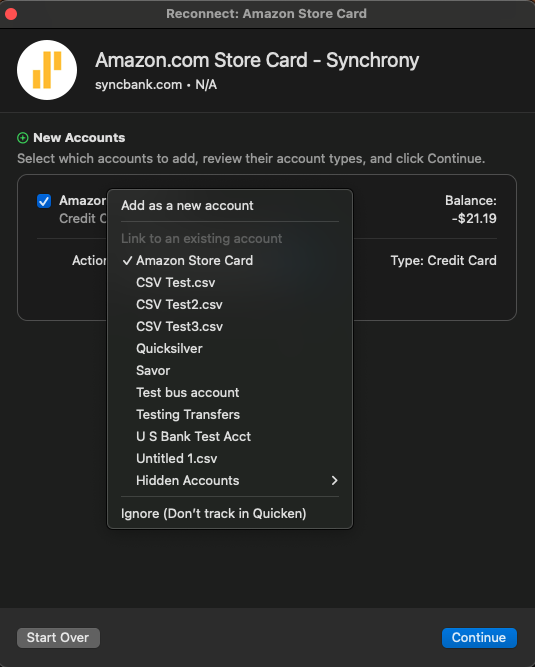
Please let me know how it goes!
Quicken Kristina
Make sure to sign up for the email digest to see a round up of your top posts.
0 -
Quicken Kristina
Make sure to sign up for the email digest to see a round up of your top posts.
0

