Quicken bill pay problem with Truist

After the recent Truist upgrade Quicken bill paid doesn't work. Going through the Truist recommended procedure after the upgrade it defaults the web express. To enable bill pay it must be a direct connect. The Truist call center recommended creating a new account. That works but none of the old data is retained. Truist recommended calling Quicken's helpdesk to import the old data. Nothing they could recommend worked either.
Answers
-
Hello @lwv,
Thanks for sharing what you've tried so far—sounds like a frustrating situation, especially with both Truist and Quicken support involved already. I’d like to get a clearer picture of the issue so we can determine next steps:
- When you say the connection defaults to Web Connect or Express Web Connect—are you seeing any option at all for Direct Connect when attempting to add or reactivate the original Truist account?
- Have you tried deactivating and reactivating the existing Truist account in Quicken rather than creating a brand-new one?
- When adding the new account, does it download historical transactions at all, or only new ones going forward?
- Did the account originally use Quicken Bill Manager or Truist’s Direct Connect bill pay functionality prior to the upgrade?
- When you contacted Quicken support, did they try restoring from a backup and re-establishing connectivity that way, or was the old account data manually exported/imported?
- Lastly, can you confirm which connection method is now listed in Tools > Account List > Edit > Online Services for both the old and new account entries?
Let me know what you're seeing!
-Quicken Jasmine
Make sure to sign up for the email digest to see a round-up of your top posts.
0 -
I have been using Quicken since 1998. I have always been confident about this service. However since Suntrust Bank merged and created Truist,. I have ben very frustrated using quicken. Initially I was able to send payment through Direct Connect and when I updated my accounts I received and payment confirmation and a check number. Since the the Truist name came about that no longer happens. Since Truists recent update I no longer can connect through Direct Connect. In speaking with Quicken they say that Direct Connect is no longer available. When speaking to Truis they say that they are trying to resolve some issues after their recent update but that Direct Connect does still work. I feel I am caught in the middle between Truist and Quicken and I am bout to get rid of both, unless I can find a resolution. Help!!!!!!
0 -
i agree… direct connect does work, but not bill pay… when using online update (one step update), click the payment button off and it will connect to download transactions, but if "bring my payments up to date" is clicked, it returns an error…
i.e. connected on direct connect, but it is acting like Truist connects on web connect which will not update bills or payments… and returns the error.
Looking under the tools menu >account list >edit (tab online services) is showing direct connect (which comes from Truist not Quicken)…
Been calling Truist everyday since the 30th, everytime I get the same response… basically deactivate through online services and reactivate… tell them I have done dozens of times and they say thats all they know and that they will escalate… not response from whoever they escalated to…
0 -
This has been an issue since mid-March when Truist did the 1st Bill Pay 'Upgrade'. Truist evidently doesnt have a clue what the issue is or how to fix it. What a cluster.
0 -
I am using Quicken for Mac, but having the same issue. Mine is only with my business account with Truist. Getting error 2000 every time I try to send a Bill pay from Quicken. My personal account and Quicken file work fine. Called Truist multiple times and getting no help.
0 -
Hello All,
Thanks for joining this thread to share that you are also experiencing this issue.
This issue has been reported and our teams are currently investigating further. In the meantime, please navigate to Help > Report a Problem within your Quicken program and submit a problem report with log files and screenshots attached to contribute to the investigation.

It would also aid the investigation to include a sanitized file when submitting the problem report. A sanitized file is a data file that removes personally identifiable information so you can comfortably share this file with the Quicken team.
While you will not receive a response through this submission, these reports will help our teams in further investigating the issue. The more problem reports we receive, the better.
We apologize for any inconvenience caused! Thank you.(CTP-13822)
-Quicken Jasmine
Make sure to sign up for the email digest to see a round-up of your top posts.
0 -
Hello All,
One more thing: I want to see if we can confirm whether you're running into the same issue we’ve seen elsewhere.
There’s a process that’s worked for some users to get stuck bill instructions to go through. Would you mind trying the following steps and letting me know what happens?
- Change the status of the bill from Send to ATM
- Run a Validate and Repair on your file
- File > Validate and Repair File...
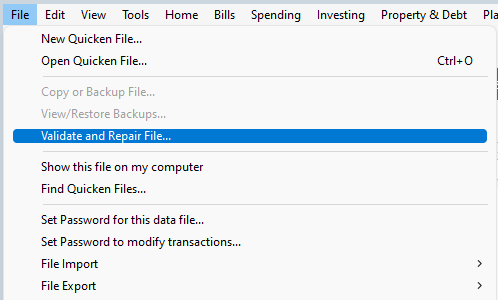
- Validate File
- Click OK
- Close the Data Log
- Close Quicken (leave it closed for at least 5 secs)
- Reopen Quicken and see if the issue persists.
- File > Validate and Repair File...
- Close and reopen Quicken
- Then change the status of the bill back from ATM to Send
- Run One Step Update again and see if the instruction successfully transmits
If this works for you too, it’ll help us confirm we’re looking at the same underlying issue. Let me know what you see!
-Quicken Jasmine
Make sure to sign up for the email digest to see a round-up of your top posts.
0
