Account Reconciliation Issue

A Classis Premier user, version R63.21 and a seasoned Quicken user.
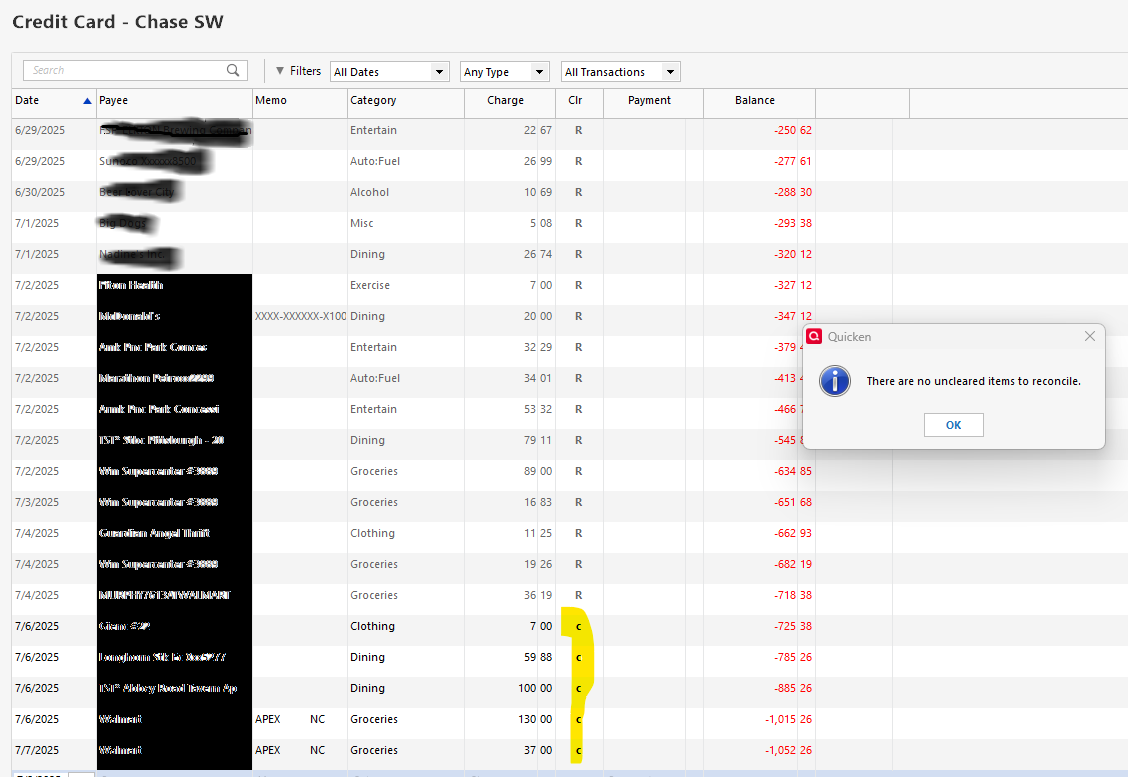
Have an issue with two accounts within one file (a checking account and credit card account issued by the same bank - Chase) where the reconcilation tools isn't working. Other accounts within the file work properly. As seen below, when I attempt to reconcile the accounts, even through there are transaction with a "C" cleared indicator, I get a message that "There are no uncleared itmes to reconcile". In checking my online balance at Chase, I can see where the transaction have, in fact, cleared. Is there a solution to this issue?
Answers
-
Double check your as-of dates for the reconciliation, that can cause the message you're getting.
Also, try taking a backup and then Validating your Q data file. If that doesn't do the trick, try a SuperValidation.
Q user since February, 1990. DOS Version 4
Now running Quicken Windows Subscription, Business & Personal
Retired "Certified Information Systems Auditor" & Bank Audit VP0 -
@Retired Banker is the current Online Balance -718.38? If so that would explain the issue. The online balance is wrong and not updating.
0 -
@Retired Banker - the current Quicken balance was $1,052.26 and agreed with the Chase online balance.
0 -
@Retired Banker if the Online Balance is correct, then the Online balance date might be wrong (7/4/2025 and s/b 7/7/2025).
Are you still having an issue today (7/9/2025)?
0 -
Quicken still does not recognize unreconciled items (items with a "C" in the cleared column. The "Online Balance" at the bottom center of the screen shows that balance of the account to the banking institution. So now I compare balance with the balance Quicken shows to manually change the "C" to "R" for cleared items.
0
