Vanguard Issues QQQ & MSFT Prices Won’t Update

Hello,
I have quicken classic deluxe for Windows. For the past few weeks (since 6-9-2026), the prices for certain Vanguard holdings (e.g., QQQ and MSFT) will not update in quicken. I run the update and get no errors. I am using direct connect for Vanguard. All of my transactions correctly show up in quicken but just the prices are old and will not update.
I look in the QFX log and the updated prices are there and the date is correct (i.e, this morning 7-26-2025 at 8:01:49). The correct prices are in the QFX log:
RECV from https://vesnc.vanguard.com/us/OfxDirectConnectServlet at 08:01:49 on 20250726
INVESCO QQQ ETF<TICKER>QQQ<UNITPRICE>566.37<MEMO>Price as of date based on closing price</SECINFO><MFTYPE>OPENEND</MFINFO><STOCKINFO><SECINFO><SECID><UNIQUEID>594918104<UNIQUEIDTYPE>CUSIP</SECID><SECNAME>MICROSOFT CORP<TICKER>MSFT<UNITPRICE>513.71
However, the prices in quicken reflect prices from several weeks ago: QQQ 529.92 and MSFT 470.38 which were the prices as of 6-9-2025.
I have disconnected and reconnected the direct connect for Vanguard with no help.
How can I get Quicken to reflect the current prices for my Vanguard holdings?
Thank you!
Best Answer
-
Thanks for the update. This is getting curiouser and curiouser!
Do you also hold QQQ in a different account that is connected for online access? Maybe the bad price is coming from there.
Go to Tools > Online center and select each of your investment financial institutions and each account that is listed, even if it is inactive. For each account, go to the Holdings tab and look for a security that has a price of $508.69. That would be what is polluting your QQQ price.
QWin Premier subscription0

Answers
-
There are normally two sources for security prices in Quicken: your broker and Quicken's quote provider. The data you have shown from the QFX log comes from Vanguard.
If you go to Tools > Security List and find the problem securities, is the Download quotes box checked and are the ticker symbols correct? If not, you will not get updated prices from the quote provider. In order to get these updated quotes, Download Quotes must be checked, the ticker symbol must be correct, and you must own some shares of the security or the Watch List box must be checked.
I just did a quick check with QQQ and it appears that the quotes are downloading correctly for QQQ.
Please let us know what you find.
QWin Premier subscription0 -
Thank you for the reply.
Yes, the download box is checked for both and the ticker symbols are correct.

 0
0 -
@egldvrbags do you have a current share balance for QQQ and MSFT? Prices will not download if the security doesn't have a share balance.
Also, try checking "Watch List". I think then prices will download even if there is no share balance.
0 -
OK, now let's look at the price history in Quicken. Click on the security name to open the Security Detail view. then click on More and select Edit price history. It should look like this for QQQ:
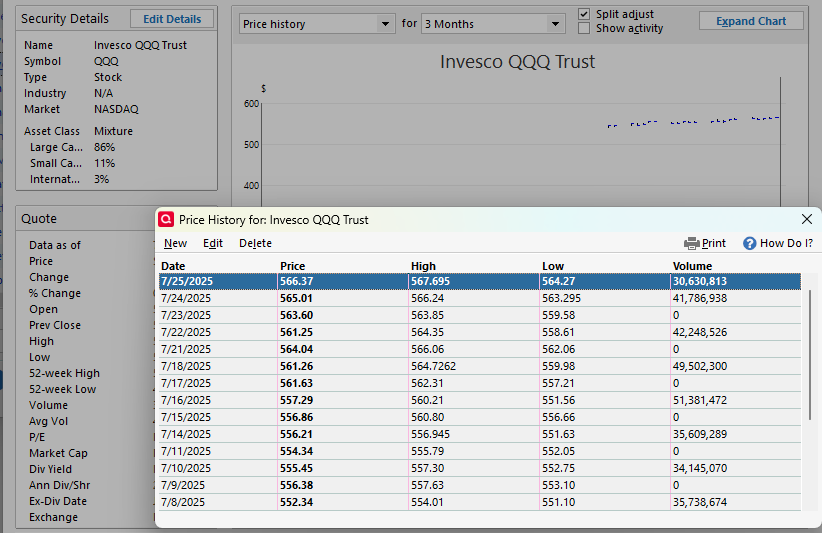
What do you see?
QWin Premier subscription0 -
Yes, I have shares in both securities. These are just 2 examples of prices not updating in quicken. I have others as well that prices are not updating, all are held at Vanguard. The log file shows the correct prices from vanguard, but these do not populate into quicken.
This is how I found the discrepancy because my balance between quicken and vanguard.com don’t match, even though the actual number of shares match. Quicken just won’t update the security price.
0 -
Please answer the question. Are there entries in the price history for recent dates? Are the prices correct?
This will tell whether the prices are being updated but they are not displayed correctly elsewhere in Quicken, or if the prices are not actually being updated.
Are the high, low, and volume included, indicating that the data came from Quicken's quote provider?
QWin Premier subscription0 -
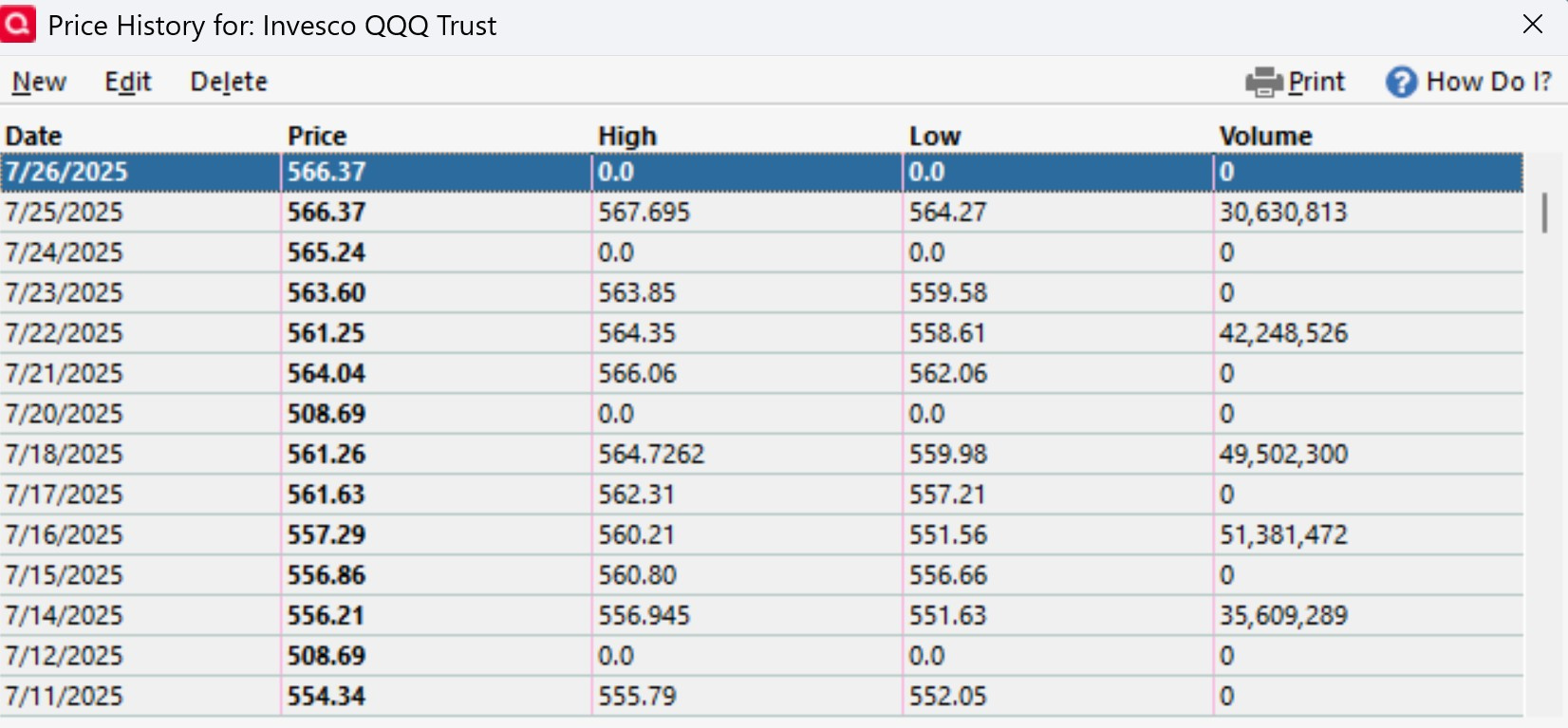
Here's what I have for QQQ:
 0
0 -
OK, so you have a mixture of prices from the quote provider (the ones with Highs and Lows) and ones that came from someplace else. The $508.69 prices on Sun 7/20 and Sat 7/12 are clearly wrong.
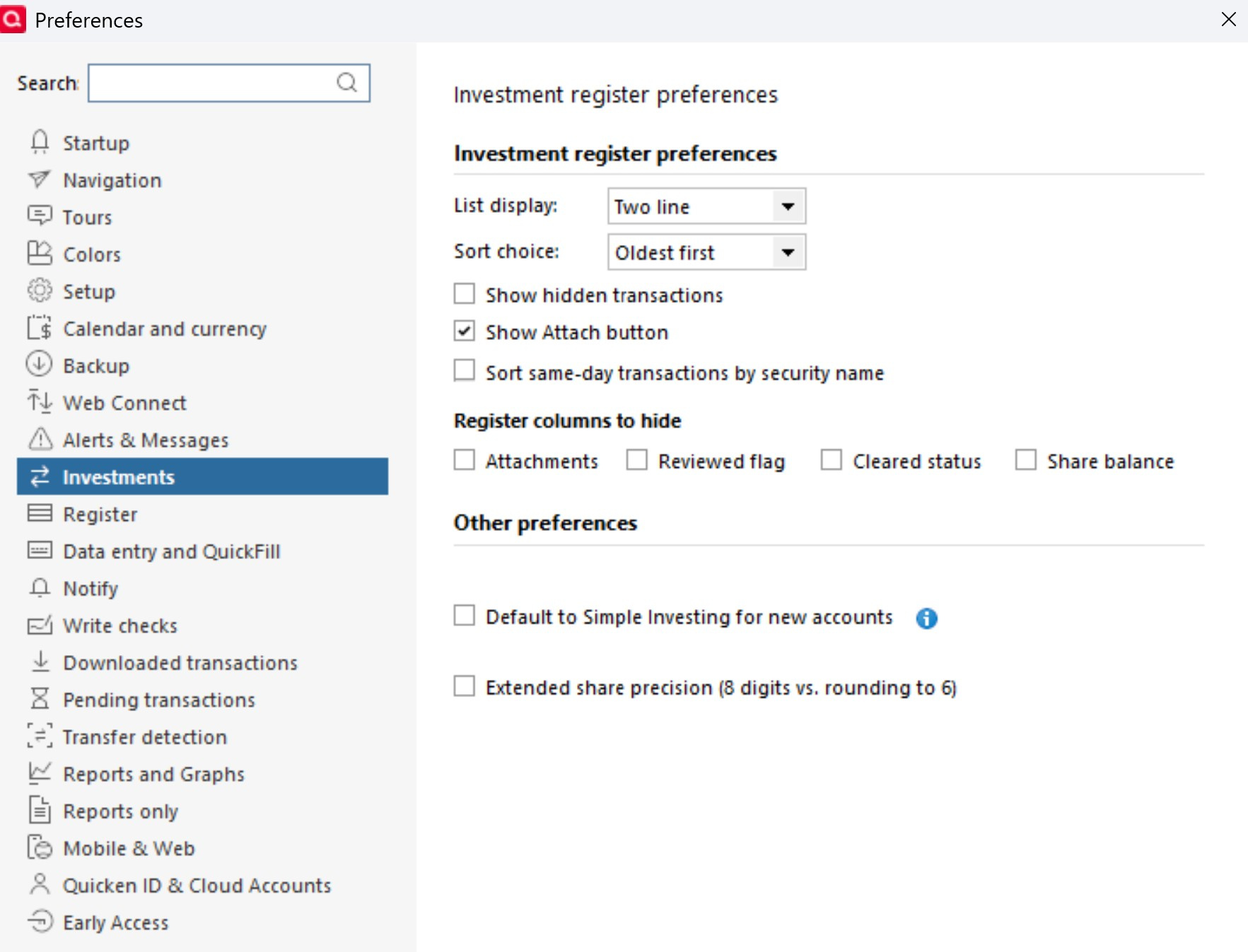
Are you running Quicken Premier or higher and if so do you have the option at Edit > Preferences >Investments "real time quotes" enabled? That might account for some of the bogus prices. The real time quotes include prices from after hours trading,
Also if you go to the Security List and check the Show hidden securities box, do you have two copies of the QQQ security, maybe one with a ticker symbol and one without? That could also explain some pricing issues.
QWin Premier subscription0 -
Quicken Classic Deluxe. No option for real time quotes.
 0
0 -
OK, then that's not it.
If you go to the Security List and check the Show hidden securities box, do you have two copies of the QQQ security, maybe one with a ticker symbol or with a different or blank ticker? That could also explain some pricing issues.
QWin Premier subscription0 -
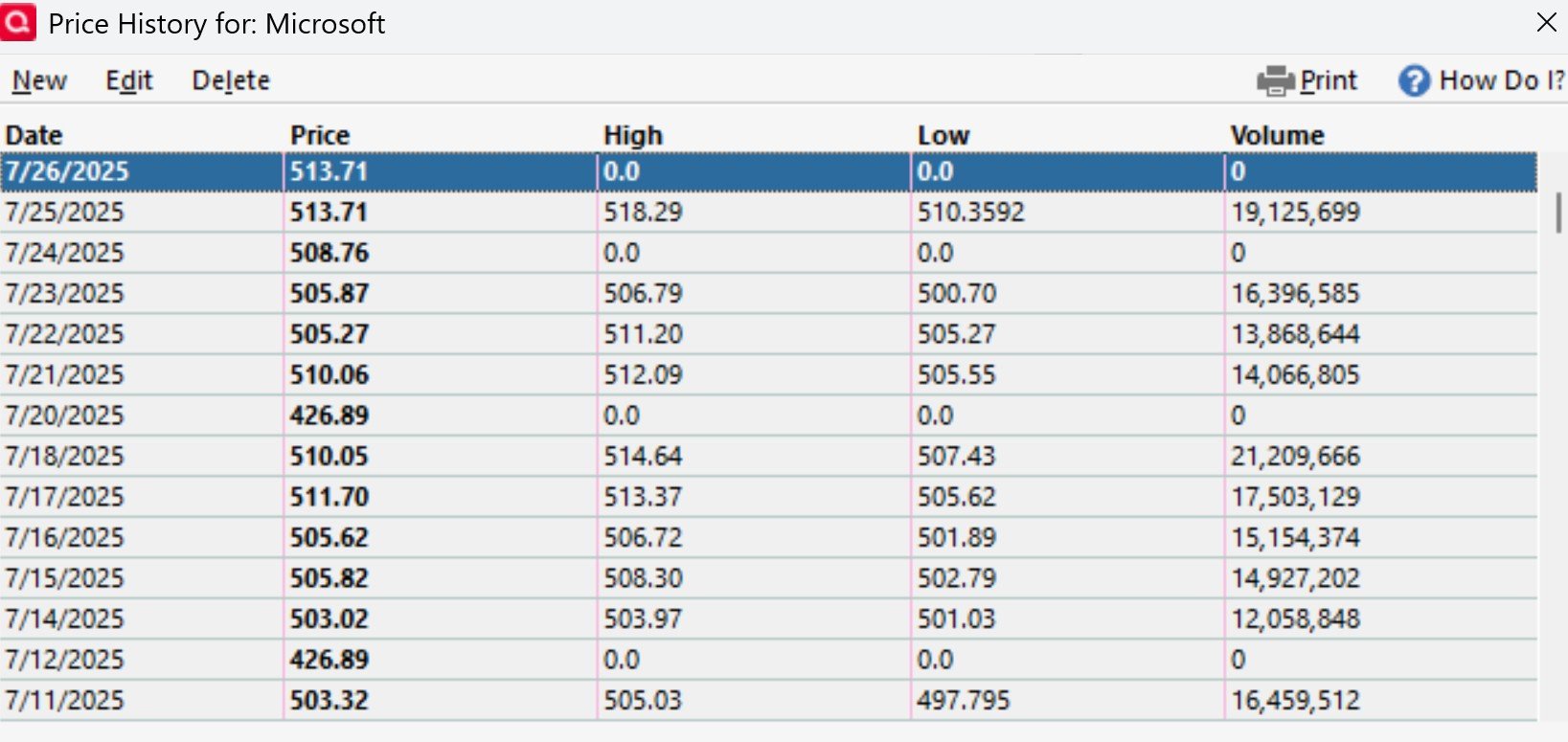
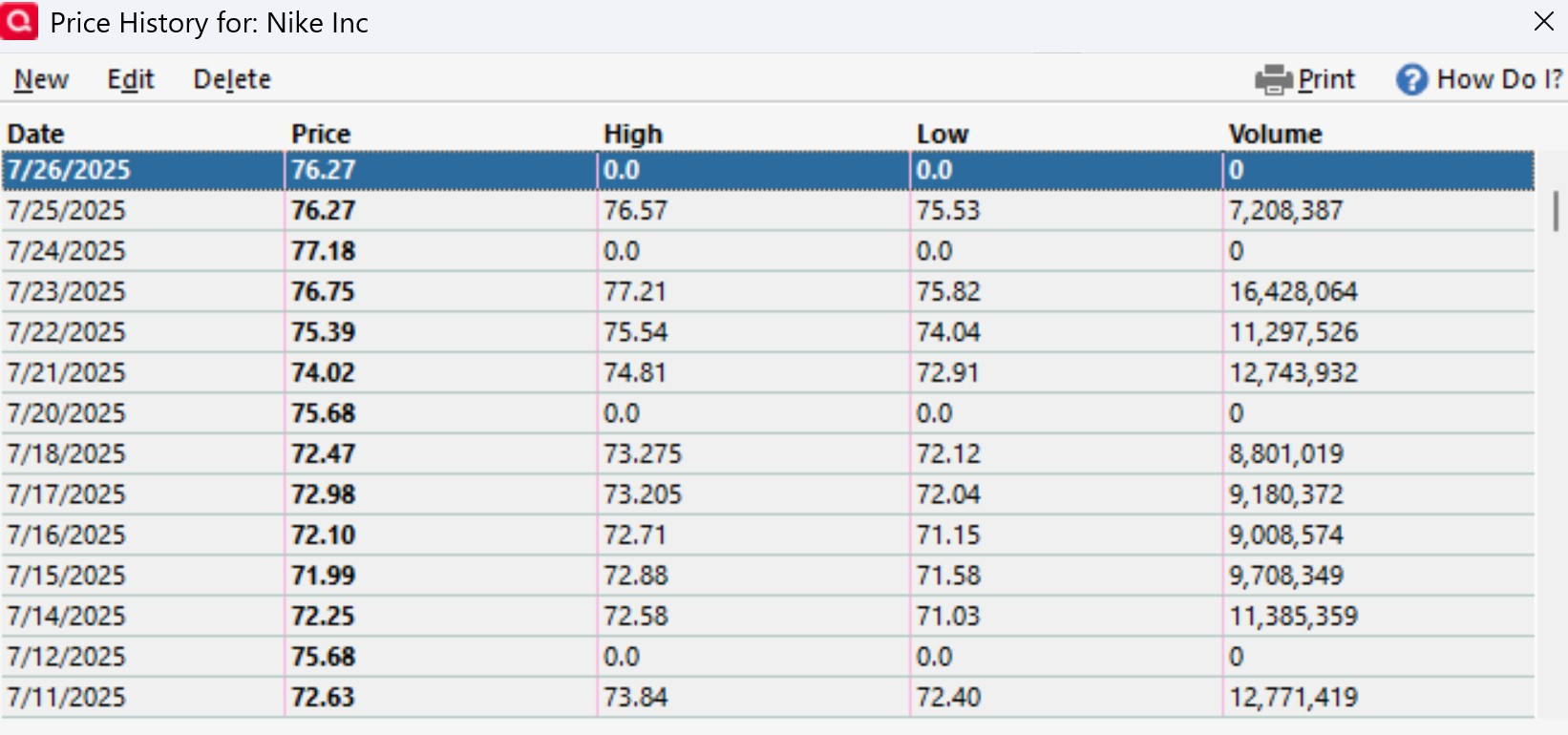
What's interesting is that bogus prices show up on the weekend. Here's MSFT and NKE:
 0
0 -
«If you go to the Security List and check the Show hidden securities box, do you have two copies of the QQQ security, maybe one with a ticker symbol or with a different or blank ticker? That could also explain some pricing issues.»
No duplicates.
0 -
Because the bogus prices are not on trading days, you could simply delete them, but that does not explain where they are coming from.
I looked at several of my holdings at Vanguard, and the only price history entries I have that do not have High and Low numbers are for Juneteenth, 6/19, when the market was closed.
Where in Quicken are you seeing the incorrect prices? For example if you click on Holdings in the Vanguard account and adjust the As of date, is the price for QQQ stuck at $529.92, (the closing price for 6/6 not 6/9 BTW) or does it just show that price on certain dates?
QWin Premier subscription0 -
«Where in Quicken are you seeing the incorrect prices? For example if you click on Holdings in the Vanguard account and adjust the As of date, is the price for QQQ stuck at $529.92, (the closing price for 6/6 not 6/9 BTW) or does it just show that price on certain dates?»
The incorrect prices are showing in "holdings" for the individual vanguard account and control + U and go to the vanguard account (obviously the same info, just the entire quicken portfolio with the control + U……I'm an old school short cut key guy). When I clicked on the "As of date" and cycled thorough each date starting on June 6th, the prices changed to match the "historical prices" from the earlier screenshots, and thus the value of my quicken portfolio changed as well, which it was not doing before.
However, when I set the date to one of the bogus dates (e.g. July 20th or July 12th) then the value of my quicken portfolio dramatically decreases because it's using bogus price data.
Also, it appears the bogus data is only appearing for individual stocks (or ETF in the case of QQQ) held in my Vanguard account. Vanguard mutual funds do not have any bogus data.
0 -
So now it is only when you set the As of date in the Holdings view for the account, or in an Investing > Portfolio view, to one the days when the market was closed and the prices are incorrect that you are seeing the problem? That is different from what you originally said:
For the past few weeks (since 6-9-2026), the prices for certain Vanguard holdings (e.g., QQQ and MSFT) will not update in quicken. I run the update and get no errors. I am using direct connect for Vanguard. All of my transactions correctly show up in quicken but just the prices are old and will not update.
And this problem is only occurring in one Vanguard account? Do you have other accounts where it does not occur?
As I said earlier, you can simply delete the incorrect prices, but that still doesn't explain where they came from.
The OFX log data you posted was for today. If you look back in the at the OFX log for the July 20 entry, does that have the bad price? If so, then the bad data is definitely coming from Vanguard, and they are the only ones who could fix it.
How often do you run a One Step update? At the bottom of the the OSU settings, is the "Download quotes and investment information" box checked? If that box is not checked and you don't update quotes separately, then the only prices you have will be the ones from Vanguard, which will be as of the last time you updated the Vanguard transactions.
QWin Premier subscription0 -
«So now it is only when you set the As of date in the Holdings view for the account, or in an Investing > Portfolio view, to one the days when the market was closed and the prices are incorrect that you are seeing the problem? That is different from what you originally said:»
What I am saying now that as soon as I toggled through each "as of date" then the problem went away, at least for the data I have showing. Meaning, where I previously had only 1 price (the same price) for each day displaying in the holdings view, toggling through them on each date now put in the correct price for each of those days. It's like I manually updated each day by simply toggling through each date.
«And this problem is only occurring in one Vanguard account? Do you have other accounts where it does not occur?»
Yes, only in this one Vanguard account. I have several Vanguard accounts, but this one is the only one that it occurs in and this account is the only Vanguard account with non-mutual funds. This issue is occurring with non-mutual funds.
«How often do you run a One Step update? At the bottom of the the OSU settings, is the "Download quotes and investment information" box checked?>
Once a day. The box is checked.
«The OFX log data you posted was for today. If you look back in the at the OFX log for the July 20 entry, does that have the bad price? If so, then the bad data is definitely coming from Vanguard, and they are the only ones who could fix it.»
This is from the OFX log on July 20th:
RECV from https://vesnc.vanguard.com/us/OfxDirectConnectServlet at 07:37:11 on 20250720
INVESCO QQQ ETF<TICKER>QQQ<UNITPRICE>561.26<MEMO>Price as of date based on closing price
The price in quicken is showing as $508.69 on July 20th.
0 -
That is certainly an odd problem. So the incorrect $508.69 price is in the Price History for July 20, and correct prices are there for later dates, but the Holdings view for today still shows $508.69. Cycling through earlier As of dates in the Holdings view causes the correct prices to be displayed.
Does the problem return if you exit and restart Quicken?
Is the incorrect price also shown in the Investing > Portfolio Value report?
This sounds very similar to the problem discussed here, which has been around since 2019:
QWin Premier subscription0 -
When I restart quicken, the prices that were previously there before I restarted are the same ones that display after the restart. Meaning, if the incorrect prices were there when I did the restart, they are still incorrect after the restart. If I have the correct prices displayed before the restart, then these correct prices are there after the restart.
Same incorrect prices in the Portfolio Value report.
When I did a OSU this morning, the incorrect prices showed up again in quicken in all places that I can view the prices (see screenshots below). The QFX log however has the correct data:
RECV from https://vesnc.vanguard.com/us/OfxDirectConnectServlet at 08:09:26 on 20250727 ***** -->
SECNAME>INVESCO QQQ ETF<TICKER>QQQ<UNITPRICE>566.37<MEMO>Price as of date based on closing
<SECNAME>MICROSOFT CORP<TICKER>MSFT<UNITPRICE>513.71<MEMO>Price as of date based on closing
However, quicken is still displaying the incorrect data for QQQ $508.69 and MSFT $426.89. These are the same incorrect data that is shown on the price history for July 12, 20, and 27th. Looking back in the history these exact incorrect prices are on the weekends.
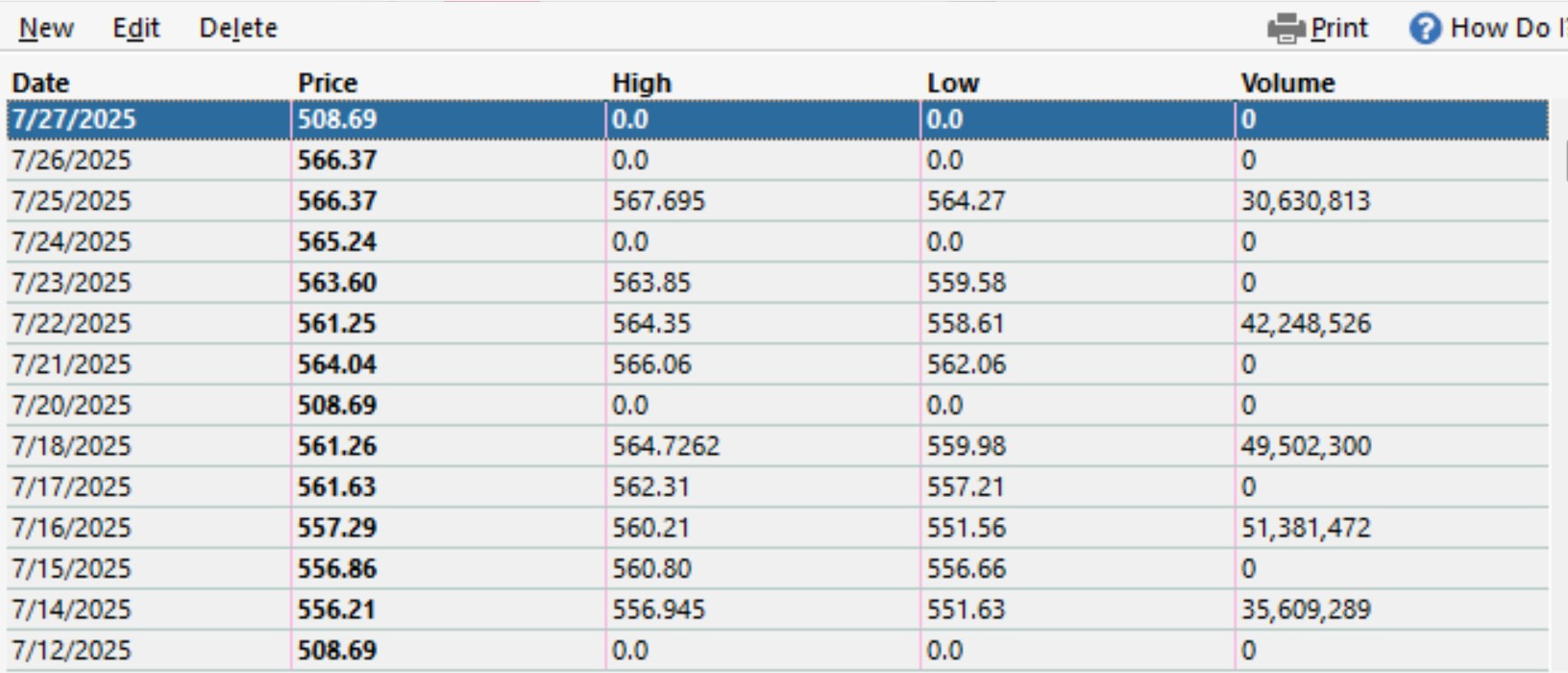
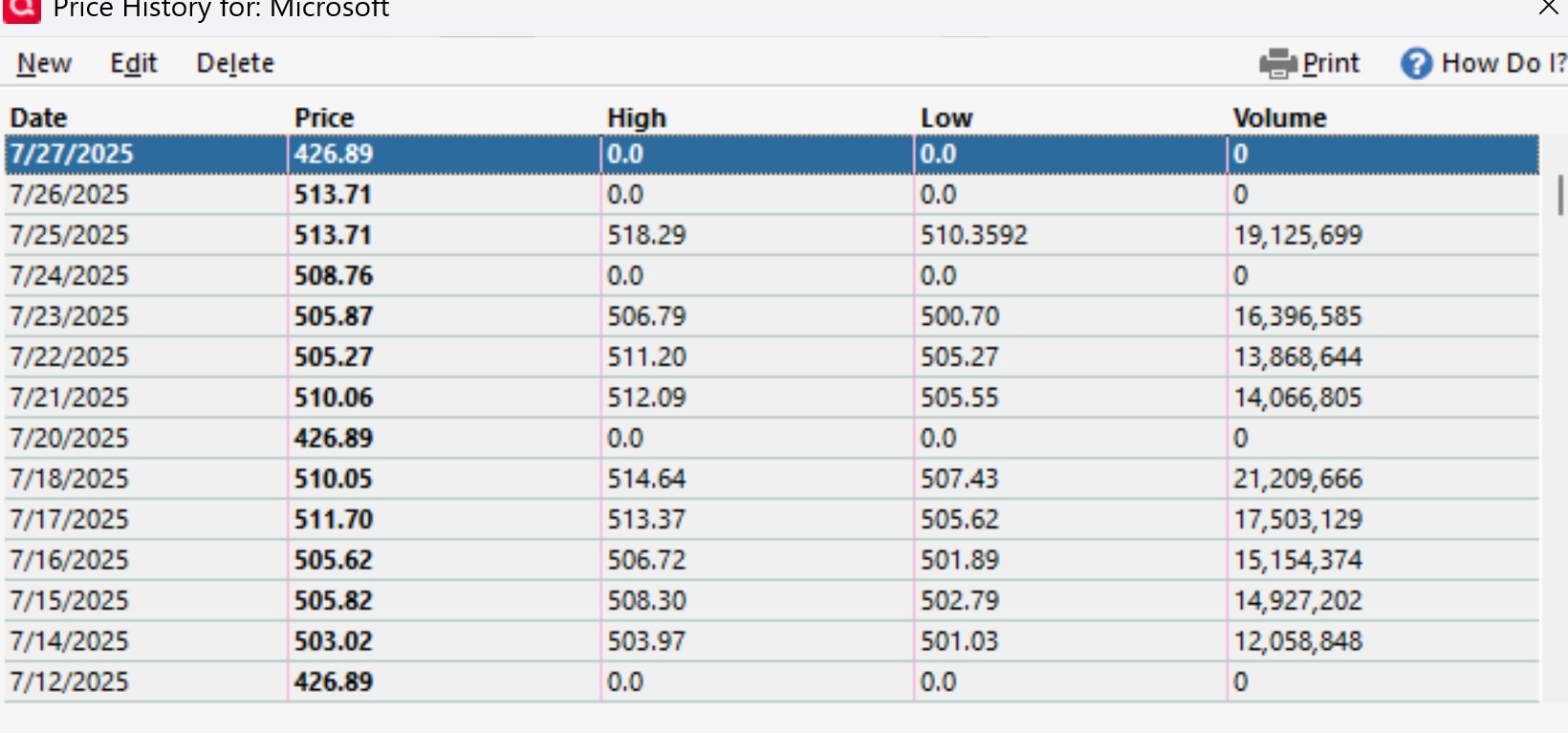
Is there a way to have quicken use the Vanguard provided prices vs quicken provider since it appears the correct prices are being provided by Vanguard in the QFX log?
0 -
Yes, you can stop downloads from the quote provider for selected securities by un-checking their Download quotes box in the Security List. This will affect prices going forward but not repair incorrect prices.
You could also try going to File > Validate and repair file and selecting the Correct investing price history / Repair option. Be sure to make a backup first in case it does not fix the problem. It might make things worse.
Please let us know what you find.
QWin Premier subscription0 -
«Yes, you can stop downloads from the quote provider for selected securities by un-checking their Download quotes box in the Security List. This will affect prices going forward but not repair incorrect prices.»
I unchecked the Download quotes box for QQQ. Then, I deleted the price entry from today (security detail>more>edit price history) and ran a OSU. The incorrect price of $508.69 showed back up for today. So, quicken is not pulling the data from Vanguard even though it's correct in the QFX log.
I'm at a loss other than not doing a OSU on the weekends 🤬
0 -
@egldvrbags there could be another source of the weekend prices. When you create a transaction that involves a price, and there is no price on that day, a new price will be created on that day. Even if you delete the transaction, the price will remain. I have had this happen to me when I do testing and create a transaction with a price. I sometimes forget to delete the bogus price and only remember to do so when I notice that the market value of the account is way off.
0 -
I went into the price history for QQQ and deleted all of the bogus $508.69 entries….all weekends, back to Nov 16, 2024. I closed quicken and restarted and all of these bogus entries were not there….good so far. I ran a OSU and the bogus entry of $508.69 showed back up for today. This bogus entry shows up always as $508.69 whether I update with the download box unchecked or checked. The QFX log has the correct price from Vangard.
0 -
Thanks for the update. This is getting curiouser and curiouser!
Do you also hold QQQ in a different account that is connected for online access? Maybe the bad price is coming from there.
Go to Tools > Online center and select each of your investment financial institutions and each account that is listed, even if it is inactive. For each account, go to the Holdings tab and look for a security that has a price of $508.69. That would be what is polluting your QQQ price.
QWin Premier subscription0 -
YES, THIS RESOLVED THE ISSUE (and yes, that's a shout) 😀
I looked in the online center and exposed the hidden accounts. I had an old Schwab brokerage account that had the issue holdings (QQQ, MSFT). Since this account is dormant with zero holdings, I simply disconnected the web connect and all is resolved!
For the issue holdings, I went back and checked the box to update the quicken service with no issues as well.
So, to summarize, for example, QQQ. Looking at the Security List and exposing hidden securities, I didn't have duplicate QQQ entries as both the dormant Schwab and Vanguard both had the exact same security name and symbol. The way I found this was doing what @Jim_Harman just suggested to check the on-line center and search for duplicates. It was the dormant Schwab account with zero holdings that was still connected via direct connect that was causing the issues.
Thanks so much to all who have helped resolve this issue, especially @Jim_Harman
1