New Fidelity Connection - Incorrect # of Shares/Missing Investment Accounts [WIN]
Comments
-
This morning I too was asked to reauthorize my Fidelity connection. I carefully read each page but in the end ALL of my Fidelity accounts were corrupted!
I restored back to yesterdays backup and, when I did One Step Updated, Fidelity is now showing up as zzz-fidelity. So, even though I was not prompted to reauthorize the connection, I don't feel like the Fidelity connection is correct with the zzz-fidelity name!
I am restoring again and excluding Fidelity from the One Step Update until I see that the connection issues have been fixed in this thread.
FINALLY, month end is a horrible time to implement a connection change! I won't be able to reconcile my Fidelity accounts until this is fixed!!!!
2 -
Does your account include any CDs? As far as I can tell, all CDs are broken for everyone so it would be interesting if you had some that weren't.
Similarly, just about everyone has had "new" transactions downloaded that duplicated ones already in their account. Did that not happen to you? If you had NO transactions downloaded, that might account for why you're not seeing decimal place issues, since they seem to be in the new transactions rather than the account balances.1 -
FWIW, it's not prices that seem to be the problem: it's number of shares.
4 -
My account doesn't include CD's and when I transitioned, no new transactions downloaded. I will update everyone the next time I receive new transactions.
0 -
I am thrilled I am on vacation without a laptop right now
And I don’t know about the rest of you, but I charge $100 an hour for beta testing. Nuff said.1 -
They will always say that because the people on the phone have no idea what goes on the IT department. And, they are too lazy or too ignorant to ask.
I still feel like this was a Fidelity initiated problem that Quicken badly mishandled.2 -
In my case, some of the newly downloaded number of shares are rounded to 2 places after the decimal point and the share price is wildly wrong.
Here is an example:
Already in my register: 5/12/2025 ReinvDiv Diamonds 0.048 shares @ 411.041667 $19.73
Downloaded today : 5/12/2025 ReinvDiv Diamonds 0.05 shares @ 394.60 $19.73In both cases, the math works, but I'm not OK with the share price being off by $16.442
On the Fidelity website, it says the share price for that transaction was $413.29, which is also wrong but closer to the original.Regardless, all my accounts are perfectly balanced without accepting any of these new messed up transactions.
The workaround, although tedious, is to manually erase every Fidelity transaction that downloaded today, except those that don't come close to matching any existing transactions. And, you will probably want to uncheck the option "After downloading transactions, automatically add to investment transaction lists" in preferences if you haven't already.Will be fun to see what crap they send us tomorrow.
1 -
Thank you for sharing, we understand the frustration that these issues with the migration are causing.
-Quicken Jasmine
Make sure to sign up for the email digest to see a round-up of your top posts.
0 -
The Quicken - Schwab conversion several years ago was also full of errors, and it took quite a while to resolve. I think, at this point, you owe your customers the following info:
- A list, updated daily, of all reported incidents, and the resolution status and expected timeframe for each.
- A description of your testing process and resources. What tests were run? What were the test cases? Etc.
- What is your testing environment? Why do you need clients to submit detailed incident and local software info when you should be able to replicate the problems from the clients' descriptions?
Anybody who's been through a software implementation, as a client or vendor, knows that this is a pretty basic ask.
3 -
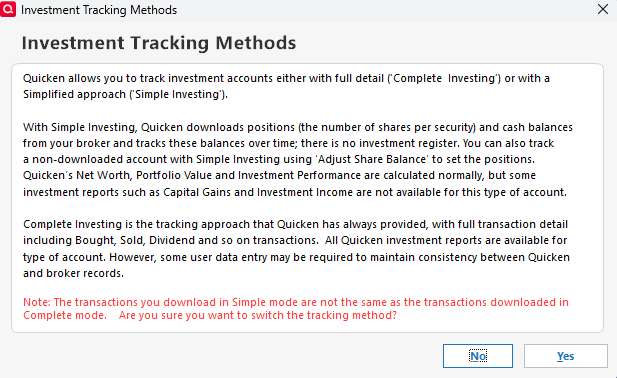
Multiple Fidelity accounts here as well with 32+ years of accumulating data and accounts in Qucken! Reliability and user friendliness of this product has degraded rapidly over the past several years. Hopefully, the last sentence of this pop-up dialogue is not an warning of things to come.
Not sure why antyone would waste time tracking investments in Quicken with Simple Investing if they can get the same information directly from Fidelity website? But the prospect of havng to audit and/or modify every downloaded transaction and position in order to achieve detailed tracking for financial planning and tax purposes will make using Quicken an untenible burden for many if not most users.
I am already having to manually update prices, balances, and transactions for a number of private funds in a Schwab workplace account that QDWC fails to match, reporting 3 unique instances of "unidentified securities," while others, that are recognized, only update data from the immediately preceding trading day.
So thanks to all who have taken the time to report this SNAFU, as you have kept me from blindly pulling the trigger on the baffling, unannounced, forced re-establishment of my Fidelity connections until adequate information is made available to avert a potential disasterous corruption of data and unintented changes in tracking method. Sadly, I received zero email alerts or useful information from Quicken or Fidelity in advance of this significant event.
3 -
The new transition with Fidelity messed up most of my accounts. The point of using Quicken is to not have to login online with all your accounts and Quicken matches what your online balances are. After the transition I had so many new entries which increased my wealth by millions. Quicken is downloading transactions and trying to classify them and prompting me for what they are when they do not exist (How I am suppose to know). I delete the entries and next sync they come right back. I need my portfolio to match what is online when I login to Fidelity or Vanguard or whoever I do business with. If it does not match then why have Quicken. I have spent hours figuring this out. At this point I have to login to Fidelity to get the real information because Quicken is showing something much different. These accounts are 401k, HSA, Employee Stock Options, and Roth. If Quicken can tell me how you would ever have a cash balance in a 401k plan then I would say QA is not doing their job. I just deposited 1k in my wife's Fidelity Roth account, Quicken created two entries for that. I am turning 52 this Saturday. Happy Birthday from Quicken.
Bottom line people is this: Quicken uses QA testers to test the systems before software deployment. Sounds great, problem is the QA testers have no money or investments or really understand how that works. Quicken just got a punch from Mike Tyson straight in the eye.
0 -
The Fidelity reauthorization process in Quicken to switch from direct connect to web connect is poorly implemented and tested. Quicken failed badly on this one. The reauthorization is failing in multiple ways. 1) It often fails to maintain the linkage between the Quicken account and the Fidelity account. 2) It fails to maintain the sync point. The sync point is a timestamp used to identify only new transactions to be downloaded. 3) The reauthorization process can result in months of old transactions being downloaded. These are transactions already in your Quicken register. Since there is no ability to delete or reverse the download, you have to delete each transaction one at a time. There can be hundreds of duplicates. If you use the automatic update option, the download posts duplicate transaction to the register, requiring you to identify the duplicates in the transaction register, and remove them manually one at a time.
As of this entry, there is no solution to the above problems. The solution seems very simple and obvious. The reauthorization process should maintain the linkage to Fidelity accounts and maintain the timestamp used for the sync point. Additionally, Quicken should provide an option to remove all downloaded transactions for a given Quicken account. Finally, Quicken should provide the ability for the user to specify the sync point manually. There are situations, such as the reauthorization process, which can cause problems with the sync point. Providing the sync point manually may cause overlap or loss of a few transactions. That is a small price to pay and can be addressed with manual entry.
To avoid these problems with downloads from Fidelity, you may want to suspend doing updates from Fidelity until Quicken fixes their software. I also suggest manually doing a backup before you download transactions from Fidelity.
1 -
Same problem as most above biggest issue is redownloading duplicates back to 5/15/2025 and all CD quantities are reported in $1 units as opposed to 100 unites and CD prices are updated as .9999 instead of the old 99.99 format.
Hopeful to see a resolution to fix the historic pricing of CD's and getting the download to update pricing for CD's correctly going forward along with reporting the correct quantity of CD units. IE $1,000 dollar CD should be reported as having 10 unites priced at 100, after the upgrade or reauthorisation it is reported as having 1,000 units and a price of 1. It must revert back because if you change and update the quantity if destroys your historical account balances.
3 -
Between my wife and I, we have about 15 accounts at Fidelity. I'm estimating that the reauthorization downloaded more than 2000 transactions which I must now delete one at a time manually. I am restoring to a backup and will just not reauthorize until there's a fix to this mess.
2 -
Same issue w me on one of my Fidelity accounts. Lots of duplicate transactions, incorrect decimal points in new downloads, and something about 'cash' representation which I'm not sure has caused reconciliation headache yet …
Poor QA in general. There are many bugs with Quicken for Windows, and this just adds to the list and user frustrations. Annual membership fees to support this bugged product.
Put an AI review on the code base and have it clean up all the bugs once and for all.
2 -
Update:
Today everything downloaded nicely from Fidelity. No duplicates.
Except, there are no more fractions of a penny. Everything is rounded to the nearest hundredth of a dollar. I think we will just have to accept this as the new normal.0 -
Agree. Nothing works. Transactions don't download properly. The balance is not displayed. Reauthorizing changed a 2011 opening balance. The changeover corrupted 15 years worth of data.
1 -
All my Fidelity account transactions stopped downloading after the transition. I haven't lost anything because nothing is downloading.
I have my own software for downloading from Fidelity outside of Quicken and that seems to be working fine. The problems are due to the new connection system.
Either fix it very, very, fast or roll it back.
1 -
A major problem after converting my Fidelity accounts…. Dividend Reinvestment transactions are downloaded with number of shares carried out to only two decimal places places. When I look at the transaction on the Fidelity website it shows three (or more) decimal places. As a result my latest number of shares in Quicken does not agree with what is shown on Fidelity website. I had to manually correct all my dividend reinvestment transactions in Quicken. This will be a major hassle going forward if not corrected.
1 -
Seems like several Fidelity threads are getting merged so it's getting hard to follow the different specific issues and their workarounds. Still, it's better than reading dozens (perhaps many) separate threads, some I may miss entirely (or you miss mine).
Anyway, a short recap. Completed the transition to EWC+ Weds. Did take several attempts to get through it. Once done, my 401Ks were mark as "Brokerage" accounts (not 401Ks as before) and the Accounts Detail Page was different. Turns out they were not marked "Tax Deferred". Once I marked them "Tax Deferred", it allowed me to pick 401K and the details page returned to normal. At this time, it was still marked for Complete Tracking. Ran OSU again and all seemed well. No new transactions.
Yesterday, run OSU. One downloaded transaction in one of the 401Ks. This was a for a fee. Normally these are marked SOLDX and come from the specific security. This time it was marked as Withdraw and had no security listed. After looking up the transaction on Fidelity's website, I was able to correct the transaction. Everything else looked OK.
Today another OSU and another 401K transaction. This time a Dividend distribution. Normally listed as "ReinDiv" with the details for the security (it is Complete Tracking!), however is just came down as Deposit with just the new amounts. This seemed like Simple Tracking and not Complete.
So off to the account details I go and flip the selection to Simple. I get a warning about converting placeholders (yes I had a few very small one I never fixed but totals were correct), still said Yes and completed the switch. Then I switched back to Complete. Placeholders gone (now show as added/removed). Totals still match those on website.
So not sure why the transaction types are showing differently. Seems like they should match those for Complete Tracking (as they did before) but appear to be the ones for Simple tracking. I'm not expecting any new transaction until mid this month for another dividend distribution. Hopefully this gets sorted before then.
0 -
Apparently, I was one of the 10% that was forced into the reauthorization step early. I only link a cash management account (with linked checking account). The first time through, it refused to link to the placeholder account and insisted upon connecting directly to the linked checking. It brought in several hundred duplicated transactions that had to be individually deleted. Today, it insisted upon reauthorizing again. This time, the only option provided was to the placeholder account. It brought in two additional transactions posted last evening. Instead of mapping them to the linked checking, however, it mapped them to an unrelated checking account that had been inactive (and hidden) since 2017 and modified the 2011 opening balance of that account. It seems they're just trying things at this point.
1 -
I, too, have successfully transitioned over to the new Fidelity EWC+ connection. While I am getting all of my transactions, as others have noted, the shares are being rounded to two decimals instead of the usual 3 decimal places. I get the pop up telling me the reported number of shares between Fidelity and Quicken are not the same. I then have to go back and update the downloaded transaction to use the correct share amount. While I can make this work, it defeats the purpose of downloading transaction details. I have reported this issue via Quicken's Report a Problem feature.
1 -
I have not transitioned my QWin file to the new Fidelity connection. However, I have completed this process with my QMac file and restored it from a previous good backup because Quicken can’t properly handle “core cash” positions. For example, after the conversion, QMac showed core cash reconciliation errors equal to the amount in money market funds listed in portfolio holdings. In other cases, the money market fund was not shown in portfolio holdings but was included as a core cash reconciliation error.
0 -
I addition to all the above issues noted, cash balance transactions only worked for accounts using the FDRXX money market fund. These funds correctly asked if I wanted to delete all the buy and sell transactions and use a simple cash balance. Other accounts using SPAXX were not recognized as cash balance and were simply omitted. My linked checking account was also missed and my total account balance was off by the amount in my linked checking account. Yes, duplicate transactions were downloaded. I didn't notice the two decimal share issue, but it will keep me from reauthorizing until it's fixed. Finally, I was asked for the reauthorization early on 7/31/25. After spending a couple of hours trying to correct all the problems, I called Quicken Support who provided no help other than to convince me it was time to go to backup. Interestingly, the reauthorization request seems to have been taken down later that morning and I was able to do a normal OSU with my restored backup file.
0 -
Royally Borked! I have 22 years of transactions in my data file and I too was having problems with EWC+ downloads. I reverted to a backup, and accounts are downloading properly through the old dc connection without the reauthorize nag screen popping up.
As an experiment, I created a new blank file and added my 6 Fidelity accounts (rollover, roth, HSA etc). I did not get an option on what type of connection method to use. I tried both simple and complete and neither one of them showed my correct balances. I'm dumbfounded that Quicken could push out this update and cause so many problems for so many people. This has me researching alternatives. Fix it please!
0 -
All the same issues as in the comments. CD shares and prices off by a factor of 100 (but not all of them). The attempted "fix" for handling the money market to cash kludge worked (for some value of worked) on one of the existing funds and not the other, but not for new dividend transactions which leave a share balance even though it is marked as a dividend (or perhaps the mismatch is the share balance reported by Fidelity).
Seems like I go through one of these major SNAFUs with quicken at least once per year. This one is egregious. I went to the last backup and turned off download from Fidelity. Manual transactions it is.
I've tried twice to move to another tool over the years. Guess it's time to try again.0 -
Pray tell, what is Quickens plan for resolving this mess and how will we be notified that OSU for Fidelity is working correctly. Hopefully after thorough testing. I plan to disable OSU for all my Fidelity accounts.
0 -
Same problem here. Had to set up Fidelity Investments with Express Web Connect +. Noticed my shares from Fidelity were rounded to two decimals while Fidelity had the shares presented with three decimals. Tried to revert back to Direct Connect download option, which worked great, but apparently there is no way to do it. I guess I'm going to have to scrutinize each time I download using the new Web Connect + to make sure they match what is in Fidelity. What a pain.
0 -
You can revert back if you have a backup from before the conversion.
0 -
I was "transitioned" to Express Web Connect + for my numerous Fidelity accounts a few days ago, without a choice to opt out. I presumed that Quicken had this under control, and that all would be OK. I successfully linked all my existing accounts, and it appeared all was in order. I receive no error messages when I run OSU, and receive no erroneous information (like wrong number of shares, etc.) Instead, I receive no information whatsoever from my many Fidelity trades and end of month dividends of the past few days. So, I'm stuck hand-entering all these transactions, wondering when this is going to get fixed. [Removed - Sarcasm]
0




