Fidelity Issue - account balance not displaying and transactions downloading incorrectly [Edited]

Fidelity download no longer working. Account balance does not display. Transactions do not download correctly. The account opening balance from 2011 was changed. Is anything ever tested before rollout?
Answers
-
Which Fidelity account(s)? Brokerage, IRA, 401(K), credit card….?
Were you prompted to reauthorize Fidelity for downloading and did you do that? If so, you are now connected with the EWC+ connection method and while some are reporting no issues with it there are others (including myself) who are.
This change to EWC+ was 1st announced on 6/30. You should have received an email about it back then. There was an Announcement posted in this Community on 7/30 regarding the current status: NEW! 7/30/25 Fidelity Cut-Over Migration.
If you do now have the EWC+ connection method, you might want to do what many are doing: Restore a recent backup file (dated from before when you reauthorized Fidelity).
- If you had a DC connection previously, that will be the connection method, again, and should function normally.
- Other financial institutions with EWC or EWC+ connections will need to be set up for downloading, again, but this will be a 1X occurrence.
- If/when you get prompted to reauthorize your Fidelity connection, again, click on the "Remind me later" link. That prompt popup will close and your DC connection will not be affected.
- On 8/20 Fidelity will do a forced connection change to EWC+. Until then you can continue using DC provided you click on that "Remind me later" link if/when you ever get prompted to reauthorize, again. Hopefully, this 3 wks window between now and then will allow Fidelity/Intuit/Quicken to resolve the issues that have been identified.
Quicken Classic Premier (US) Subscription: R66.23 on Windows 11 Home
1 -
Cash Management account. No, there was no email. The first indication was the relabeling to zzz-Fidelity and then a popup that reauthorization was required. Upon reauthorizing, it insisted upon connecting to the "associated" checking account, rather than the placeholder account (no option to link to the placeholder). It brought in several hundred duplicated transactions that had to be manually deleted. Today, that OSU failed, and another reauthorization link was provided. This time it connected to the placeholder account, but instead of using the "associated" checking account, it posted transactions to an old Checking account that had been inactive since 2017…and modified the opening balance of that account from 2011.
1 -
Here is the email that I received on 6/30:
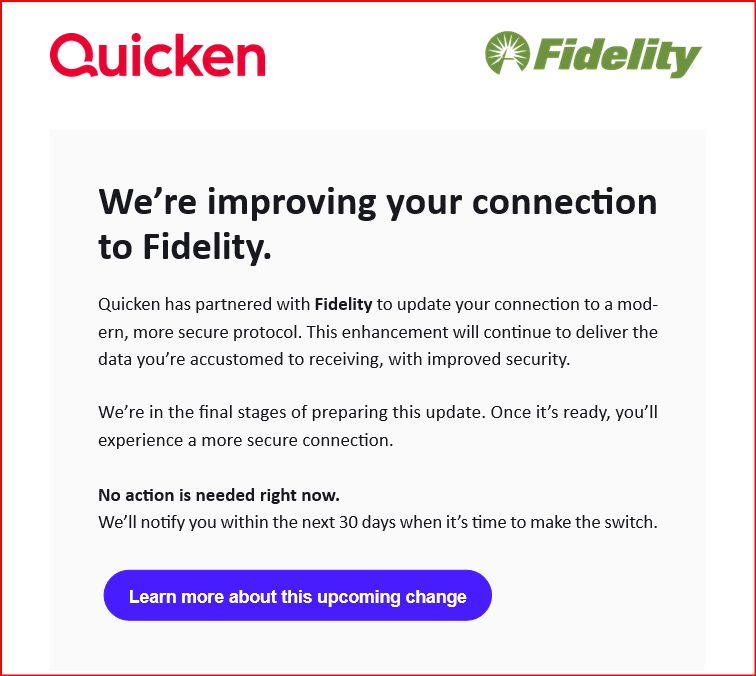
Here is the latest Announcement posted in this Community: NEW! 7/30/25 Fidelity Cut-Over Migration
If you hadn't seen these then of course you would not have known about this change but I thought you might want to see them now, especially since the Announcement states that it is an optional migration until 8/20 when there will be a hard-cut in the EWC+. So, until then we do have the opportunity to continue running with DC.
I provided instructions for how to go back to DC in my previous reply to you. I suggest that you try doing that because I don't see all of the issues with Fidelity's EWC+ connection being fully resolved in the next few days or even the next couple of weeks. Hopefully by 8/20 they will have resolved all of them but that remains to be seen.
BTW, the prompt you got to reauthorize was not a forced change. There is a link toward the bottom right corner of that prompt popup that says "Remind me later" that can be easy to miss unless you make a point of looking at the entire prompt popup. Click on that link and the reauthorization prompt goes away and DC then remains intact….at least for now.
Quicken Classic Premier (US) Subscription: R66.23 on Windows 11 Home
1 -
No plans to go back to a prior version given that I'm dozens of month-end transactions past the last daily copy. It's far easier to just abandon the OSU process for Fidelity until things are working properly.
0 -
I wasn't suggesting going back to a prior version.
I was suggesting restoring a backup file. Since this reauthorization process started on 7/29 that is just 4 days ago so it's not like having to deal with a lot of days or weeks of transactions, all over again…unless, of course, you do not run Quicken very often and/or do not back up your data file very frequently. (I automatically back up the data file everytime I close Quicken.) And all of the transactions that will get downloaded will be with DC just like it used to be.
The Fidelity EWC+ issues could take weeks to resolve. You need to decide what is going to be the best path for you to take on this matter.
Quicken Classic Premier (US) Subscription: R66.23 on Windows 11 Home
2 -
As mentioned, I've posted dozens of manual transactions since July 29 (month-end interest in multiple accounts, accrued interest on bond holdings, estimated taxes), so reverting to a backup copy from prior to that date is a far bigger task than just disconnecting Fidelity's OSU. Quicken, it's my experience, has a propensity for making these major changes just before month-end, which is something that would never be the practice in an corporate setting.
0 -
Agree gmk3 —- I'm in the same position since I have many month-end transactions.
Is it possible that Fidelity will correct the downloading problem on EWC+ before 8/20?
What is Quicken saying about this latest problem
0 -
I also was not suggesting disconnecting Fidelity's OSU.
I do not know who sets the schedules for these EWC+ migrations but it is important to note that it is only the financial institution (Fidelity) that decides which download connection(s) they will support. A while back it was told to me by a Moderator that the financial institutions that have or are planning to migrate to EWC+ are telling Quicken/Intuit that they must support the migration or their customers will be left out in the cold and not be able to download anything into their software. That put a different perspective on the situation for me.
Quicken Classic Premier (US) Subscription: R66.23 on Windows 11 Home
0 -
Per a Quicken Development Team member that I talked with last night: They, Fidelity and Intuit are all well aware of the Fidelity EWC+ issues, including this one. And they have dedicated teams working on addressing them. Their objective is to fix the issues well before the 8/20 hard cut-in date but they can make no promises about that.
I did tell them that I have been recommending to those who are experiencing issues with their Fidelity EWC+ connection to restore a recent pre-EWC+ backup file to restore DC and to then decline the reauthorization process if/when they are prompted until the issues are resolved or until forced to migrate. They responded with (paraphrased), "That's reasonable given that we are in the optional migration time period."
Quicken Classic Premier (US) Subscription: R66.23 on Windows 11 Home
1 -
Thank Boatnmanic—-I bit the bullet & restored a recent backup with a DC connection for my 6 Fidelity accounts. Since the time frame covered month-end, I had a long list of entries that I had to re-enter but at least I'm current with the Fidelity accounts. Thus far, I have not yet been prompted to reauthorize but will be looking for the "Remind me later" link until they fix this problem. Sad that they roll out an unpdate to EWC+ that doesn't download transactions.
Thank again as your post were super helpful and clear! Appreciate the time you took to respond.
0 -
You are welcome. Glad to hear it's now working out for you.
Quicken Classic Premier (US) Subscription: R66.23 on Windows 11 Home
0
