How do I remove the tag field from a transaction entry popup?

How do I remove the entire tag field from a transaction pop up? My old entries did not have this and it takes up too much space in an already too small popup. As it is, the memo filed is too short to show the entire memo and now I have this new field to contend with. I should be able to expand the transaction box and resize the columns. I do not use this column, I have no need for a tag column at all.
Build 27.1.63.21
Comments
-
As far as I know, there is no setting option to remove that Tag field from the pop-up.
0 -
Not sure which specific transaction entry popup you're referring to, but …
- banking account registers can be customized to show only the fields you need. There's a Register Columns icon in the register view, next to the Balance column title. Click it to open a selection view. Uncheck the Tag field.
Also uncheck either the Amount field or the pair of Payment and Deposit columns together. You don't need all three of them. Choose which of them you want to keep on using.
This will free up some space in the register view. - removing the Tag field from the banking account register also removes it from the Split Transaction Detail popup
- repeat this change with all other banking registers where you don't need these fields
- if you're tight on space in a transaction line and you're displaying the register in 1-line-per-transaction mode, you can also try to switch the register into 2-lines-per-transaction mode. Pressing CTRL-2 toggles the register view between the two modes.
- banking account registers can also be customized to use a different font type and font size. Try one of the available fonts to see if a different font or font size will help. With a register view open go to Edit / Preferences / Register and click the Fonts button to make changes.
1 - banking account registers can be customized to show only the fields you need. There's a Register Columns icon in the register view, next to the Balance column title. Click it to open a selection view. Uncheck the Tag field.
-
removing the Tag field from the banking account register also removes it from the Split Transaction Detail popup
This is not true for the version that I'm using - Quicken Classic Premier for Windows 11 version R63.21 build 27.1.63.21. The tag field is not checked in my register and I have no entries in my tag list.
Ctrl-2 gives me two lines in the register but I don't need it there. The Category field merely says split and I don't need extra room. Where I need room is in the window that pops up when entering a split transaction. That window is not expandable and the empty Tag field pushes the Memo field to the right and I am unable to read more than a few characters. This is a recent update, as that column did not appear until recently.
0 -
Please click on the gear at the top right of the account register and select Register columns. Un-check the box next to Tag and click on Done. This should remove the Tag field from the register display.
Then when you enter a split transaction, the Tag field should no longer be shown in the Split Transaction window.
At least that is the way it works for me in R63.21, is it different for you?
QWin Premier subscription0 -
@UKR @Jim_Harman I think there is some confusion as to which split detail is being discussed. When you hover over a split transaction, you will see a pop-up that shows the split -
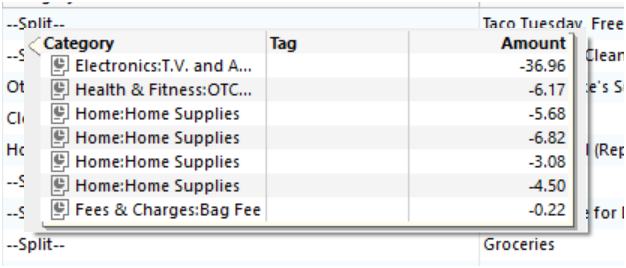
In that pop-up box that shows the split, there is no way to suppress the Tag column. I don't use tags in any of my account registers, but this Tag column always shows up.
@trburns57 please confirm if this is the split pop-up box you are referring to.
0 -
@CaliQkn @Jim_Harman Yes, that pop-up box is exactly what I'm asking about. My apologies for any confusion. As I stated in my previous message, the Tag field is unchecked in my register settings and the field does not appear there. However, it did show up in the split transactions pop-up.
I just made a new transaction with a new payee and the Tag field did not appear in the transaction box. It also seems to be gone from previous entries. It does show up when hovering over the entries but did not appear the last time that I was entering data, nor when I manually open the split box to view the entries. So for the moment, I'm going to consider the problem resolved.
0 -
There already is an Idea - type discussion to request a change to this popup menu.
Please seeMemo not shown in split hover — Quicken
Review this Idea and vote on it. If we get enough votes, the programmers will consider it for implementation into a future release of Quicken.
0 -
@UKR thanks for the link to the enhancement idea. I added my vote. It's not a big deal, but if possible, I would like the ability to remove the Tag column and add the Memo column.
0

