Year end copy

It says it will remove previous years transactions, but it doesn't do ANYTHING. Please fix this. I'm dealing with transactions from 2017. NEITHER ADVANCED OPTIONS ON CREATE BACKUP DO ANYTHING. I tried both options, neither works. I'm still stuck with YEARS of reconciled transactions. It saving everything. I reconcile regularly. ANNOYING.
Comments
-
Did you select the proper radio button?
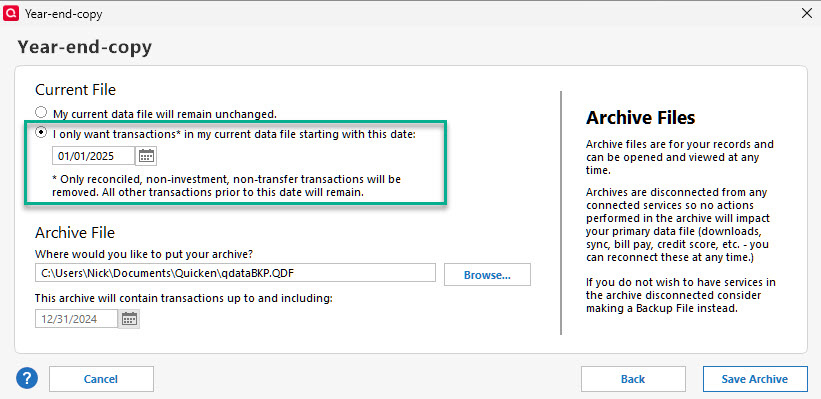
Bear in mind it will NOT delete transfers (such as Savings to Checking, or CC payment when linked to payment account). Any investment accounts will retain the entire register.
I just did this on a copy of my own qdata file going back to 2001. When I completed, it asked me to choose the file to open. The choices were my QDATA file or my QDATABKP file. I picked my QDATA and all prior transactions, except the ones listed above were gone. I opened the QDATABKP file and everything was in there.
So double check and make sure you assigned the right cutoff, and then opened the right file.
0 -
If I create this Year-End-Copy with the settings shown above, how does Quicken establish the Opening Balance for my credit card accounts and bank accounts? My statement ending dates will not necessarily coincide with the cutoff date I choose. It seems to me that I tried this once and every account was set to zero, which really messed up my accounting.
0 -
I don't and recommend that you don't archive or delete anything. I've got a data file with transactions going back to the 90's. Your transactions going back to 2017 are not going to affect Quicken performance at all. In fact, you may need to research a financial transaction(s) and the data comes in handy. But, do delete any obsolete or unnecessary attachments as they contribute to file bloat. And, backup regularly and frequently.
1 -
First, I agree with @RalphC . I prefer to have the full history to run reports or easily lookup (search) past purchases. I have no attachments and my qdata files is less than 86k. Since I have a LOT of transfers, and investment transactions, the post cutoff file did not shrink very much in size.
I didn't spend a lot of time with the year end file. I just went back to the "backup" file. (renamed back to it's original). I didn't really look at the beginning balances, just verified the ending ones matched, they did.
However, best as I can figure, it likely just sets the opening balance to whatever value is needed, once it deletes the records, so the ending balances match. That value will change based on cutoff date. If the account was created after the cutoff, all of the transaction will carry over.
0 -
Hello @MarshaD,
As @RalphC and @nmestanas said, it is typically better to keep your full history in your main Quicken file.
Is there a specific reason you're wanting to shrink your file, such as performance issues (slow loading), or unexpected behaviors?
I look forward to your response!
Quicken Kristina
Make sure to sign up for the email digest to see a round up of your top posts.
0


