Comenity Bread CashBack credit card (comenity.net) Account Not Downloading

I just reviewed this old post from last year
Comenity Credit Card Accounts Still not updatingMy situation is similar. Yesterday I spent an hour with the ignorant Comenity CashBack customer non-service. They say they support Quicken (as they have in the past), however their servers are currently broken. I had someone hack my credit card, so Comenity issued a new one. I went to set it up in Quicken and adding the new account (where Quicken gets you to their website, you sign in, then you get the choices to add, link, etc.). I had success to the point of logging in with the Quicken route to comenity - then the answer was no credit cards on file.
I logged in to comenity via the web (as usual, and most certainly the new account is there. I've noted of late there are usually special firewalls that force you to call the merchant; they they unlock the firewall temporarily to enable Quicken to do it's handshake. I tried to get someone at Customer non-service to help - they are totally clueless. They affirm they support Quicken, but have no staff conversant on their Quicken server issues, or who cares about helping. I was escalated 'to the top' and the lady did not seem to care - she said it's my Quicken problem, they can't help with that.
I tried de-activating my old and account and reactivating - no change - none of the new card transactions show up and I'm not given a list of accounts to choose from or link. When I select created a new quicken file - all the old CC transactions download, none of the new ones.
Looks like I'll simply stop doing business with those folks. Anyone have a workaround?
Comments
-
Hello @Inman Lanier,
Thank you for letting us know you're seeing this issue. To help troubleshoot, please provide more information. Are you seeing any error messages/codes, or is everything acting like it's working, but no new transactions download? What is the URL (web address) that you use when logging into the account directly through the financial institution's website?
Please try following these steps to correct the issue. First, backup your Quicken file. Once the file is backed up, please deactivate all accounts connected to the Bread Cashback Card connection option. Once you've made sure all accounts connected to that option are deactivated, navigate to Tools>Add Account and follow the prompts. When you get to the Add/Link screen, please make sure to carefully link your accounts to the correct nickname in Quicken.
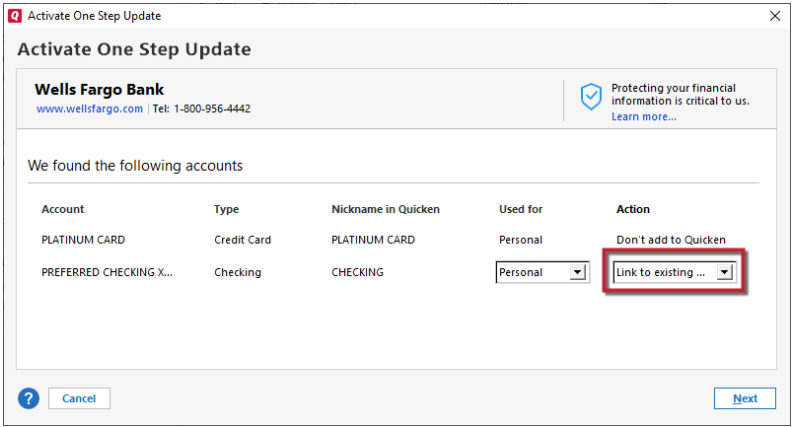
If the issue persists after that, then please follow the steps in this article on missing transactions/transactions not downloading:
Please let me know how it goes!
Quicken Kristina
Make sure to sign up for the email digest to see a round up of your top posts.
0 -
Quicken Kristina
Make sure to sign up for the email digest to see a round up of your top posts.
0
