Capital One Reauthorize Accounts

I haven't been able to access Capital One Accounts for a few weeks. I'm getting an error that "your bank needs you to reauthorized. I have clicked on the Reauthorize Button in Quicken, but it just keeps coming back.
I've gone to Capital One where the link is, but there's no place to reauthorize. The link looks fine. I can only break the link at CapOne.
So how do I fix this?
Comments
-
Hello @Catherine Shenoy,
Thank you for letting us know you're encountering this issue. To help troubleshoot the issue, I checked our internal tools and can see that you are getting the FDP-350 (invalid token) error, which would prompt you to reauthorize your accounts. However, I'm not seeing a successful account refresh afterwards, which indicates you're unable to complete the reauthorization.
What happens when you click the reauthorize button in your Quicken? Is it taking you to Capital One's website? If not, what is happening? If it is taking you to the website, are you able to successfully reauthorize through their website? Are you seeing any error messages/codes? If you are, do you see them on Capital One's website, or in Quicken?
I look forward to your reply!
Quicken Kristina
Make sure to sign up for the email digest to see a round up of your top posts.
0 -
When I click the Reauthorize button, it briefly shows a working button, but it's only for a second. Then the button is still there and nothing seems to have happened. I've pressed it many times and it's always the same. It doesn't take me to Capital One.
0 -
Still happening. NO change
0 -
Have you gone to the Capital One website to check whether the financial institution still has you setup for downloads? To do that - sign in to your Capital One account on the web and go to "Security" by clicking on the small down arrow next to the "head & shoulders" icon in the upper right. Click on "Security". In the section for "Linked Apps" does "Quicken" appear?
Frankx
Quicken Home, Business & Rental Property - Windows 10-Home Version
- - - - Quicken User since 1984 - - -
- If you find this reply helpful, please click "Helpful" (below), so others will know! Thank you. -0 -
I checked Capitol One first. It is still linked to Quicken.
0 -
Thank you for your replies,
Since the reauthorize button isn't working, please follow these steps to resolve the issue:
- Backup your Quicken file.
- Deactivate your Capital One accounts.
- Navigate to Tools>Add Account and follow the prompts.
- When you get to the Add/Link screen, carefully link your accounts to the correct nickname in Quicken.
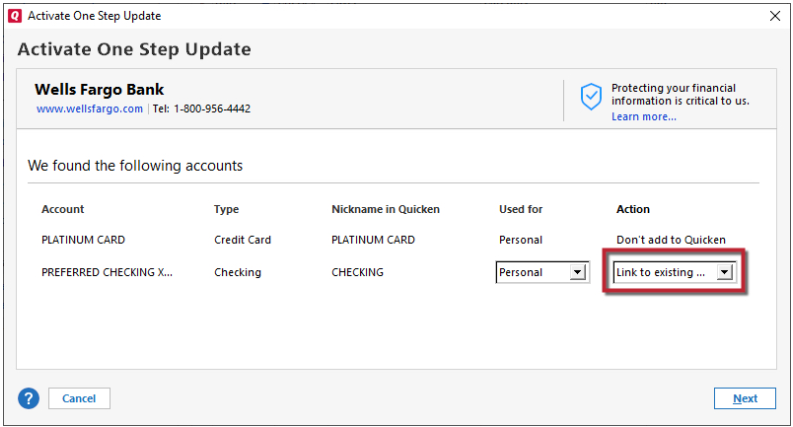
Please let me know how it goes!
Quicken Kristina
Make sure to sign up for the email digest to see a round up of your top posts.
0

