zzz-Fidelity Updates
Comments
-
I have two Fidelity logins. One has access to a combination of brokerage, HSA, IRA, a legacy NetBenefits account, and view-only permissions (no transact rights) to a couple of other brokerage accounts. This account has not received any updates since late July.
I have another account that is a lot simpler - two brokerage accounts and IRA. This one (finally!) received a transaction this morning after not receiving any updates since late July. It did not pick up the missing transaction in July, so I had to manually add that.
In addition, the one transaction I received - the shares was still rounded to 2 decimal points which caused a holdings mismatch.
So some progress in that a transaction did finally download, but still not great as it relates to the quality of the data.
0 -
Are you still on DC (zzz-Fidelity) or have you moved to EWC+?
0 -
Just FYI.
Fidelity Active Trader Pro forced me into an unusable Beta this morning. Truly unusable. After three transfers got a great tech support guy. While working through this issue, which he is aware of, I mentioned Fidelity and Quicken. He is more than aware of these issues. He said, all of the problems are on the Quicken side. I asked, why was DC dropped? At your request or Quicken? The answer was Quicken dictated the change.
Just an interesting aside.
2 -
Here is another user also being told by Quicken that this is all their doing — and Fidelity, as I said, has disavowed triggering this change, saying they were as surprised as anyone. What source are you citing in your various posts when you claim otherwise?
Oh, and today, even the "Reset Account" to bring down non-security transactions in the Cash Management account stopped working.
0 -
When I spoke to Fidelity about a week ago, they said their back office tech support insisted that they did not change any data content being presented to Quicken.
Deluxe R66.23, Windows 11 Pro
1 -
@leishirsute Well, so far they have not done so - the reason Direct Connect still works through Quicken and other third party financial software providers. This will change with the announced changes, when Direct Connect will not any longer work for anyone. Please make a formal request with Fidelity to keep Direct Connect up and running in the future, this will effectively resolve the matter for all financial software providers, not only Quicken.
0 -
I think Fidelity was referring to the content of the data but not the delivery method of the content.
They implied that issues like 2 decimal places vs three was on Quicken's side.
The problem that concerns me is that Fidelity could keep the Direct Connect access up and Quicken could disable access to it.I have been sending in requests to Fidelity on their reddit support site: https://www.reddit.com/r/fidelityinvestments/
Deluxe R66.23, Windows 11 Pro
0 -
They most definitely addressed "direct connect" with me claiming Quicken made the request (demand). Who knows. I was not there and do not have the emails :)
1 -
Today Quicken offered me new version of the software to go from current version 63.21 to 64.19. I am still on the zzz - DC version and am wondering if installing the new version is a good idea. Is anyone already on v 64.19 and also on the DC version for Fidelity? Does it work as expected ? I don't want to get into a jam here.
0 -
One thing I understand but have not personally experienced is that ALL Online Billers need to be reset up and some will no longer be supported. So aside from Fidelity foo, I am anxious about that update.
I have not hear of a similar update for Mac yet.
0 -
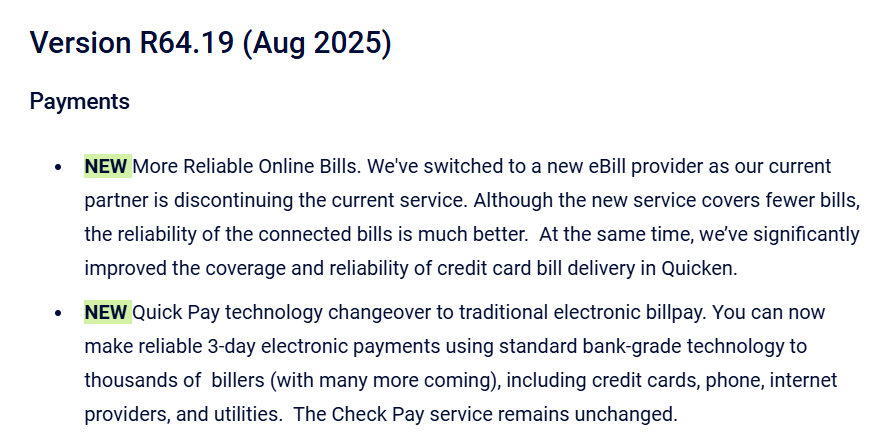
I am not aware of any changes between R63.21 and R64.19 as far as EWC+ One Step Updates are concerned. I permanently migrated to EWC+ on July 29, 2025 and therefore have no information on @Bill Sauter's DC R64.19 info request, possibly someone in the forum has direct experience on his point?
0 -
I'm on the legacy "zzz" connections to Fidelity and Fidelity Netbenefits. This morning I had a forced update to version 64.19 — forced in the sense that when I open Quicken it started updating and not asking me if I was ok with it. So far, no impact on me at all. What's wierd about this forced update is usually the tell me there is a new version to upgrade to at the end of a one-step upgrade. I've learned that it's a good idea to wait so I always decline the upgrade at this time. Then sometime later, I get the forced upgrade. This time, I never received the upgrade suggestion at the end of the one-step update. Just the forced upgrade at start-up.
The major change seems to be with BillPay and I don't use that. Seems to have no impact on legacy Fidelity connections.
1 -
@Robert thanks for the feedback. I guess I'll go ahead and install the new version - but do a backup first just in case.
0 -
I'm trying to read through the litany of issues with EWC+, but unfortunately the tread is too interlaced with other topics.
No transactions have been downloaded on my EWC accounts with Fidelity since 7/26. How can I get it to start downloading transactions again?
1 -
This is the problem. Once you upgrade to EWC+, transactions no longer update. I'm not aware of any solution other than reverting to a backup file that you created before upgrading to EWC+ and then simply rejecting the update.
Per an earlier recommendation, I'm going to try waiting a few more days to see if the issue is fixed. If not, I'm pursuing the above solution.
1 -
Hello @Brian S.,
Unfortunately, it is a known issue. If you haven't already done so, please bookmark the Community Alert linked below in order to be notified of any updates, once available, and know when the issue is resolved.
There is some troubleshooting that may help. First, backup your Quicken file. Then, navigate to Tools>Account List and click the Edit button next to the problem account. On the Online Services tab, click the Reset Account button.

Follow the prompts and check to see if the issue is resolved.
If it is not resolved, navigate to Tools>Add Account (do not deactivate the account first), search for the financial institution, and follow the prompts. When you get to the Add/Link screen, make sure to link the account to the proper nickname in Quicken.
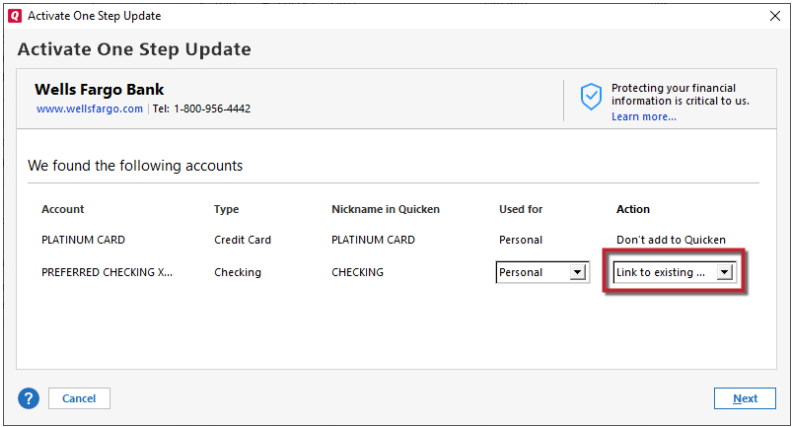
If the issue persists after that, please let me know, and I'll post the instructions for the final troubleshooting step.
Thank you!
Quicken Kristina
Make sure to sign up for the email digest to see a round up of your top posts.
0 -
I did that… no change on the 14 accounts I have there.
0 -
Thank you for the follow-up @Brian S.,
This final step is for investment accounts only. If any of the problem accounts are not investment accounts, please let me know, since the steps would be different for regular banking accounts.
Close the Quicken program. Then, open your File Explorer and navigate to the inv3.ini file. The file path to find that file is Local Disk (C:) > ProgramData > Quicken > Inet > Common > Localweb > QCS > inv3.ini.

Note: If you cannot see the ProgramData folder in the C: Drive window, go to View>Show>Hidden items.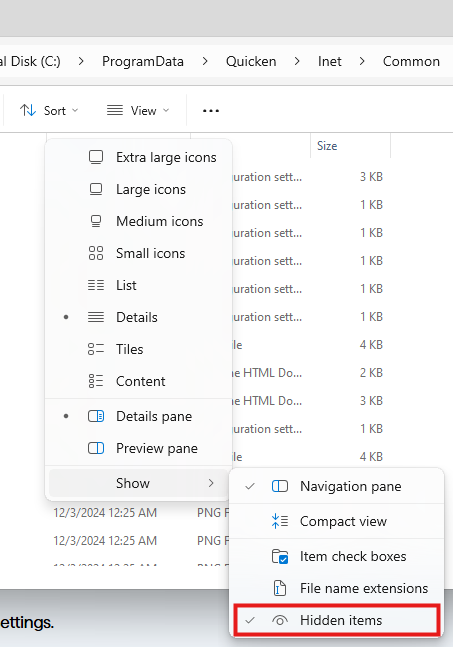
Open the inv3.ini file and scroll all the way to the bottom. Enter the following lines of text into the file:
[Override]
AllAccounts=1
OlderTransactions=90
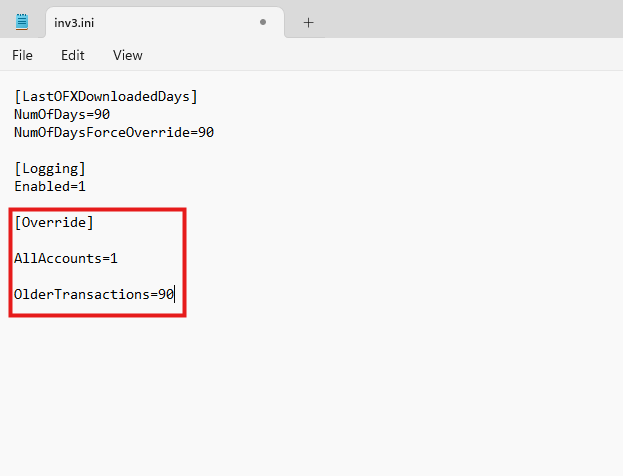
Go to File>Save.
Once you have saved the change to the inv3.ini file, open Quicken and run One Step Update.
Note - If you are not comfortable following these steps on your own, you can contact Quicken Support by phone to have an agent walk you through the process. The Quicken Support phone number can be found through this link here. Phone support is available from 5:00 am PT to 5:00 pm PT, Monday through Friday.
I hope this helps!
Quicken Kristina
Make sure to sign up for the email digest to see a round up of your top posts.
0 -
Thank you—I edited the inv3.ini file, but there was no change to the OSU results. It says that transactions were downloaded on the summary, but there is nothing in the register.
Note this is only happening with my Fidelity accounts. Schwab, which also uses EWC+ is behaving normally.
1 -
I'm familiar with the update. It is not in any way connected with the EWC+ migration. It's an update to the online bill manager.
Barry Graham
Quicken H&B Subscription0 -
I was offered 64.19 but did not proceed because of possible Fidelity conflicts. Once I had investigated and determined that proceeding was likely to be OK (after an overnight backup), I went back this morning and got
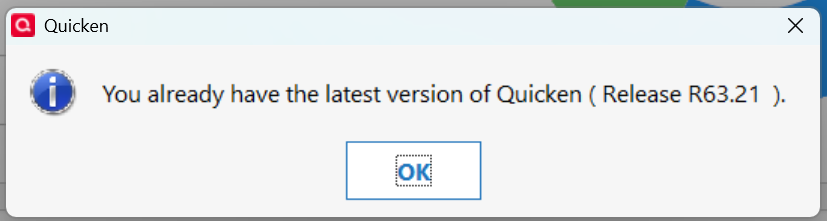
I don't know why I'm no longer seeing 64.19, but I'm not unhappy about missing it. Lots of moving parts in Quicken this month, so one fewer is OK with me.
0 -
@BrittMayo if you decline a staged release (like R63.21), you can always update later at any time by installing a manual update.
0 -
I also saw an earlier comment about 64.19. When I "asked" Quicken to update, it responded the same, so I downloaded the update from the Mondo patch and installed it. Rather than further drift the Fidelity issue off topic. I posted my issues in the "Installing and Updating WIndows" Forum. My specific thread is here:
I would suggest further discussion on this matter take place in the other forum.
2 -
I've been on EWC+ since July 27.
I have the same issue in certain accounts not downloading transactions and these steps also did not do anything.
1 -
Hello All,
The migration will not start back up tomorrow. It will remain paused while both Fidelity's team and ours work to resolve the issues that have been identified.
Thank you for your continued patience while we work with our service provider and Fidelity to address the reported issues.
Quicken Kristina
Make sure to sign up for the email digest to see a round up of your top posts.
4 -
Makes sense not to force others into the [Removed - Language] I and others have been experiencing since end of July. When will you provide an update to those that migrated and continue to have issues? This week, before EOM, next year? What is going on? Wait or abandon your product is the decision I am forced to make.
-1 -
Thank you for the follow-up @Brian S.,
Since that troubleshooting did not correct the issue, then I recommend bookmarking the Community Alert for the missing transactions issue and waiting for the issue to be resolved.
I apologize that I could not be of more assistance!
Quicken Kristina
Make sure to sign up for the email digest to see a round up of your top posts.
0 -
Thank you @Quicken Kristina. Happy to see this.
0 -
I think that to wait is the better option at least for those of us for whom Fidelity tracking is a small part of what we use Quicken for. As a software specialist I understand it's not always possible to give a fix date. In the meantime I'll either pause the Fidelity updates or fix them manually. I've been very impressed with the way that @Quicken Kristina and her colleagues have helped us and shown empathy during this challenging unfortunate episode.
Barry Graham
Quicken H&B Subscription1 -
I just saw a security transaction (BoughtX) show up in my Cash Management account through EWC+ today — for the first time in weeks. It still required a "Reset Account" after the OSU to get it though. Progress?
0






