M&T Bank Credit Cards - still no resolution since June 6 and it is now August 11

Still getting error messages when trying to reconnect to M&T Bank for credit cards. Latest one below:
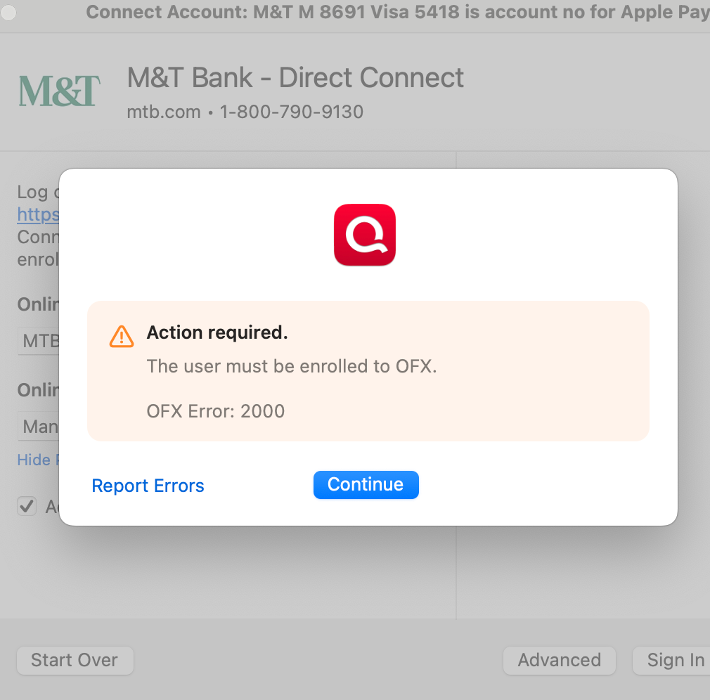
Please fix ASAP!!
[Merged Post]
Comments
-
Wondering if anyone is experiencing an error message when trying to update accounts that says 'Financial Institution Sync Error - M&T Bank-Direct Connect [brandingld:14770]' it states that M&T Direct Connect no longer supports transaction downloads with Quicken. However, I don't see any indication that M&T has discontinued services with Quicken Direct Connect. Any suggestions? Also, the app on my iPhone hasn't worked in over a year. Similar issue, connectivity issues. Tried everything suggested, just keeps going back to 'connectivity issue'. Not sure why I'm paying each year for this, the phone app is the real reason why I purchased the service.
0 -
Same issue. It worked yesterday.
0 -
Hello @MoniK, @JVelarde71, & @raianoat,
Thank you for taking the time to report this issue with M&T Bank - Direct Connect.
M&T Bank – Direct Connect is no longer appearing in Quicken’s financial institution list, which typically indicates that the bank has discontinued support for this connection method. Users will likely need to contact M&T Bank directly for clarification or further assistance.
However, we will also be forwarding this issue to the proper channels to have this further investigated on our end. We request that you please navigate to Help > Report a problem within your Quicken program and submit a problem report with log files and screenshots attached in order to contribute to the investigation.
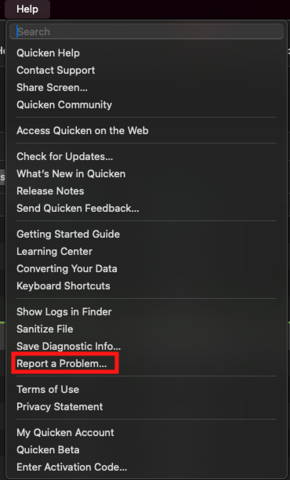
It would also aid the investigation to include a sanitized file when submitting the problem report. A sanitized file is a data file that removes personally identifiable information so you can comfortably share this file with the Quicken team.
While you will not receive a response through this submission, these reports will help our teams in further investigating the issue.
We apologize for any inconvenience in the meantime!
(CBT-765)Additionally, @JVelarde71 to start with, I suggest that you please try to reset the cloud again by following the instructions below. Doing so does not affect your data file or other Cloud Accounts (if applicable).
- Sign out of the Quicken Mobile app
- Navigate to the Quicken dropdown menu (in the Quicken desktop program)
- Settings...

- Mobile, Web & Alerts
- Use the toggle button on the left to turn Sync OFF

- Click Disable Sync
- Navigate to Connected Services
- Click Reset (click Reset again on the pop-up box)

- Once the Reset completes, navigate back to Mobile, Web & Alerts
- Use the toggle button on the left to turn Sync ON
- Click Enable Sync
Once that is done, go back to Mobile, Web & Alerts > Accounts
to select/deselect the accounts as desired, then click Update. Once that completes, sign back in on Quicken Mobile, and see if the issue still continues to persist.
I hope this helps!
-Quicken Anja
Make sure to sign up for the email digest to see a round up of your top posts.0 -
I'm having the same problem. I spent about an hour on the phone with both M&T and Quicken. Long story short, I just spoke with a manager at M&T who confirmed that other customers are experiencing this issue and they opened a ticket to look into the problem.
1 -
Anja, I'm having the same problem as the other two postings with M&T Bank today, there has been no previous communication from M&T that Direct Connect is no longer supported so I doubt that is the case the service has been in place or many years. I've tried calling M&T support but so far can not get anyone that supports this function. If you could reach out to your M&T bank contact to let them know and try to resolve that would be helpful. Thank You
0 -
Thank you both for chiming in, @markwirth1 & @wickerberry. I will include you both in the escalation ticket on our end. To contribute, please follow the instructions in my previous response to submit your log files.
Thank you!
-Quicken Anja
Make sure to sign up for the email digest to see a round up of your top posts.1 -
Hello again,
This is now considered a known issue that has been escalated internally, though we do not have an ETA on resolution at this time. While the investigation remains ongoing, please refer to this Community Alert for any and all available updates and information.
We apologize for any inconvenience in the meantime! Thank you.
-Quicken Anja
Make sure to sign up for the email digest to see a round up of your top posts.1 -
Anja's suggestion on how to fix my issue for the mobile app worked…for a week. Now we're back to the same issue. I don't think I should have to 'reset' the mobile app every week. Not what I expect for something I pay for annually.
0
