Quicken Load times

When opening the application after start up of the PC, a Dell, 8 years old with 2.70 GHz cpu and 8 GB of ram running W10, it sometimes takes 5 minutes or more to load the data and application. The Task Manager shows "unresponsive" during this period. The application sometimes shuts down on its own. At best, when running W10, it takes 20 to 30 seconds to load the data. The data file is 80 MB. There is no database compact routine under the File tab. I hesitate to do a Validate and Repair on the file.
I am going with a Dell All In One in a few weeks, running W11 at twice the clock speed, so is this the performance to be expected?
Answers
-
It is difficult to determine the issue if any so we are just comparing and I think that is your initial inquiry.
I am on a three year old core i7 higher-end Win11 dell laptop with similar file size as yours, and my data file opens almost instantaneous and one step update (OSU) takes 20-30 seconds to download all accounts' transactions. There are users reporting minutes for their OSU to complete! So there are all kinds of experiences out there for a variety of reasons.
I did have a 2009 dell laptop with 4GB ram and a traditional 5400rpm hard drive (not SSD) that I used as backup and sometimes testing Quicken on it, which finally died a few months ago, and the Quicken performance was similar. There are users will 200 MB file size with no performance degradation. So just based on my personal experience and what I have learned on this community, hardware and Quicken's file size do not make much of a difference. Complexity of the investment accounts do slow it down, but should not drastically.
You may have something unusual with your setup, other programs or Q data file.
UPDATE:
I just got home and ran a test with a stop watch: From clicking the Quicken icon to a fully functioning Quicken file takes 4 seconds on the initial launch and subsequent launches are faster. And OSU completed in 26 seconds. In comparison, MS Word or Excel v2021 take about 7 seconds on the initial launch and subsequent launches about 4 seconds. So Quicken almost launches faster that MS Word for me. (I am guessing maybe double those figures for my old 2009 laptop which is frankly unnoticeable). I use the standard Windows Security antivirus + Malwarebytes.
- Q Win Deluxe user since 2010, US Subscription
- I don't use Cloud Sync, Mobile & Web, Bill Pay0 -
Immediately after booting your PC or after waking it up from hibernation, it has been my experience to wait 10 - 15 minutes before doing anything else.
For example, my PC seems to be doing some Windows housekeeping and some scan functions by Norton Antivirus. During that time, my C: - drive runs at 100% busy.
Once the wakeup routines have completed on my PC, Quicken will start as usual, within 15 - 20 seconds.Does the same apply to your PC? Have you looked at Windows Task Manager to see what's going on during these first minutes after wakeup?
0 -
Wow, that's horrible. Quicken starts slowly for me (meaning the time it launches until it's "ready" to actually do stuff in), but not that slow. I'd say more like 1-2 minutes for me. Windows 10, SSD hard drive, 32 GB of RAM, AMD Ryzen 5 2600. It's definitely slower than a year or so ago, so I just figured it was some update and that's the way it is. Once it's up and running, it's mostly OK, unless you're doing anything in ANY investment account for some reason.
What does Task Manager show for performance during this time (CPU pegged at 100%, Disk, etc.)?
0 -
OSU might depend on network and internet speeds. I am on Cox and run 50 Mb down, and a few less for upload. WIFI is not the bottleneck, I am seeing 1 to 2 minute times for OSU. Update Quotes is fast. The issue is load times on start up.
0 -
Excel and Word are slow to open, may 15 to 30 seconds to open.
0 -
2 Computers (HP Laptops) Both load Quicken in 6 seconds or less (corrected scrivner error). Both load all MS Office Pro Plus 2021 software (Word, Excel, Access, etc) in 2 to 3 seconds. Both complete OSU’s normally in 20 to 30 seconds. Both have Solid State Drives. Both are running wireless on local network.
Quicken Data Files a bit over 64 MB each (separate file names on each computer for redundance)
Computer 1:

Computer 2:

WINDOWS 11 Version 23H2 RUNNING ON BOTH COMPUTERS (64 bit)
MS Office Professional Plus 2021 on Both Computers

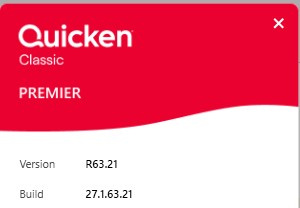
Quicken Classic Premier for Windows:
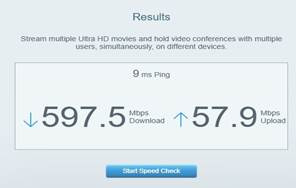
Cox High Speed Internet:
Windows 11 (2 separate computers)..... Quicken Premier.. HAVE USED QUICKEN CONTINUOUSLY SINCE 1985.
0 -
When people talk about performance in the minutes for Quicken other than for investment accounts (which are prone to performance problem for anyone that has a lot of transactions, securities, security lots in a given account) the problem is always going to be either a corrupted data file, corrupted Quicken install, or the most likely something on the machine.
Quicken is quite "unique" and not what people expect.
My data file is 183MB (which for most part is almost useless information as far as judging performance).
It makes very little use of multiple threads, as such is more dependent on running on a single core. It is light on memory, disk, and network. For instance, discussing how fast your Internet is basically useless unless you are still on dialup.
Let's look at this a bit. I'm using MS Edge, one tab open. It is using about 618MB of RAM.
Quicken is using 157MB (if I open every one of my active accounts so that Quicken caches them in memory it goes up to about 240MB).
I haven't bothered to figure out exactly how much data is transferred at startup (most likely a trivial amount, unless downloading a program update), but we can get an idea of how much data is transferred during One Step Update by just looking at the log. In my case, 8 accounts two logins at Chase and one a Citibank. So, the whole "conversation" is in the Cloud Sync Log, including the timestamps. Almost all the time is "waiting" for server to serve up the that.
36 seconds for One Setup Update. I only had 5 credit card transactions, but it should give you a feel for the size.
94KB and note that includes all the back-and-forth messaging.
So, how it is possible that some people have load times that are minutes, and such?
My overall guess would be that it is waiting on something. Just as in the case of One Step Update where most of the time is just waiting for the server, the same is most likely true of any "minutes of delay" (again with the exception of investment accounts)
What are the possible things it might wait on at startup?
How about your anti-virus software or "cloud folder" process locking the data file or interfering with Quicken's reading of it in some way. Another possible cause is some kind of problem with the network. Quicken definitely checks with its server at start up. Quicken can work "offline", but what it expects of that is to get a network error right away. This would be true for instance if you network is disabled, but let's say the network is on, but for whatever reason Quicken can't connect to the Quicken servers, Quicken will wait for the network error which is only going to happen with a network timeout. Network timeouts are in the minute range, because they are trying to be as reliable and error cover as possible.
So, it comes down to things like a misconfiguration, problems in drivers, the system loaded (the mentioned 100% disk use while trying to use Quicken)… That kind of thing. A new one that someone suggested is that by default Windows 11 might not put Quicken on a fast core (and there is a suggestion to change Quicken to direct Windows 11 to do what I would have expected, but I guess there really isn't anyway for Windows 11 to know that Quicken is mostly a single threaded process that needs the fastest core possible to perform properly)
I personally, haven't seen this, but it sounds like a reasonable cause for some possible performance problems.
One thing that I see from time to time is "My machines is state of the art, faster, than a speeding bullet, why does Quicken perform badly (and in their case "badly might be in the seconds")?
There is a bit of a relationship between the "machine performance", and there is certainly a boast going from a hard drive to an SSD, but mostly you are talking seconds here. Just because of the history of how Quicken was designed, and the APIs and such it uses, you just aren't going to turn it into a speed demean with a "faster machine".
I have two machines, my "fast one", and my daily use machine. Here is what my daily use machine looks like (boy that picture shows much more dust than I see!):
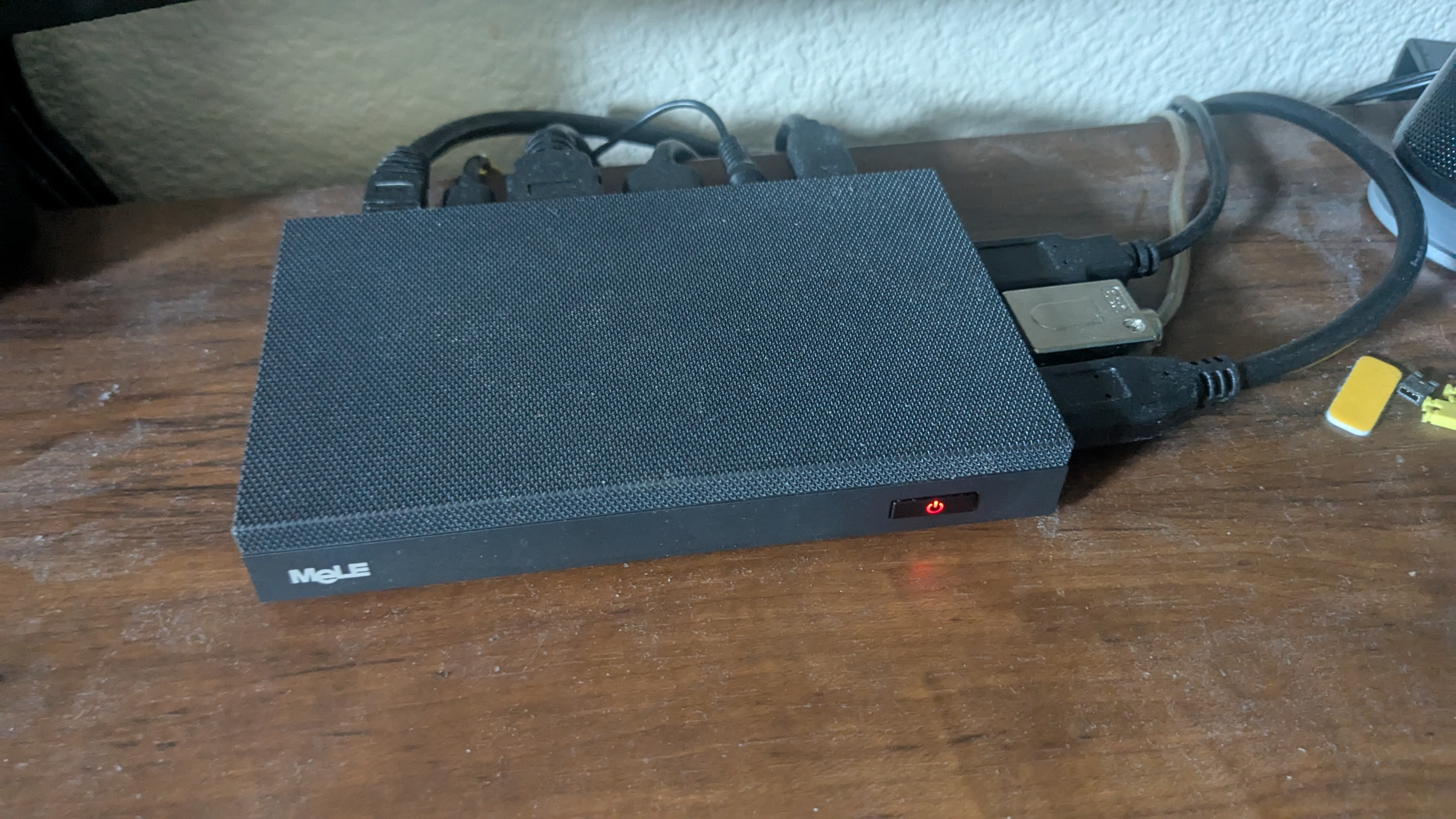
I like it because it has no fans (neither does my "fast one") and can drive three monitors, not to mention the 3 1/4" by 5 1/4" size is really nice, I can even take with me on vacations.
I don't use sleep or hibernate, because I have had problems with them on Desktop computers, but because I want a clean startup. I power down/up at least once a day. From power up until I get logged in is about 25 seconds. And about another 30 seconds for this amount of programs to start:

Startup time for Quicken is about 9 seconds. Certainly not going to compete with "fast machines", but hardly "minutes". My fast machine starts Quicken in 5 seconds.
The little machine:


"Fast computer:"


I didn't mention it before, but I will see that I haven't seen anything to suggest that Quicken can really make use of a "fast GPU", in fact, I have seen Quicken have more problems with them than with just the internal ones that I always use.
0 -
P.S. A quick check for network problems being the cause of the slow startup is to disable your network and then start Quicken. If it starts up quickly you have a network problem (not bandwidth, some kind configuration or reliability problem).
1 -
P.S. Remembering an Internet issue of about a year ago with the transfer of data from point of origin to end point.
Long story - short version:
Data transfer traced from point of origin (such as Quicken or Intuit Servers) thru each down line Internet provider's servers hops in multiple states until it reached my computer. Significant packet loss occured in multiple servers in 2 states and much latency was detected. Internet Provider was notified and issue was corrected.
I check packet loss, latency, and etc. from time to time…
Windows 11 (2 separate computers)..... Quicken Premier.. HAVE USED QUICKEN CONTINUOUSLY SINCE 1985.
1 -
My 10 year old Windows 10 PC with SSD is painfullly slow loading Quicken and moving between different tabs. It's still very quick with current Microsoft apps and databases but Quicken was a snail. I bought a new Windows 11 PC and added a Samsung 990 Pro SSD specifically for Quicken. It made a big improvment but it's still a little sluggish. There should be an option to disable unused Quicken modules like "rentals" to lighten the load.
I realize that the software needs to be modernized, but to do so may result in the loss of features added over the years. It still provides the best feature set in the market for a reasonable price, as it is.
1