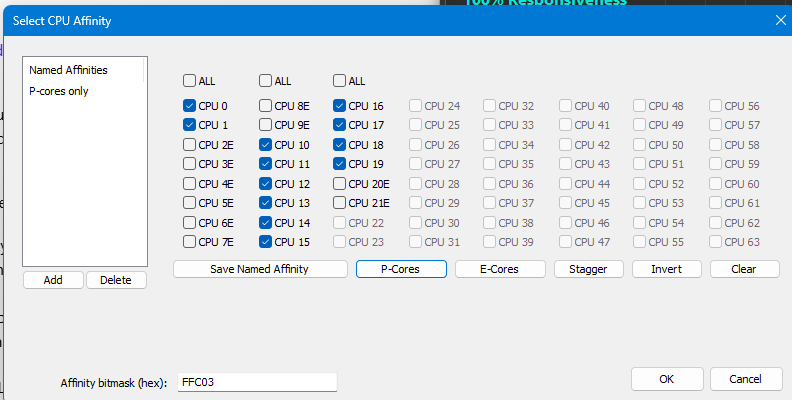
Background: My LG Gram laptop has an Intel Ultra core 7 H155 processor. Quicken Classic performance was usually "OK" when plugged in but was really bad when using the battery, regardless of whether I was using the "Balanced" or "Performance" power profile. I followed all the steps in the Quicken Performance Troubleshooting | Quicken guide. It helped, but not enough.
How I solved it: I did some digging and learned that many 12th generation and newer Intel processors have 2 different types of cores: "Performance" cores & "Efficiency" cores. Using “CPU affinity”, I was able to force Windows to always execute Quicken Classic on a "Performance" core and now things run much better, especially on battery. The difference is significant: Accessing an investment account that used to take 5-7 seconds to open now only takes 2 seconds. In general, everything is much “snappier”.
My enhancement request: My request is that the quicken development team enhanced the product to do this automatically.
Additional information: I also found that these 2 additional changes helped a bit:
- When qw.exe is running, shift the power profile to "Performance".
- Set the GPU priority to "Above normal".
One can accomplish these changes by writing a PowerShell script. I used "Process Lasso", a 3rd party windows utility that automates this process, so I don’t have a script I can share.
Marc