Mortgage payments

I am running Windows 11 and Quicken R63.21.
How do I change my mortgage principal and escrow/property tax amounts?
My mortgage payments are not downloaded they are entered manually.
Answers
-
You'll need a liability type account for the mortgage loan itself, an Asset account for the Escrow amounts paid monthly and Expense categories for the interest portion of your payment and whatever those escrow payments go to.
Q's "Mortgage Wizard" can help you to set up the monthly payment from your bank account, and it will automaticallly update every month as the Principal vs Interest component varies. You can also record the transfer to the Escrow account within the transaction that the Wizard will create.
When, probably annually, when your Real Estate Taxes are paid from your Escrow account, you record a transaction in Escrow for the amount paid using your "Real Estate Tax" category. And likewise for your homeowner's insurance payment, using an appropriate category for that.
Unless you JUST RECENTLY took out that mortgage, you'll have some calculations to do to figure out what the current balances in the Mortgage and Escrow accounts are.
It's probably not worth the effort (but that's your decision) to go back to last year to record those payments, but you might want to set the opening balances in Mortgage and Escrow as-of 1/1/25 and go back to your first mortgage payment of this year to accurately input those payments … so that come time to do next year's tax return Q will have done all of those calculations for you.
Q user since February, 1990. DOS Version 4
Now running Quicken Windows Subscription, Business & Personal
Retired "Certified Information Systems Auditor" & Bank Audit VP0 -
@ccpjr you can adjust the mortgage principal balance by doing a "Ctrl-R" anywhere in the mortgage loan account. In the pop-up box, enter the date and amount of the balance adjustment. You will also need to add a category which can be something like "Balance Adjustment". In the Memo you can provide details or explanation for the adjustment.
I think the easiest way to change the escrow amounts, is to go to the Payment Details tab and click on "Edit Payment Details". If you don't see that button, checkmark "Show Payment Graph". That will reveal some detail information, including the button you would need to click on.
0 -
I didn't explain good enough what I wanted to know.
When you go to bills and income.
How do I change the "monthly payment" principal and escrow split transactions amounts.
0 -
@ccpjr when you change the payment split in Payment Details, it should automatically change the payment reminder in "Bills and Income" as well.
You can also go to into your "Bills and Income Reminders" (Ctrl-J) and adjust the split in the payment reminder.
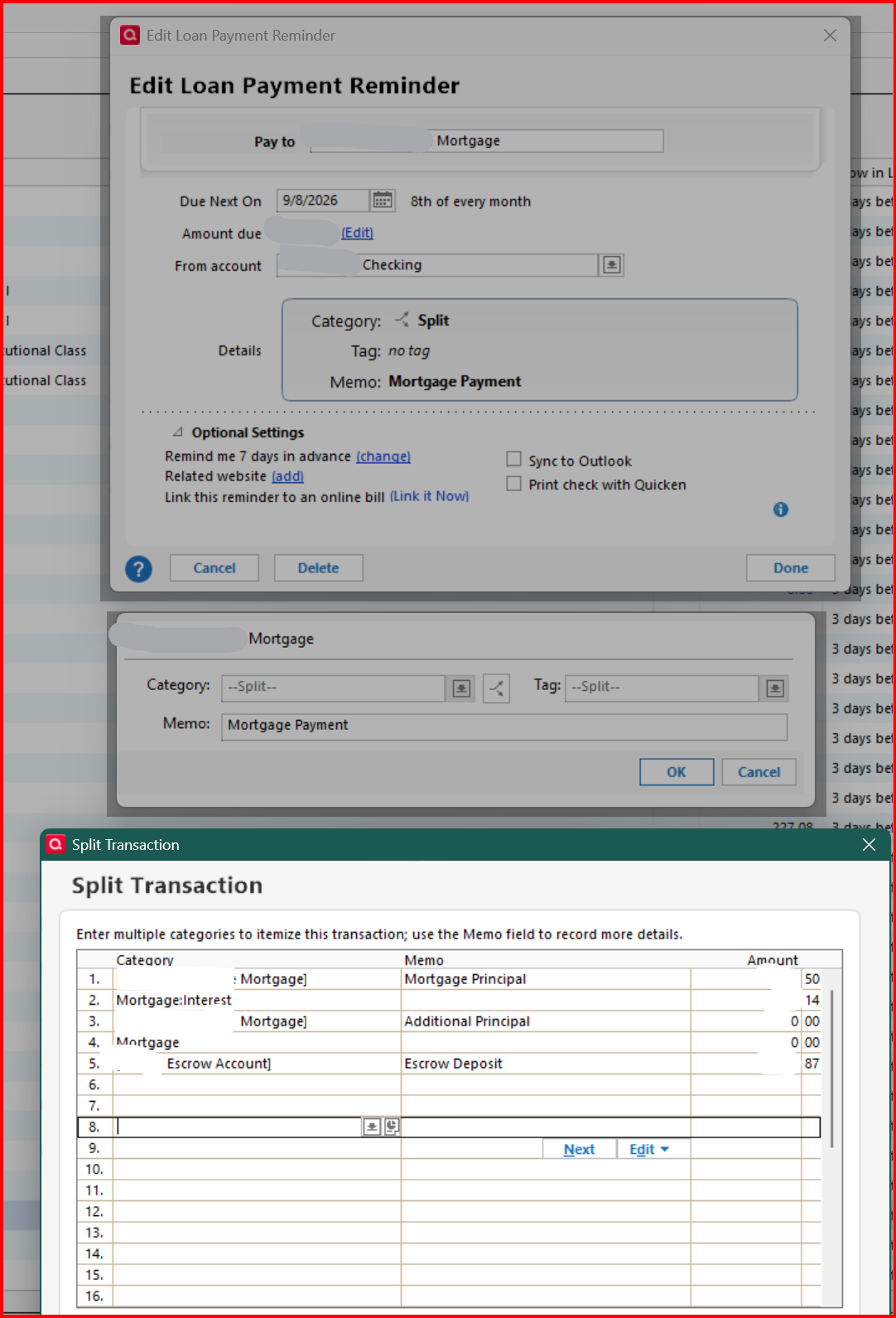
It is also important to keep the default split lines intact and in the same position. Quicken uses these splits to calculate the P & I split. That is why it is safer to go into Payment Details in the mortgage loan account to change the payment split.
0 -
I was able to edit the escrow amount to ($556.41), but I can't edit the principle or interest amount.
The principle and interest total is off by $.021.
my total payment should be $918.60 but it's $918.8.
In bills and income, payment reminder for my mortgage. The princable and interest amount is wrong.
I have gone to my mortgage account and clicked on edit payment details and then edit.
It opens the split transaction window with and unlabled -35.77 amount.
File 01 shows the monthly reminder with the wrong total of $918.81
File 02 show edit payment details in the mortgage account.
File 03 Shows the window that opens when I click on edit from the edit payment details.
0 -
@ccpjr the escrow amount (556.41) needs to be in split line #5. You have it in #3 which is additional principal. Please refer back to my sample split I provided. Split order and location is critical for mortgage payment splits.
Make this change and see where things end up. If it is still not balancing correctly there may be other issues with the loan payment set up.
0 -
@ccpjr it is always best to adjust your loan payment components in Payment Details. The reminder gets updated automatically with the splits in the correct placement.
0 -
I am still having an issue not being able to edit the princable and interest amounts for the loan.
I go to my mortgage account and click on edit payment details. It brings up the loan details window and I click on edit in the middle of the window arross from Other:.
It then bring up a split transaction window but everything is blank.
0 -
You cannot edit the principal and interest payment amounts in the loan setup. These amounts are calculated based on the data you input for interest rate, number of payments, loan amount, etc.
If your total payment is different, the difference needs to be added to Additional Principal.0




