Quicken Classic Deluxe will not download DFCU transactions

I haven't been able to download for two weeks. all kinds of error messages…929, 503 etc.
I will not be renewing my subscription to Quicken Classic Deluxe because this happens way too often!
Comments
-
Hello @lassie5573,
Thank you for letting us know you're encountering this issue with DFCU. To clarify, does that stand for Digital Federal Credit Union?
To start troubleshooting this issue, since you mentioned you've been getting CC-929 errors, please start by following these steps from our article on CC-929 errors:
First, wait one hour. Then, sign out of Quicken and sign back in:
- Go to Edit > Preferences > Quicken ID & Cloud Accounts.
- Click Sign in as a different user.
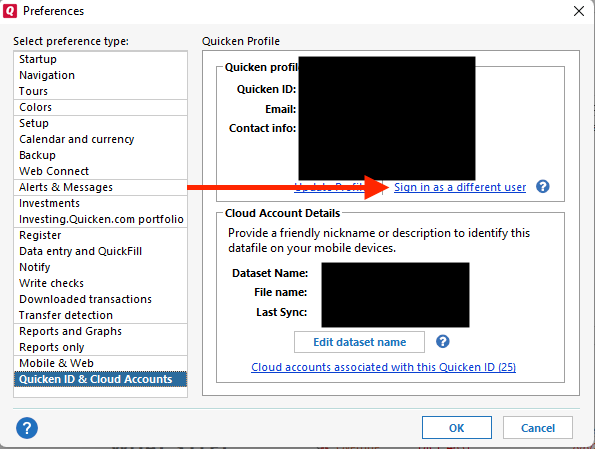
- Type "yes" to confirm and click Sign Out.
- After you sign out, sign back in with the same Quicken ID.
- Attempt to add your account again.
Since the CC-929 errors may be the reason you're seeing the CC-503 errors also, it's important to resolve the CC-929 issue first. If the CC-929 issue persists after following the steps above, then please contact Quicken Support directly. The Quicken Support phone number can be found through this link here. Phone support is available from 5:00 am PT to 5:00 pm PT, Monday through Friday.
I hope this helps!
Quicken Kristina
Make sure to sign up for the email digest to see a round up of your top posts.
0 -
It's still not fixed after multiple phone calls to both the bank, Digital Federal Credit Union, and your support team. It's been escalated twice. I have been without downloaded transactions since August 3. This is unacceptable. They narrowed it down to a Multi-Factor Authentication Issue between Quicken Classic for Windows and the DFCU bank. What is the Estimated Time to Fix this error. Very frustrated.
0 -
[Fri Aug 22 15:14:45 2025]
File: "C:\Documents\Quicken\2025 Household Quicken Working File_Aug 3 2025"
QDF:
Validating your data.
No errors.QEL:
No read errors.QEL:
All internal consistency checks passed.[Fri Aug 22 15:14:57 2025]
Maximum security reference: 4, number of securities: 4.
All security references are within the normal range.Validation has completed.
0 -
Thank you for your replies,
Unfortunately, our teams do not give ETAs, so I'm not able to tell you when it will be fixed.
I do see that you have an open escalated ticket from the 20th (ticket# 11912597). Our escalated team should reach out to you by email if they need more information or when they believe the issue is resolved.
Thank you!
Quicken Kristina
Make sure to sign up for the email digest to see a round up of your top posts.
0
