Can I delete a mutual fund from the Portfolio list?

I have lots of mutual funds that I no longer have any shares in. Can they be deleted from the Portfolio listing?
Answers
-
Yes, but there cannot be any transactions recorded for the mutual fund. You can do this by going to Tools/Security List. Highlight the mutual fund and select Delete. If the Delete option is greyed out then a transaction has been recorded in some account. Click on the Security Name and the Security Detail View for the mutual fund will open showing where the transaction was recorded.
0 -
Hello @ejbucknell,
Thanks for reaching out!
Good advice from @crwalejr. Go ahead and give that a try, and let us know if it clears things up for you.
Thank you!
-Quicken Anja
Make sure to sign up for the email digest to see a round up of your top posts.0 -
Rather than deleting the securities, you can edit and customize the Portfolio views. There is a Portfolio preference to show/hide closed positions. You can also edit Portfolio views to change which accounts and securities are displayed.
Quicken user since Q1999. Currently using QW2017.
Questions? Check out the Quicken Windows FAQ list0 -
@ejbucknell Your question hinges directly on what you mean by "Portfolio Listing". Please clarify.
Yes, if you have no transactions in any Quicken account using the fund, you can delete the security, but I doubt that is your situation.
For portfolio views (Ctrl-u), you can opt to not show closed lots.
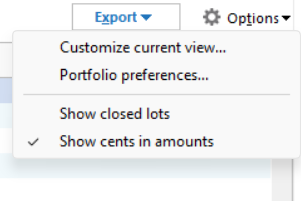
A Portfolio Value Report normally just shows currently open positions. If that is the reference you are meaning, there may be something funky in your data or your installation. We would need more data to diagnose that.
If you mean some dashboard card, please be specific.
0



Categories
- All Categories
- 5 Product Ideas
- 34 Announcements
- 248 Alerts, Online Banking & Known Product Issues
- 19 Product Alerts
- 265 Welcome to the Community!
- 301 Before you Buy
- 1.5K Product Ideas
- 55.8K Quicken Classic for Windows
- 16.9K Quicken Classic for Mac
- 1K Quicken Mobile
- 834 Quicken on the Web
- 129 Quicken LifeHub