Unable to Connect to Ascensus RPLink

Comments
-
Has there been any update to this? The Community Alert linked to above is not an active link.
0 -
Hello, Quicken. Anyone there? As noted above, your "Community Alert" above is a dead link. Problem still exists. User ID and PW are correct since I can log in directly to Ascensus outside of Quicken. It's only in Quicken that this is a problem.
0 -
Hello @Louis Block & @blubkeman,
We appreciate you both reaching out!
I’ve gone ahead and moved your comment to a separate thread since you're using Quicken for Mac, and the original post you commented on was regarding the Windows version.
As for the Alert that was linked—it’s no longer accessible because it has been marked resolved and archived.
@Louis Block Upon reviewing your account, we can see you are receiving an internal FDP-102 error. Please review and follow the guidance outlined in this support article for this error.
@blubkeman For your account, we’re seeing an internal FDP-103 error. Please review and follow this support article for troubleshooting instructions.
Hope this helps!
-Quicken Anja
Make sure to sign up for the email digest to see a round up of your top posts.0 -
Hi - appreciate the suggestion, but the solution did not work. I had already disconnected my account and reconnected several times. The user id and password are correct for Ascensus (confirmed with them). Still not working, although it used to work fine. Suggestions welcome. It's not critical, just annoying since it just simply stopped working.
0 -
Thanks for the update. Since the steps didn’t work and you’ve already verified your credentials with Ascensus, the next step—as noted at the bottom of the article—is to contact Quicken Support directly.
They’ll be able to collect and review your log files and escalate the issue if necessary. This will give them a clearer picture of what’s going on behind the scenes.
We appreciate you taking the time to try the troubleshooting steps!
-Quicken Anja
Make sure to sign up for the email digest to see a round up of your top posts.0 -
As multiple folks are experiencing the same issue, is it possible for us to get an update within the forum as opposed to having everyone contact Quicken Support. Seems like a general issue to me and not tied to any one particular instance.
1 -
Hello All,
We have forwarded this issue to the proper channels to have this further investigated. However, we request that you please navigate to Help > Report a problem within your Quicken program and submit a problem report with log files and screenshots attached in order to contribute to the investigation.
It would also aid the investigation to include a sanitized file when submitting the problem report. A sanitized file is a data file that removes personally identifiable information so you can comfortably share this file with the Quicken team.
While you will not receive a response through this submission, these reports will help our teams in further investigating the issue. The more problem reports we receive, the better.
We apologize for any inconvenience in the meantime! Thank you.
(CBT-749)-Quicken Anja
Make sure to sign up for the email digest to see a round up of your top posts.0 -
Add me to the list of people unable to log in. Credentials are fine and verified via web but Quicken can't connect. Any updates?
0 -
It worked today!
0 -
Thanks for the update, @Louis Block! Glad to hear it’s working for you.
—
Could others in the thread please confirm whether the issue is resolved for you as well, or if it’s still ongoing?
Thank you!
-Quicken Anja
Make sure to sign up for the email digest to see a round up of your top posts.0 -
Hello - per your request Anja, just tried it again. Still not working for me.
0 -
@blubkemanThank you for confirming. We’ll keep the ticket open. In the meantime, could you please navigate to Help > Report a problem in Quicken and submit your log files? Please let me know once that's done. This will allow us to attach them to the ticket and aid in the investigation.
We appreciate your assistance!
-Quicken Anja
Make sure to sign up for the email digest to see a round up of your top posts.0 -
Hello - just did. Thanks.
1 -
Interesting - so I just decided to try again (same method - delete connection, re-establish) and it now works! I will let you know if the issue recurs, but for now back in business. Thanks for resolving, to the extent you all did.
0 -
One final comment: previously, Ascensus allowed for "detailed" investment tracking. Now, it seems to only allow "simple." That's fine, but disappointing since it previously allowed for the detailed selection. Oh well - half a loaf is better than none. Last post from me for a while unless the inability to connect at all recurs.
0 -
Thanks for the update! Glad to hear your connection is working again. The change from “detailed” to “simple” tracking for Ascensus accounts is unfortunate. You might check with Ascensus to see if this change was intentional and detailed tracking is no longer supported, or if it can be re-enabled. If it can, you can update it by following these steps:
- Select the account you want to change, then go to Accounts → Settings.
- In the Account Settings window, select the Details tab.
- Under Investment Tracking Method, choose either Simple (Positions Only) or Detailed (Positions and Transactions).
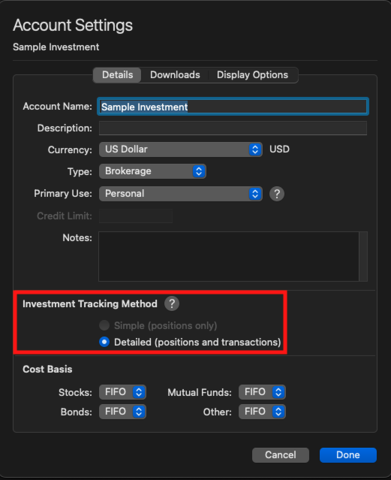
- Select Done. After making this change, it’s a good idea to update your investment accounts.
Hopefully, everything continues to run smoothly. Feel free to reach out if any issues recur.
Thank you!
-Quicken Anja
Make sure to sign up for the email digest to see a round up of your top posts.0

