I have an issue similar to a closed one 7962498 about sorting the columns in Bills & Income

I remember that when I would open the Bills and Income reminders table it would always be next payment due by date on top. Recently the list is sorted in oldest first (farthest out), with the next payment (or income) on the very bottom of the list.
When you "hover" over the column titles for Date, Pay to/Receive from or Amount the cursor changes to a "pointing finger" which lets the user know that the item is clickable for action, in my case to sort that column.

Now if I click that header (Due) it should change direction and sort in reverse order of what is currently displayed. Alas it does not. Nor does options.
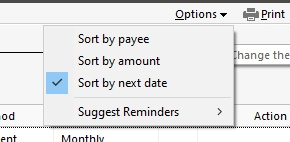
I would consider next date to be the closest to today but clicking the column or selecting "Sort by next date" has no effect.
Best Answers
-
Are you referring to this discussion?
Bug Report - Sort By in Bill & Income Reminders — Quicken
As mentioned there, does your list of reminders include "reminders proposed to be scheduled"?
If you deactivate the settings to show these proposed reminders, does the problem go away?Also, what is your version of Quicken (R xx.xx)? US or Canadian version?
0 -
That is why I put that number in the header 7962498 . The reason I posted was because it was listed at the bottom as "This discussion has been closed."
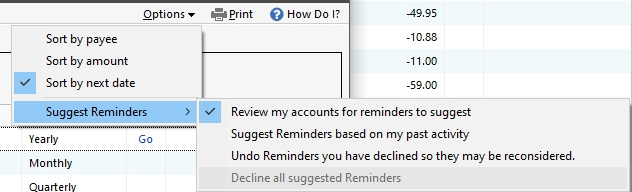
You had me going on a little search. "Deactivate proposed reminders". Initially went to Edit > Preferences, couldn't find it there. Subsequently went to "Options" in the Bills & Income reminder screen, which broke out the sub-menu. "Decline all suggested reminders" was selected, clicked that one and now sort is back.
Thanks so much! 😁
 0
0

Answers
-
Are you referring to this discussion?
Bug Report - Sort By in Bill & Income Reminders — Quicken
As mentioned there, does your list of reminders include "reminders proposed to be scheduled"?
If you deactivate the settings to show these proposed reminders, does the problem go away?Also, what is your version of Quicken (R xx.xx)? US or Canadian version?
0 -
That is why I put that number in the header 7962498 . The reason I posted was because it was listed at the bottom as "This discussion has been closed."
You had me going on a little search. "Deactivate proposed reminders". Initially went to Edit > Preferences, couldn't find it there. Subsequently went to "Options" in the Bills & Income reminder screen, which broke out the sub-menu. "Decline all suggested reminders" was selected, clicked that one and now sort is back.
Thanks so much! 😁
0 -
Thanks for responding.
I included the actual URL link to the closed discussion, for reference.So, as you determined, unchecking the "Suggest Reminders based on …" resolves the Due Date sort issue.
It looks to me as if this issue should be reported to the programmers, for correction in both the US and Canadian versions.
Sort by … functionality should work whether or not the section showing suggested reminders is present in the list.0 -
Hello @Tip.N.Ring,
Thank you for taking the time to report this issue, though we apologize that you are experiencing this.
We have forwarded this issue to the proper channels to have this further investigated. However, we request that you please navigate to Help > Report a problem within your Quicken program and submit a problem report with log files and screenshots attached in order to contribute to the investigation.
It would also aid the investigation to include a sanitized file when submitting the problem report. A sanitized file is a data file that removes personally identifiable information so you can comfortably share this file with the Quicken team.
While you will not receive a response through this submission, these reports will help our teams in further investigating the issue.
We apologize for any inconvenience in the meantime! Thank you.
(CBT-790)-Quicken Anja
Make sure to sign up for the email digest to see a round up of your top posts.0

Categories
- All Categories
- 24 Product Ideas
- 34 Announcements
- 248 Alerts, Online Banking & Known Product Issues
- 19 Product Alerts
- 265 Welcome to the Community!
- 301 Before you Buy
- 1.5K Product Ideas
- 55.8K Quicken Classic for Windows
- 16.9K Quicken Classic for Mac
- 1K Quicken Mobile
- 834 Quicken on the Web
- 129 Quicken LifeHub