Using Quicken on 2 computers - Again

I have read the original posting and tried it on a few occasions. Whenever I bring up the file on my laptop It throws update errors requiring me to close all of the accounts and reopen them for online access.
Returning home the same thing happens if I copy back. Also, if I do not copy back and just use my original file on my desktop, I still am required to reinitiate all of the online account access.
Answers
-
Hello @Bione,
Thank you for sharing your experience. Is this the original posting you're referring to?
To help troubleshoot, please provide more information. Are the errors you're seeing CC-800 errors? Is this impacting only Express Web Connect/Express Web Connect+, or is it also happening with Direct Connect accounts? What process are you using when you copy the file to/from your device?
When you say it requires you to close all the accounts and reopen them, do you mean you have to deactivate them and re-add them? If not, the what process are you having to follow to get your accounts working again?
I look forward to your reply!
Quicken Kristina
Make sure to sign up for the email digest to see a round up of your top posts.
0 -
I will be traveling again in a week and will update then.
1 -
Thank you for your reply,
Have a safe trip!
I'll wait for you to post more information.
Thank you!
Quicken Kristina
Make sure to sign up for the email digest to see a round up of your top posts.
0 -
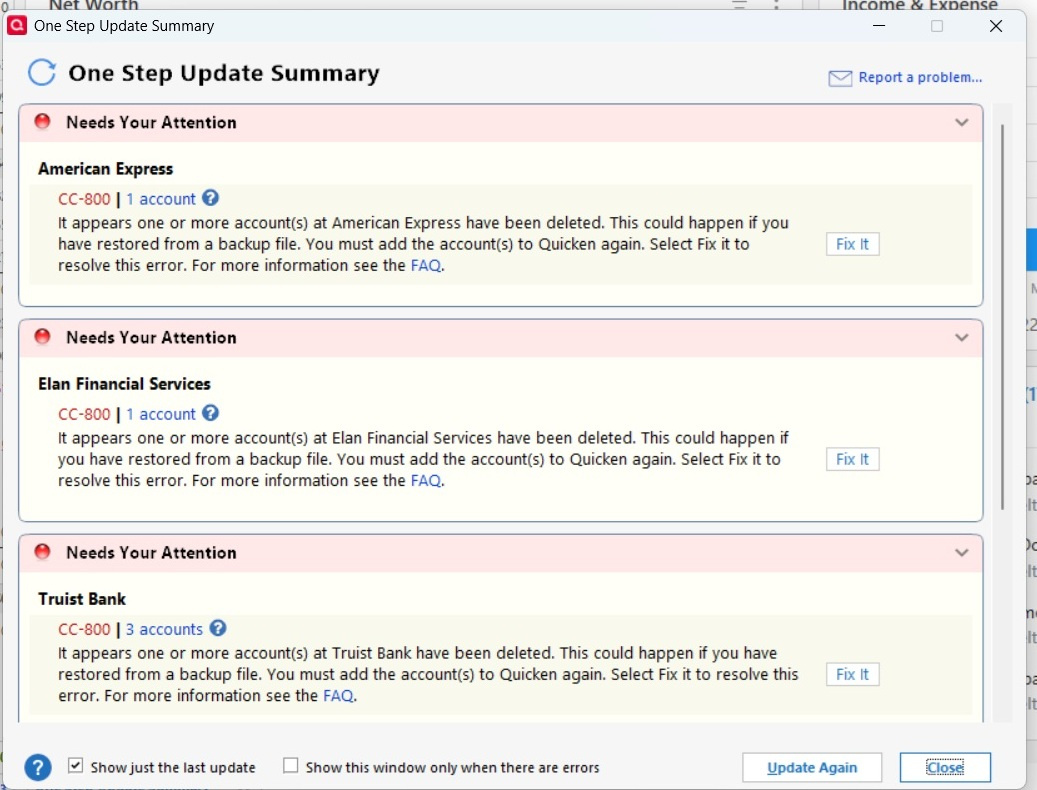
I had to roll back both PC and Laptop to 64.19 from 64.21 because of lockup issues while somehow missing the new Bills and Income changes. After this I went ahead and again transferred my db file to my laptop and ran OSU. I got similar error messages as I saw before.
 0
0 -
An additional note. When I used my PC again, the same error message appeared. I did not copy back the db file from my laptop. I had to reset all the accounts. Also, if there were any pending transactions in my checking account that show up in the account balance even though the transactions have not come across, the program makes an adjustment to match up my balance throwing everything off when those transactions clear. I have to make another adjustment to balance things out.
0 -
Thank you for the follow-up,
This issue is likely being caused by the change in device causing the financial institution to detect something different about the connection and require you to reconnect your accounts as a security measure.
If you want to investigate the issue further, it may be beneficial to reach out to Quicken Support directly when you're about to copy your Quicken file from one device to the next. That way, they'll be able to see the entire process and be able to better determine if this is normal behavior or not. The Quicken Support phone number can be found through this link here. Phone support is available from 5:00 am PT to 5:00 pm PT, Monday through Friday.
Thank you!
Quicken Kristina
Make sure to sign up for the email digest to see a round up of your top posts.
0

Categories
- All Categories
- 6 Product Ideas
- 34 Announcements
- 249 Alerts, Online Banking & Known Product Issues
- 19 Product Alerts
- 266 Welcome to the Community!
- 301 Before you Buy
- 1.5K Product Ideas
- 55.8K Quicken Classic for Windows
- 16.9K Quicken Classic for Mac
- 1K Quicken Mobile
- 834 Quicken on the Web
- 129 Quicken LifeHub