Direct Connect and EWC+ to two different accounts at the same Financial Institution

Historically in Windows (not tried in 64.19) I could only have one connection method to Wells Fargo. If one was/is Direct Connect, both must be. And I kept it that way to be able to pay bills through Wells Bill Pay Direct Connect. But could not add Wells Visa as an eBiller.
Now that I am also using Quicken 8.3.0 Mac and new version, was hoping that could be a different result there. I am VERY cautious in what I do not to lose Direct Connect for Checking or cause new issues.
I selected Change Connection for the Visa Card and got this:
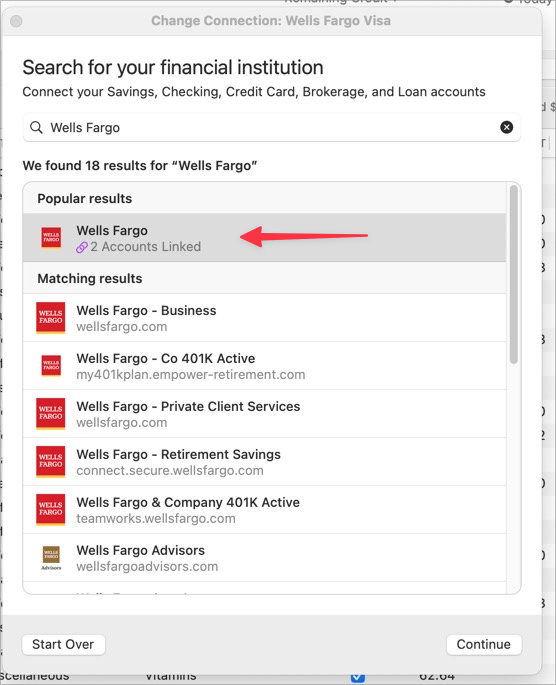
The fact it says "2 accounts linked" is telling me they are both direct connect now, which they are. But not clear if I change and "unlink" if I can have one DC and 1 EWC+.
Very tentatively clicked Continue:

At this point I stopped. I have low risk tolerance for losing DC in checking. I imagine if I continued it would find both Checking and Credit Card and perhaps check boxes for each to connect to Quicken. It might require I add both. It might not.
Then if I could and did select only Credit Card, it likely would have me "Link to Existing".
If that happened and now CC was EWC+ and Checking DC, would be fabulous. But I am afraid to try even with current backup.
Does anyone know what would happen and if I can yet get me desired result in Mac 8.3.0?
Appreciate your thoughts and experiences.
~Bob
Comments
-
OK, decided to try in a test system and appears it will not work. Seems all accounts at the same FI (at least as Wells Fargo is concerned) need to be the same connection method whether Quick Connect or Direct Connect.
Maybe one day that will change. Hopefully.
0 -
Hello @Bob.,
Thank you for sharing, though it's disappointing to hear that it will not let you have both Direct Connect and Quicken Connect (EWC+) with the same financial institution.
I've shared your feedback with our team!
Quicken Kristina
Make sure to sign up for the email digest to see a round up of your top posts.
0 -
In the Windows version, I hesitantly added back the Fidelity credit card to the Fidelity institution, which already had DC set up for the bulk of the Fidelity accounts. (Fidelity had broken the prior online setup for their Elan-managed credit card - could no longer log in to it using the Elan credentials.)
So to get the card downloads working again, had to go through the process of adding the account through the Fidelity institution, and selecting it alone from the list of accounts at Fidelity. EWC+ was the only option, but that was acceptable to me.
This worked - it left my existing DC to the other Fidelity accounts alone, and added EWC+ connection for the credit card.
Is this the kind of thing you are hoping is possible in QMac? Maybe it would work if you only selected one account at WF and not all of them? I wonder, why wouldn't that work - I'm working from memory here, but isn't it the institution that provides the list of accounts, each of which Quicken shows with a checkbox next to it, and the option to link it to an existing Quicken account?
0 -
Thanks for the reply @qudtp yes indeed. BUIt, I have tried that with BOTH mac and Windows and it seems Wells wants all accounts to be one method. Maybe the difference is that it is a Checking and CC rather than Investment and CC. I do not know.
I have not tried deleting the CC account and then adding back, just deactivating. I am overly cautious about not losing Wells Checking in DC where I pay all my bills.
BTW, I AM set the same for Fidelity with CC as EWC and Investments as DC, BUT the investments are the ZZZ while all this is being sorted out with Fidelity and Quicken. So it seems it can be done, just not with Wells. Might be time to try to add Wells fresh to a test account.
0 -
Good point - it's probably that at Fidelity, the DC is set up via the alternate zzz institution. While all the accounts are also offered via the new institution through EWC+, if you ignore those, it doesn't tamper with any other institution like the zzz one. So you're probably right, that it isn't possible to use 2 separate methods with one institution.
Doubtful Quicken would change this limitation, since DC is slowly phasing out.
0 -
Thank you for your replies,
It may be due to the account types, but it could also be due to using separate connection options.
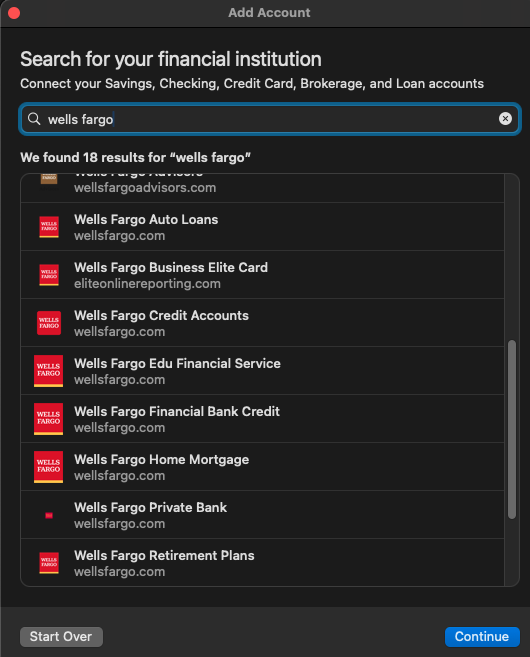
I notice there are quite a few different connection options for Wells Fargo. If you do decide to try in a test account, maybe see if using a different connection option for the credit card works.
Thank you!
Quicken Kristina
Make sure to sign up for the email digest to see a round up of your top posts.
0 -
Thanks Kristina. But they only appear under one of those and currently say "linked" 2 accounts.
I tried adding to a test account and it wanted me to start as if I never had any Wells connected to quicken. I forgot the name of the link I was asked to log into "frm" something? But I aborted. I have Direct for Checking working in both Win and Mac and although I could play with a number of things such as the Mac change connection, or deactivate and reactivate, I am just so paranoid about losing the DC for Checking to pay my bills.
Similar with Change Connection for CC in Mac. Gets to a point to select connection type but unclear if juts for CC or for ALL. In the past in Windows there was an actual error message that ALL accounts needed to be the same. May have changed.
If I had confidence a restore would make me whole again, I would play more.
0 -
OK, learned a lot in another thread on copies vs backups. Wells has been such a hassle aside from prompt bill paying with DC on my checking account/ You might recall the dupes and of course, not being able to add the CC as an online biller.
So today I decided to put the card in a drawer. Remove the card as a manual online biller. Hide the account in Quicken and open a new card. I thought the Apple card looked great. But then…
The New Biller does not have the Apple card as an online biller!! Nor is it under Goldman Sachs.
I just can't win.
0

