Quicken Apple App

I was wondering if I was the only one with an issue with the Quicken Apple app and the error message 'Connectivity Error: Swipe to Fix'. I reset the cloud as instructed by Quicken, and that does resolve the issue but only for one week. I don't feel like I should have to reset the cloud every week to fix the issue. Is there an actual fix to the issue out there? This has been an issue for me for over a year. When you swipe to fix, The message I receive is 'Account needs attention. We are unable to connect to M&T Bank at this time. Please Try Again Later.' The desktop version is connecting with the bank, so there doesn't appear to be any issues with connecting to the bank, so I'm not sure what is happening. Thank you!
Comments
-
Hello @JVelarde71,
We appreciate you bringing this to our attention.
Since you've already tried a normal cloud reset, next, I suggest manually resetting the cloud account instead.
To do this, first, save a backup (just in case). Sign out of the Quicken Mobile app. Then, follow the instructions provided below to remove the cloud account from your main data file (this does not affect your data saved with your file).
- Navigate to the Quicken dropdown menu
- Settings...
- Mobile, Sync & Alerts, and use the toggle button to turn Sync OFF
- Click Disable Sync
- Close Settings
- Open a different data file, or if you don't have a second data file to open, then create a temporary new data file (click here to view instructions under To create a new data file).
- Once you've opened a different data file, navigate back to Quicken
- Settings...
- Connected Services
- Click on See all cloud accounts
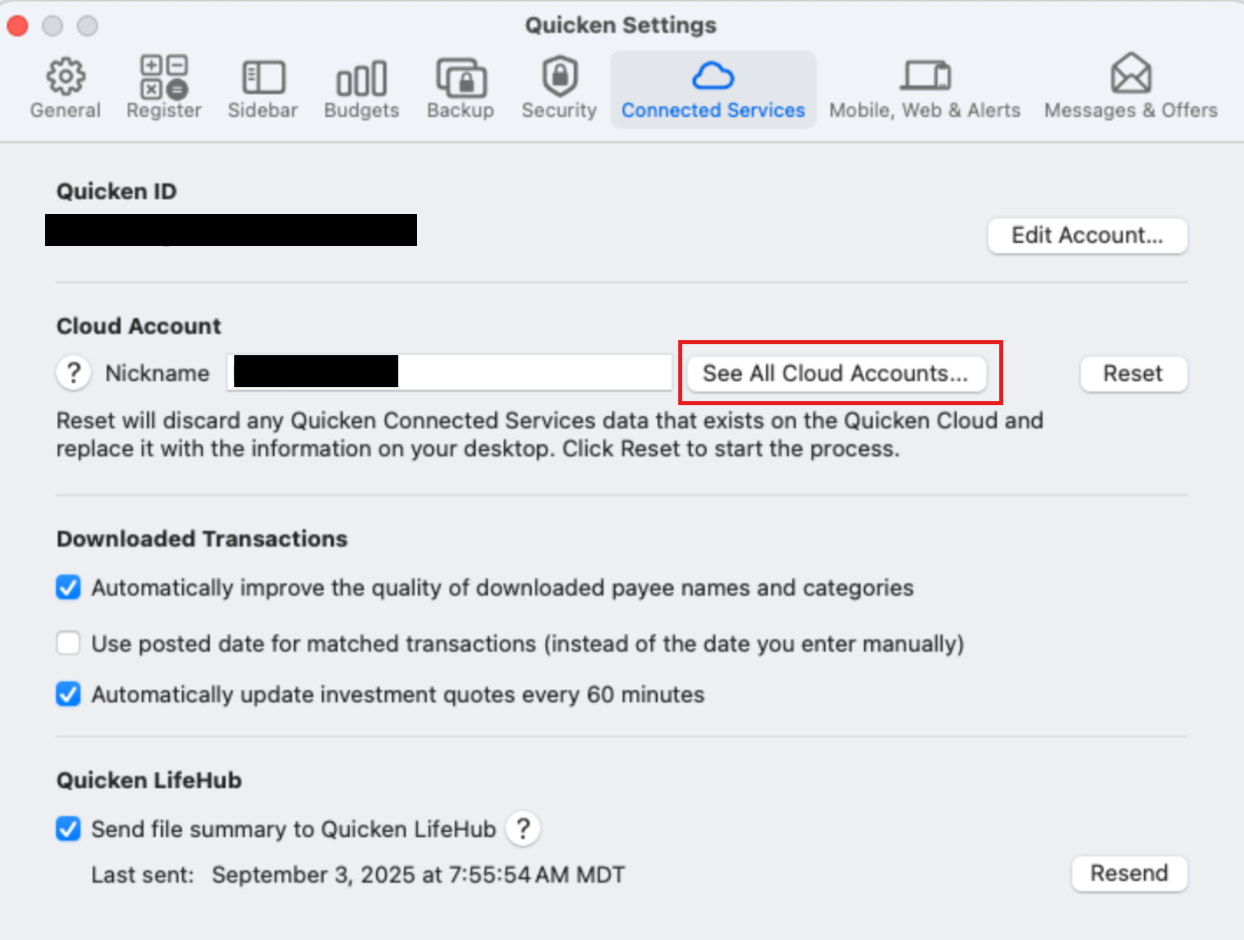
- Select the cloud account name from your original file
- Click the minus-sign (-) in the bottom left corner
- On the pop-up screen, click Delete Cloud Account
- Switch back to your original data file (click here to view instructions, scroll down to Switching between data files)
- Once you've returned to your original data file, navigate back to Quicken
- Settings...
- Mobile, Sync & Alerts and use the toggle button on the left to turn Sync ON
- Click Enable Sync
Once the sync completes, sign back in to check and see if this resolved the issue. You can then also delete the new file you previously created as well as its cloud account (if applicable).
Let us know how it goes!
-Quicken Anja
Make sure to sign up for the email digest to see a round up of your top posts.0
