Quicken experienced an issue and this biller was not deleted.

Since the last upgrade/change to the online billing service provider, all of my existing online bills have the same issue.
The biller listed in "Bills & Income" shows the Yellow Triangle and the action has "Fix it" as the option. When I go to "Fix It," I get the error "This biller account is no longer valid. Please delete and re-add the biller." When I pull down and select the option to "Delete Biller" I receive the error "Quicken experienced an issue and this biller was not deleted."
This is occurring for accounts from CapOne, Citi, Chase, Amex, and Verizon.
I have tried uninstalling Quicken, deleting hidden files, and reinstalling Quicken. That hasn't resolved the issue. This error has been going on for days.
Any solutions?
Comments
-
As an edit - I've tried the "Create a Copy" and re-add all of the online connections - direct connect and online billers. The direct connect adds to the Copy. But, the "Online Billers" won't re-add as Quicken shows the status of each as online billers as "already added" but they do not appear as online billers under "Bills & Income" - Online bills.
0 -
Have you tried the Review and Repair functions available under the gear icon in the Bills, Income & Transfers tab?
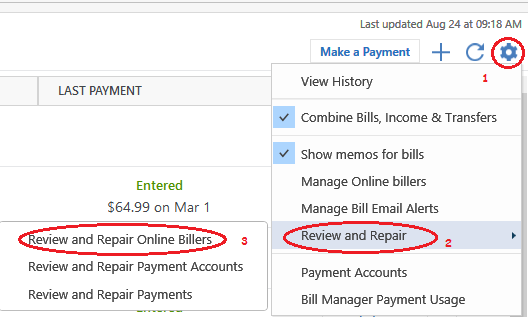
If that doesn't work or gives you error messages, please contact Quicken Support on the phone during posted hours of operation and request help. Let them do a screen share session with you to review the situation on your computer, to determine the nature of the problem and to figure out how to fix it.
0 -
I have two online billers that I can't delete. I tried to get help with Quicken Customer support but we didn't get anywhere.
I believe it is a problem with the latest version of Quicken. I used my old laptop with R63.21 and was able to delete both online billers. With my new laptop with Quicken version R64.23, I get an error message "Quicken experienced an issue and this biller was not deleted". The only thing that changed is the version of Quicken.
I tried that Review and Repair, tried logging out and logging back in.
0 -
This sort of makes sense. Before R64.19 Quicken is using the old bill system. And from what I gather the bill you can't delete is basically one that can't be changed to the new bill system because the new bill system doesn't support it. That would be why you could delete it in the old system, but not the new one.
Of course, that does make it a bug, since during this transition period should know how to delete the bills out of the old system.
0 -
Thanks Chris - yeah, makes sense. Quicken customer service is disappointing. They always want to validate and repair.
I will wait for the next Quicken software update to see if it fixes it.
0 -
I had the same unable to delete problem.
For me, (it sounds like you already did it but may want to suffer through it again with newest release)
File/Copy or Backup/Create a copy or template
That gives you a new datasetID which is where some of the Billers info is stored
Unfortunately, it requires you to reconnect all Financial Institutions.
When I did it, all my prior billers were gone and it worked as expected.
I would download and install Mondo Patch from below and then try the copy.
1 -
Doesn't the new updates include the Mondo Patch?
0 -
Yes, the automatic patch install should be the same as the current Mondo Patch.
Note R64.19 was where they introduced the new billing system, and R64.23 is a patch to fix some of the problems that the users have encountered.
This announcement has the release notes for both of them.
0 -
I wonder if the next update will fix this bug. I don't really use this feature but I don't like a corrupted datafile. I've been using Quicken for 30 years.
0 -
It's fixed with the newest software update. Thanks!
-1


