Transaction details over written after a download

I manually enter all the details from a receipt into Quicken. (Usually getting rid of the receipts afterwords) then say a few days later, I enter a few more and it will also include a new download of transactions.
I'll generally have at least 10 from Amazon and a few other stores that I frequent where there is already data. The new downloads will now show/include the details from past transactions. So basically, all the data has been over written, including prices, notes and categories and now my receipts are gone so I can't re-input the info.
this does not happen every time, but enough to be very annoying.
Is there a way I can keep past details from being inserted into a new transaction from the same vendor / store?
Thanks in advance.
Best Answers
-
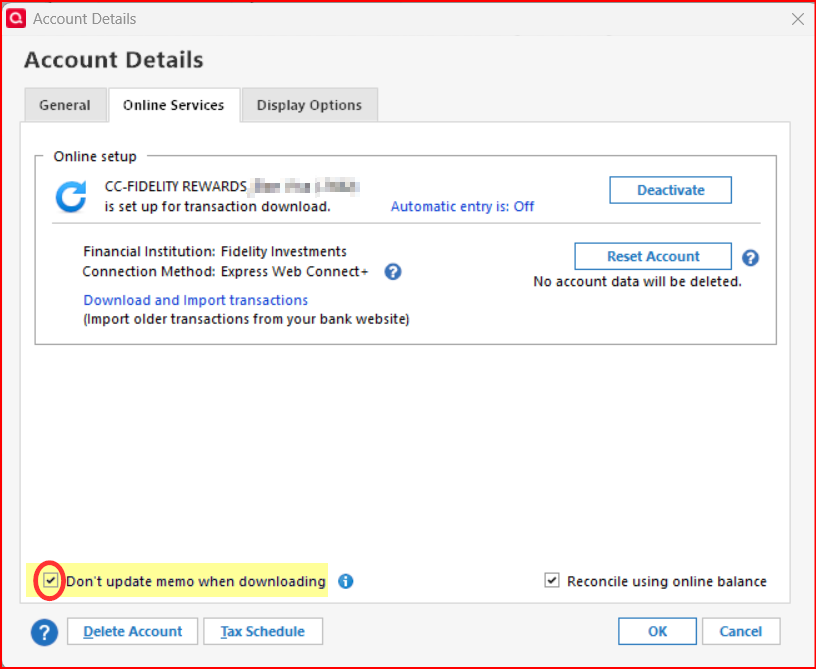
The only thing I can think of that might change a manually entered transaction is that the downloaded transaction might overwrite what was previously entered into the Memo field when the downloaded transaction is matched to the manually entered transaction. If this is what is happening, then you can prevent that by checking the box on the Online Services tab of Account Details for that account.
Quicken Classic Premier (US) Subscription: R66.23 on Windows 11 Home
2 -
Let me make sure I have this correct. You have manually entered a transaction, and then it is matched to a downloaded transaction, and then the category/memo are changed? And you don't touch the transaction after you have matched, and it is entered into the register?
In theory that shouldn't happen, with the only exception being that if you entered a blank memo and there is a memo in the downloaded information, then it would add that memo.
The fact that that it seems to repeat the same information I would certainly look at what you have for the memorized payees.
0


Answers
-
Are you entering this information as an Attachment, Transaction note, or the Memo area when you record the transaction?
0 -
The only thing I can think of that might change a manually entered transaction is that the downloaded transaction might overwrite what was previously entered into the Memo field when the downloaded transaction is matched to the manually entered transaction. If this is what is happening, then you can prevent that by checking the box on the Online Services tab of Account Details for that account.
Quicken Classic Premier (US) Subscription: R66.23 on Windows 11 Home
2 -
boatn — I'll take a look for that. may solve my issue. THX.
0 -
Seems it is only with my Credit Card. the import comes in then I match it to my receipt. I'll manually enter the category, nearly always use the "split" as there is tax on nearly everything… and I'll use the memo at the end for a quick visual. When this issue happens, it's always in the category and memo. Say I import 15 Amazon…. they will all say the same thing - like "Cat Food". SO when i see all the memos are the same, I know it's happened again. Amazons I can recreate as they are on line, but something like Lowe's or Home Depot, I'm hosed.
Thanks for replying.
0 -
Let me make sure I have this correct. You have manually entered a transaction, and then it is matched to a downloaded transaction, and then the category/memo are changed? And you don't touch the transaction after you have matched, and it is entered into the register?
In theory that shouldn't happen, with the only exception being that if you entered a blank memo and there is a memo in the downloaded information, then it would add that memo.
The fact that that it seems to repeat the same information I would certainly look at what you have for the memorized payees.
0 -
Are you automatically accepting downloaded transactions into your registers?
IMHO, this would explain why all your downloaded and newly created Amazon transactions are (mis-)categorized Cat Food … they're based on the first Amazon entry in the MPL or the most recently recorded older register transaction.For me, entering Amazon transactions manually BEFORE downloading transactions allows me to correctly create new register transactions with desired Memo text, categories and/or splits, as needed. I'm using MPL entries which match my needs.
After downloading transactions (I don't automatically accept them), I can select each downloaded transaction, match it to the correct already existing register transaction and be done with it. Repeat for other transactions and I'm done. Everything correct.0 -
@UKR whether automatically accepting downloaded transactions in the register or not shouldn't affect this.
You don't seem to understand how the automatically accepting downloading transactions mode works.
If you enter a transaction manually, and then download it, and it matches that transaction, it does exactly the same as if you were to do the same match and accept from the Downloaded Transactions tab.
It should merge the manually entered transaction and the downloaded one, keeping all the manually entered information.
In truth the Memorized Payee List shouldn't come into this as all. The reason I asked about the exact process used is because whereas if after the transaction is matched and, in the register, I could possibly see if the user started to change something in the transaction, especially the payee, it might pick up a memorized payee and change the transaction. But, barring that, it Quicken shouldn't be changing it.
@crwalejr Another question. Are you using Sync to Mobile/Web?
And it is important to understand exactly "when does it change".
0 -
I seem to recall that a few years ago manually entered Memo data started getting overwritten by the downloaded memo data causing a lot of issues for many users, myself included.
Not long after that started happening a new Quicken version was released adding that check box option to prevent downloaded memo data from overwriting manually entered memo data. For me it has worked flawlessly.
However, I don't think it has any impact on categories or other transaction data getting changed by the data in the downloaded transactions. And I don't think I've ever seen that happen before.
Quicken Classic Premier (US) Subscription: R66.23 on Windows 11 Home
1 -
Chris — I'd say I do a little of both. I'll manually enter and "entire" charge with all the details if it is "new" and not downloaded yet… but I'd say 90% or more are downloaded from my bank and I "tweak" the transaction with category and details/memo.
I've been using Quicken since the mid 90's and honestly do not use it to it's full abilities, just track our spending.
I do think the tip boatnmachanic gave me should solve my issue.
I appreciate all the answers I got, they all have been very helpful.
Terese.
0 -
@Chris_QPW No I don't use sync to mobile/web app. I tried using it but quit about a year ago. I had nothing but problems with it corrupting my data file. I tried working with Quicken for a while but they didn't seem to want to or were not motivated to solve the problem and I moved on. I would like to use it but only after Quicken works out their issues; if they ever do. I haven't checked recently, have they worked out the bugs? By the way, I think I remember you from back in the old days of Quicken. I've used Quicken since it was in DOS and was a beta tester for many years until Quicken went to their subscription model. I think I remember your username from my beta testing years. Although I'm 70 years old now and my memory isn't what it used to be.😁
0 -
@crwalejr A bit of a hint, if someone on here is asking if you are using Sync to Mobile/Web they are asking because it has been known to corrupt files and do strange things to downloaded transactions.
I don't think it will ever be declared as "safe" in the minds of the Quicken users answering questions. First off, no one answering questions (other than a Quicken employee) is going to use it in anything, but a test file. Second because it works in the background and basically can touch any part of the data file, there isn't any way to verify that it isn't doing something wrong.
Anyways, getting back to the original problem. If it is just the memo, then the option that @Boatnmaniac gave should work fine. I have had it on in some accounts and I know that it strips off the downloaded memo every time. I don't put in memos myself, but it sounds like it works for that too.
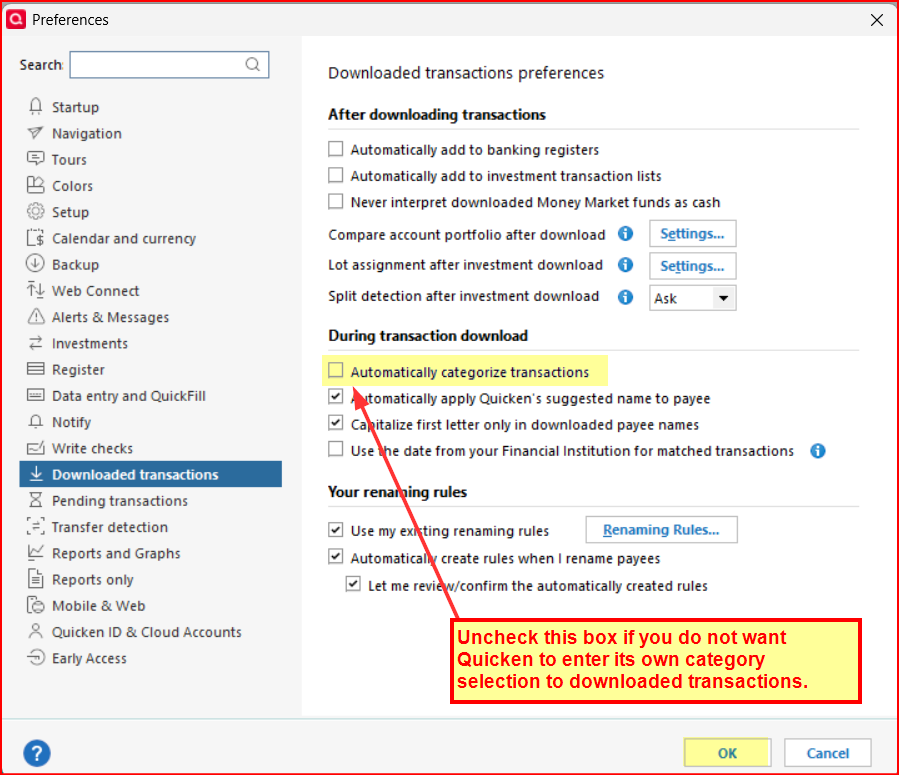
In reality if Quicken matches a transaction it should leave your information alone. If it doesn't then that is certainly a bug that should be reported. But do make sure that it is doing the matching, because if it isn't a match then of course it goes down a completely different patch that depends on your memorized payee list and if you have selected for Quicken to automatically categorized the transaction if you don't have a memorized payee that matches.
0 -
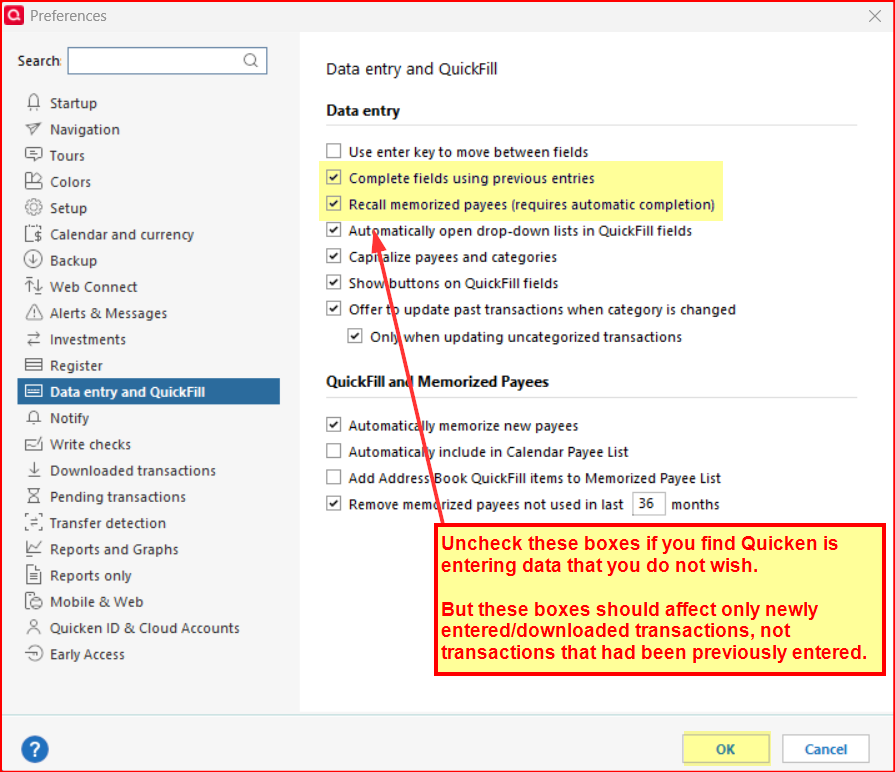
@tcs - A few other things you might want to look into if the issue you describe still exists after checking that box for not updating the Memo when downloading still exists.
Take a look at your Preference settings. Here are a couple of suggestions that can be tried out if the issue persists.
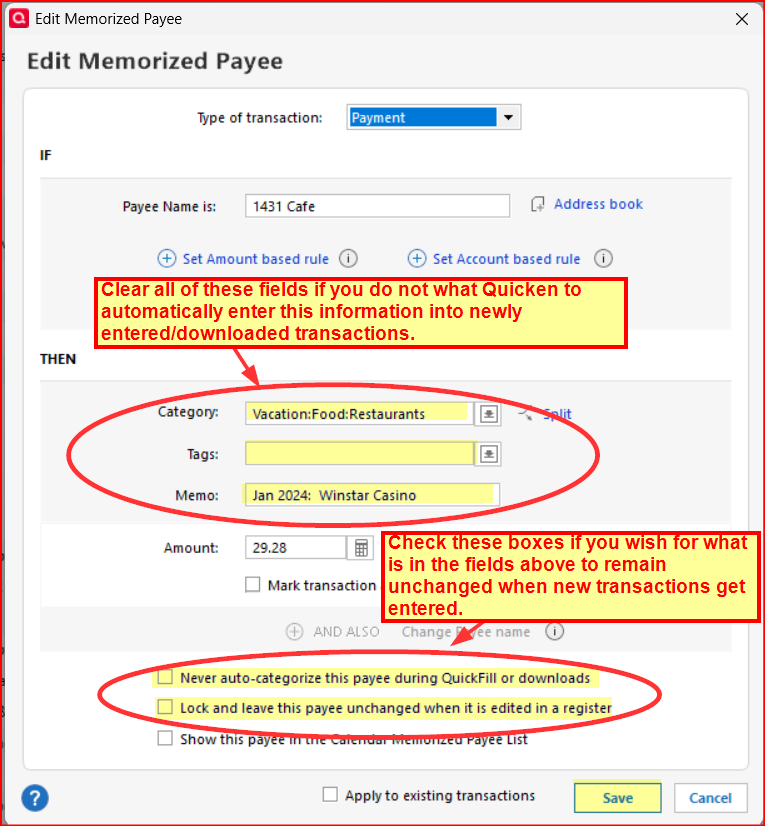
In addition, check your Memorized Payees List. Find the Payee in question and double click on it to get the Edit Memorized Payee popup. Making the changes suggested in the picture below can be quite helpful in preventing Quicken from populating transaction fields in ways that you do not want.
- Or, if you always want Quicken to apply a specific category or memo to that Payee, then enter that information here and be sure to uncheck the box for "Never auto-categorize this payee…" and check the box for "Lock and leave this payee unchanged…"
- I don't recall the box for "Apply to existing transactions" being present before. Maybe it was but I just didn't notice it. Anyway, Quicken Help says: "If the memorized payee was used in past transactions, Quicken may ask whether you want to apply the updated rule to existing entries. You can review the transactions before confirming the change." I think I like this feature.
- The look and layout of the Memorized Payee List and the Edit Memorized Payee popup changed a bit with R64.19. It threw me off a bit when I first saw it but the functionality of it remained intact.).
Quicken Classic Premier (US) Subscription: R66.23 on Windows 11 Home
0 -
A couple of notes that I have observed from @Boatnmaniac 's post.
The first is sort of "quirky".
The deselecting of "Complete fields using previous entries" and "Recall memorized payees…" only affects manual entry. If you have a matching memorized payee to a downloaded transaction, it will used the information no matter what these are set to. But note that a match to an existing manual entry, including a reminder has higher priority.
The second thing is that the "Apply to existing …" has been around for maybe 6 months to a year if I remember correctly. It looks like this:
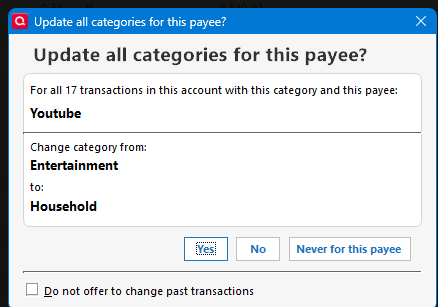
Note that I deselected the "Only when updating uncategorized transactions" because all of my transactions are already categorized.
2 -
Chris — I do not use the sync thing… your post was also very helpful.
So far so good, but I will use all the info/help given and dig deeper into Quicken.
Terese
0 -
No, Just using the categories and Memo. Most get imported and I just manually categorize and add memos.
0 -
This week, I've completed 3 imports and have had zero over-writes.
Want to thank everyone for their tips.
Issue solved.
Terese
1 -
This week, I've completed 3 imports and have had zero over-writes.
Want to thank everyone for their tips.
Issue solved.
Terese
0 -
That is good to hear. Which of the suggestions listed above did you implement? It might be helpful to other who are encountering the same issue you had.
Quicken Classic Premier (US) Subscription: R66.23 on Windows 11 Home
0