Split transaction appear in both Category (as they should) and Tag (which they should not) columns

All split transactions are displayed in TAG column automatically and cannot be removed.
Answers
-
Please elaborate upon what you're seeing and what you expected. Graphics (JPG or PNG format, please) appreciated.
Because, if the transaction is split, both the category and tag fields PROPERLY appear in the split line. I have several transactions, my mortgage being the most prominent, where the same category;transfer (to my Escrow account) has differing tags since my escrow covers both Insurance and Real Estate tax.
Q user since February, 1990. DOS Version 4
Now running Quicken Windows Subscription, Business & Personal
Retired "Certified Information Systems Auditor" & Bank Audit VP0 -
Is this what you're seeing in your register?
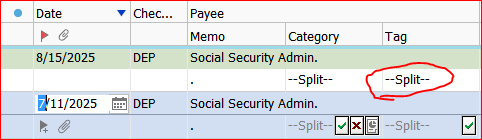
"—Split—" is just an indicator that split categories and/or tags are defined for this transaction.
To see what actually is defined for each split you need to bring up the Split Transaction Detail view. Hover the mouse pointer over the word "—Split—" for a popup view or select the transaction and click the green checkmark button.When Splits are defined for a transaction, you cannot remove the word "—Split—" itself.
However, if you are not using Tags at all, you can remove the Tag column from the register view.
0


Categories
- All Categories
- 6 Product Ideas
- 34 Announcements
- 249 Alerts, Online Banking & Known Product Issues
- 19 Product Alerts
- 266 Welcome to the Community!
- 301 Before you Buy
- 1.5K Product Ideas
- 55.8K Quicken Classic for Windows
- 16.9K Quicken Classic for Mac
- 1K Quicken Mobile
- 834 Quicken on the Web
- 129 Quicken LifeHub