USAA credit card not showing after authentication

I've been downloading to this same credit card for years and suddenly it has stopped downloading. I've tried deactivating and reactivating, have deleted the online setup, and now Quicken won't even recognize that the account exists at USAA. Anyone else having this problem? Has anyone found a resolution?
Comments
-
Hello @snowmp,
Thank you for letting us know you're seeing this issue. To help troubleshoot, please provide more information. Are you seeing any error messages/codes? If not, then what is happening when you try to reconnect with USAA? At what point in the process are you getting stuck?
I look forward to your reply!
Quicken Kristina
Make sure to sign up for the email digest to see a round up of your top posts.
0 -
Not getting stuck. No error messages or codes. Quicken sends me to the USAA site, I log in, authorize Quicken (USAA sends me an email telling me I've authorized Quicken), and then go back to Quicken where it finds only the accounts I already have connected, a checking account and a savings account: the credit card account never shows up in the list of accounts to be added or linked.
0 -
Thank you for your reply,
Is the credit card under the same userID and password as your other accounts with USAA? Are you the primary cardholder? Has the credit card had any transactions post within the last 60 days?
I look forward to your response!
Quicken Kristina
Make sure to sign up for the email digest to see a round up of your top posts.
0 -
Same userID and password as my USAA checking and savings accounts. I'm the primary cardholder. The credit card has had several transactions posted in the last couple weeks, which I am now entering by hand. Thanks for your help!
0 -
Thank you for your reply,
Please try deauthorizing your USAA accounts through USAA's website.
Then, in Quicken, backup your file, deactivate your USAA accounts, then navigate to Tools>Add Account, and follow the prompts to reconnect your accounts. On the Add/Link screen, please make sure to carefully link your accounts to the correct nickname in Quicken.
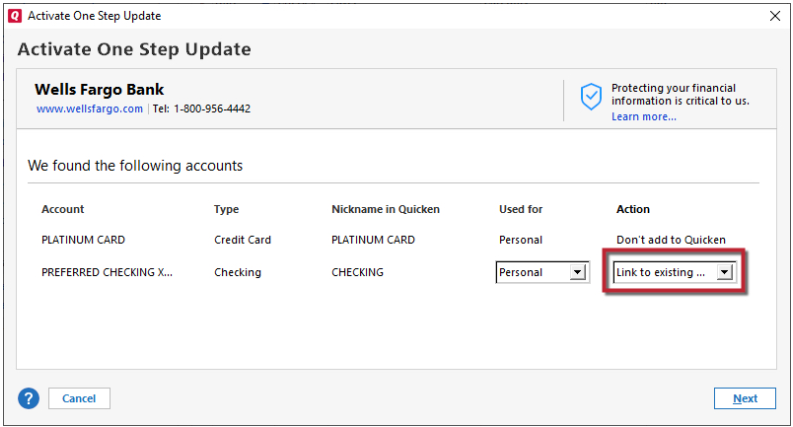
If the issue is being caused by an issue with the authentication token issued by USAA, that process should correct it.
Thank you!
Quicken Kristina
Make sure to sign up for the email digest to see a round up of your top posts.
0 -
Done. Only the checking and savings account show up in the Add Account dialog box during the last step.
0 -
Thank you for your reply,
To narrow down if this is a file specific issue or a connection-related issue, I suggest creating a test file and adding these accounts to see if the same issue occurs with transactions not downloading. It is recommended to save a backup before proceeding with troubleshooting steps in the event that you would like to return to your original starting position. Below are instructions on how to create a test file:
- Choose File menu > New Quicken File.

- Select New Quicken File

- Click OK
- In the File name field, enter the name of the new file, then click Save. Use a name like "Test File" to tell it apart from your main file. Avoid using any of these characters: * ? < > | " : \ / (asterisk, question mark, left and right-angle bracket, pipe, straight quotation marks, colon, BACKSLASH, FORWARD SLASH). Also, don't add the .qdf extension; Quicken does that for you.

- Select to not use Mobile.

- Click Add Account to start adding accounts to the new file.

After adding accounts, see if you are experiencing the same problems in this test file.
Once you are done in the test file, because having USAA accounts connected in multiple Quicken files can cause issues, please deactivate the accounts in the test file, then switch back to your main file by following the directions in this article (How to alternate between multiple files section).
Please let me know what happens in the test file!
Quicken Kristina
Make sure to sign up for the email digest to see a round up of your top posts.
0 - Choose File menu > New Quicken File.
-
Same issue in the test file: checking and savings account appear as available to add, credit card does not.
0 -
Thank you for your reply,
Since the same issue is happening in the test file, we now know this is a connection issue and that you are most likely being impacted by this known issue:
Based on the information in the alert, I recommend that you contact USAA for further assistance!
I apologize that I could not do more to help!
Quicken Kristina
Make sure to sign up for the email digest to see a round up of your top posts.
0 -
Thanks for your help! USAA, bless their hearts, had apparently put a fraud block on the account without notifying me. I had to call in to find out it existed. As soon as they cleared the block, I was able link the account in Quicken. 9_9
1 -
Thank you for the follow-up,
I'm glad to hear that USAA was able to resolve the issue!
If you need further assistance, please feel free to reach out!
Quicken Kristina
Make sure to sign up for the email digest to see a round up of your top posts.
0 -
I tried this procedure with a new quicken file and it worked for all USAA accounts. It does not work with my regular quicken file, however. Maybe is an issue with my quicken file.
0
