R64.23 Bill & Income / Bills - long Hour Glass on every action

This is unusable - everything I do like Enter a payment, or update a biller, or link / unlink to reminders, takes forever with a spinning hourglass. I'm at the point where I think it would be best to go back to MANUAL Bills with just reminders as this "Online Bill" feature is now BROKEN and frustrating.
I have tried all the Bill Repair options, file Validation, and Super Validation as mentioned in another post and nothing has helped.
I hope ya'll are working on a fix for this.
Comments
-
Hello @bullmoon,
Thank you for providing details about the issue. I completely understand how frustrating it can be when every action in Bills & Income triggers a long hourglass and slows your workflow.
Before we explore further troubleshooting steps, could you please confirm:
- Where your Quicken data file is stored—on your local hard drive (C:) or a cloud-based/external drive (e.g., OneDrive, DropBox, USB, etc.)?
- When this issue first started occurring?
- Were there any recent changes to your system or software before the problem began (updates, new installations, etc.)?
In addition, Quicken has a Performance Troubleshooting guide that covers several steps to improve speed and responsiveness, which can be found in this support article and could help in your situation.
Once you’ve reviewed and tried these steps, let us know if the slowness persists. We can then look at other potential causes or solutions.
Thank you!
-Quicken Anja
Make sure to sign up for the email digest to see a round up of your top posts.0 -
- The Quicken File is on my C: drive where it has been for years
- The issue started with the updated new Billing - a week or so ago as best I can tell
- The only thing that is significant is the Quicken Updates and normal Windows updates.
I think Manual Bills work OK. It is only the ones I set up for online, Linked to a Biller, that have problems and possibly gets worse after I Link them to an existing Reminder or new Reminder - I'd have to unlink one to test to see if that helps.
So this is not normal or a known bug?
Thanks
0 -
@bullmoon Thank you for the additional details. From what you’ve described, this is not currently considered a known bug—it’s something we’ll need to troubleshoot further to narrow down the cause.
You mentioned trying validation and super validation, however, please confirm if you had the chance to go through the steps in the Performance Troubleshooting support article I linked previously. Could you please review and try those first? They address many of the common causes of any program slowness.
If the steps in that article don’t resolve the issue, the next thing I’d recommend is doing a clean reinstall of Quicken. Please refer to the following support articles for instructions:
Note: After you uninstall and before reinstalling, open Windows File Explorer and navigate to This PC > C: Drive > Program Files (x86) and delete the folder titled "Quicken" (this will not affect your data files).
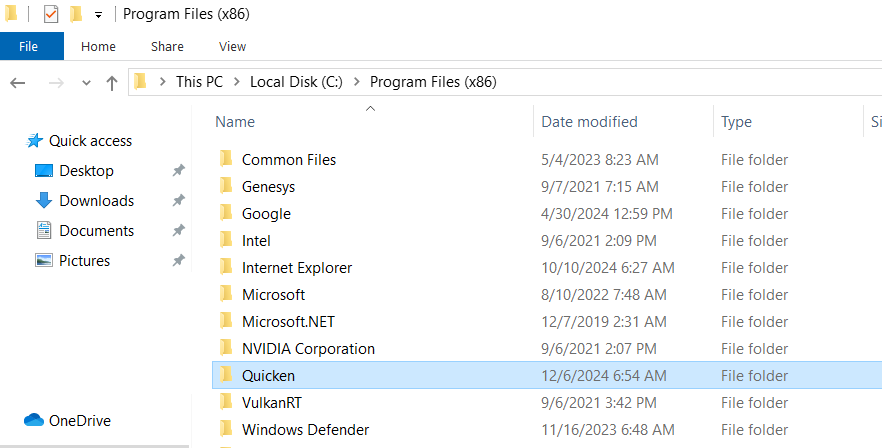
Then go ahead with the reinstall.
Let us know how it goes after trying these steps. If the problem persists, we can continue investigating.
Thank you!
-Quicken Anja
Make sure to sign up for the email digest to see a round up of your top posts.0 -
I also got the long hourglass, and the program froze. I had to forcefully close the program through task manager, and it corrupted the file. It made my data file to look like the 1995 quicken version. I was fortunate that I had backups to copy over the current corrupted file. Looks like trying to download bills is a mine field that will frustrate and probably corrupt your file.
33yr + user
0 -
Hello @jyg911,
Thank you for sharing your experience. I understand how alarming it can be when Quicken freezes and a file appears corrupted—it’s good to hear that you had backups available and were able to restore your data safely.
If you continue to see issues with the long hourglass or slow performance when downloading bills after restoring the backup, please follow the Performance Troubleshooting steps and, if needed, a clean reinstall of Quicken as outlined earlier in this thread. These steps often help prevent file corruption and improve responsiveness.
Thanks again for sharing your experience!
-Quicken Anja
Make sure to sign up for the email digest to see a round up of your top posts.0
