Principal Financial Services 401(k) duplicate cash and investment balance

I am using Quicken Classic for Mac, Version 8.3.1 (Build 803.58866.100)
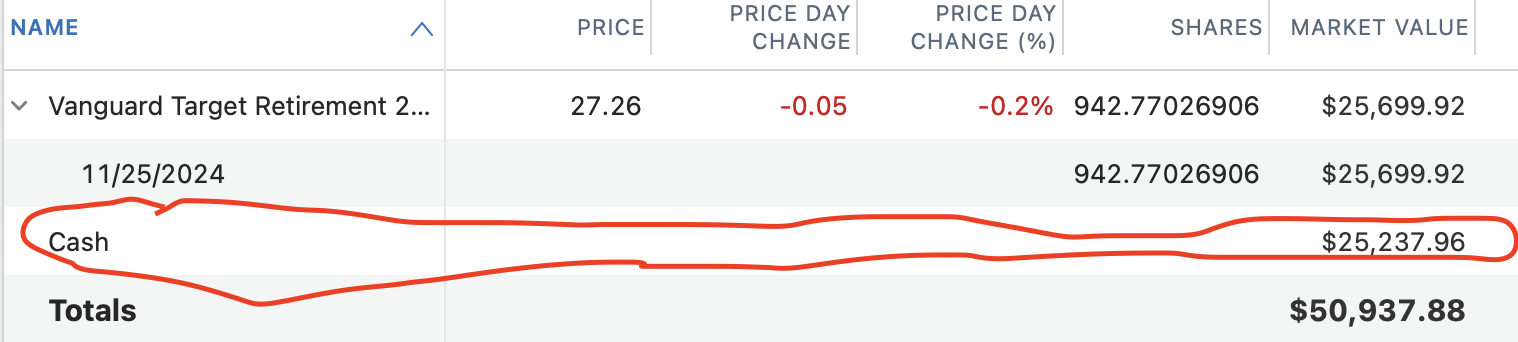
I have a Principal Financial Services 401k balance from a previous employer. I've added a new account and connected it so that I can track it. There are two lines under the investment with one showing the appropriate shares held and it value and a cash line with the same value as the investment. The program is showing this cash value as a duplicate value and incorrectly shows the value of this investment as twice what it should be. Is there a way to resolve this or different way to setup the account? I've seen similar posts but the resolutions described do not seem to apply to my situation. Thank you.
Comments
-
Hello @Delaney,
Thank you for letting us know you're seeing this issue. To help troubleshoot the issue, please provide more information. What kind of holding is in the account (Money Market, bonds, CDs, stocks, etc.)? Are you able to access the Transactions tab for that investment account, or is it greyed out? If you can access the transactions tab, then you should be able to edit or delete the appropriate transaction to correct the issue.
I look forward to your reply!
Quicken Kristina
Make sure to sign up for the email digest to see a round up of your top posts.
0 -
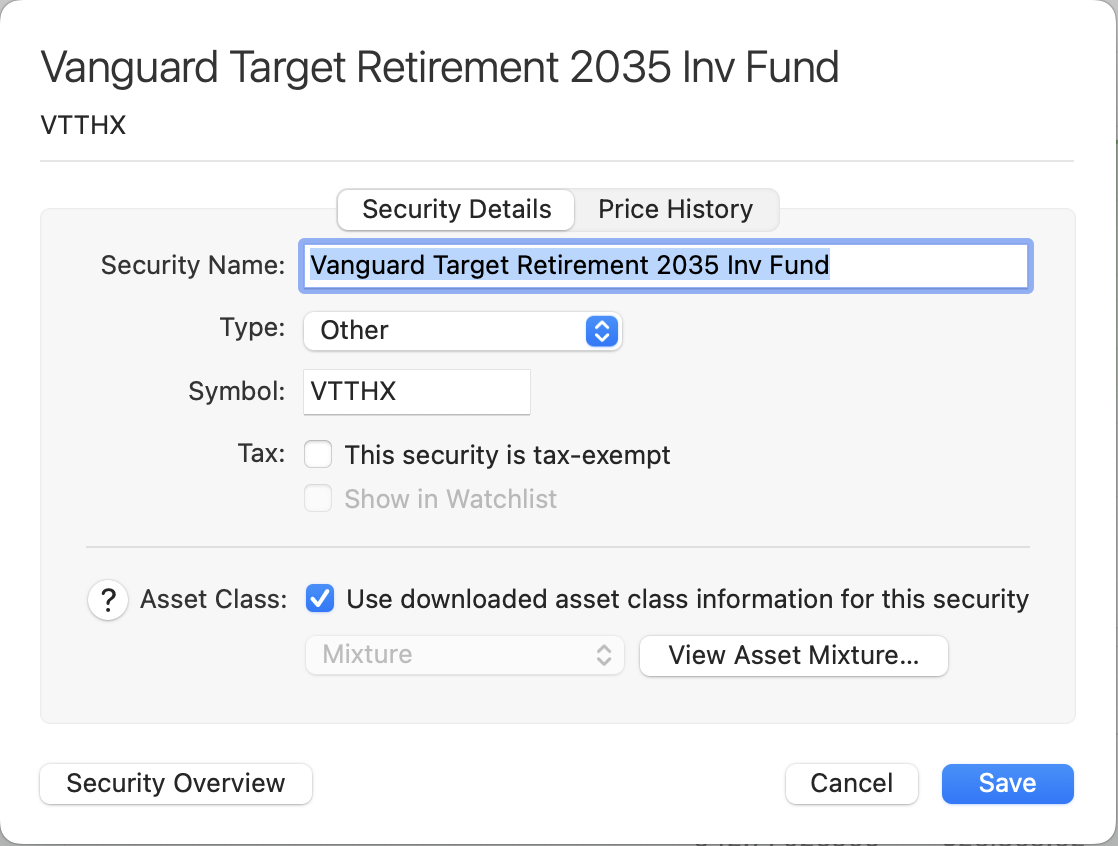
Hello and thank you, the type is listed as other and the transaction tab is greyed out. Perhaps I should change the type to mutual fund or something besides other. Thank you.
 0
0 -
Thank you for your reply,
Since the transactions tab is greyed out, that indicates that the account is using Simple investment tracking. I recommend that you check to see if you have the option to switch to Detailed tracking, since that would give you the ability to view transactions.
To do that, please click on the account to select it, then navigate to Accounts>Settings…. On the Details tab in the Account Settings window that comes up, look to see if there's an option to change to Detailed tracking.
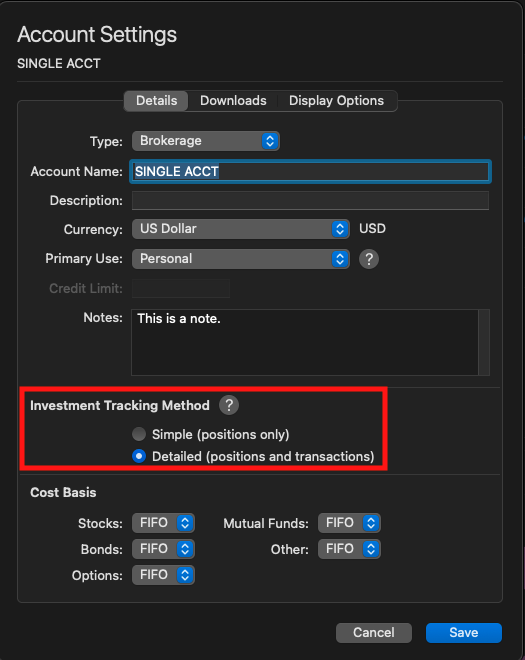
If there is an option to switch, please do so, then check for any transactions that would be causing this double counting.
If you do not have the option, please let me know.
I hope this helps!
Quicken Kristina
Make sure to sign up for the email digest to see a round up of your top posts.
0 -
Hello and thanks again! I was able to change to detailed tracking with a warning that the account would be disconnected. I did so and am now able to see transactions. There are no transaction doubling the value of the fund. The cash line remains seeming without a way to adjust it and the fund remains incorrect in Quicken Classic showing twice what is actually there. Thank you again.
0 -
Thank you for your reply,
Since the issue persists in detailed tracking and there's not obvious incorrect transaction to edit/delete to correct the issue, I recommend that you contact Quicken Support directly for further assistance, since they have access to tools we cannot access on the Community and they can escalate the issue as needed. The Quicken Support phone number can be found through this link here. Phone support is available from 5:00 am PT to 5:00 pm PT, Monday through Friday.
I apologize that I could not be of more assistance!
Quicken Kristina
Make sure to sign up for the email digest to see a round up of your top posts.
0 -
I have the same Issue.
0 -
Hello @redvw,
Thank you for letting us know you're seeing the same problem. If you followed the troubleshooting from earlier in the discussion and the issue is persisting, I recommend that you contact Quicken Support directly for further assistance, since they have access to tools we cannot access on the Community and they can escalate the issue as needed. The Quicken Support phone number can be found through this link here. Phone support is available from 5:00 am PT to 5:00 pm PT, Monday through Friday.
I apologize that I could not be of more assistance!
Quicken Kristina
Make sure to sign up for the email digest to see a round up of your top posts.
1
