Quicken is not matching transfers between bank accounts

I am trying to do some cleanup on some of my accounts where transactions have a category of the account they are in. Some credit card payments in my checking account have a category of the checking account name instead of the credit card account name. If I change the category, Quicken detects the matching transaction in the credit card account. I also have several transfers between bank accounts (such as from a savings account to the account we use for online purchases) and Quicken downloads each transfer, but in the savings account the category name is the savings account and in the checking account it is the checking account. If I try to update one, it does not find the matching transfer and instead creates a new transaction in the other account.
As an example suppose there is a 100.00 transfer from Savings to Checking. Savings will have a category of [Savings] and Checking will have a category of [Checking]. If I go to the transaction in the checking account and change the category to [Savings] I end up with 2 100.00 transfers in the Savings account. One was downloaded, the other was created by Quicken when I updated the transaction in the Checking account. If it matters these are older, reconciled transactions. I don't know if reconciled vs cleared status affects this.
I have the preferences set to match transactions, though I have to confirm the matches.
Is there a way to get Quicken to recognize this? As mentioned this seems to work with Credit card accounts.
Always the latest version
Comments
-
Are you trying to use manual matching?
If I remember correctly, the few times, I’ve tried that quicken just messes that up.
Automatic matching of transactions and transfers only happens during the downloading and accepting into the register.So, you’re starting with two transactions, one in your checking account and one in the credit card account.
Whenever you manually enter a transaction and have the category as a transfer account, that creates the a linked one to the other account.Which means that you get a duplicate transaction in your credit card account, but this one is the one linked to the checking account. You would want to delete the old one that isn’t linked to the checking account.
0 -
I am using automatic matching and have it set so that Quicken asks me, but Quicken doesn't seem to match transfers between accounts, or at least not all of them. So with the scenario of transferring 100.00 from SavingsA to CheckingB you get a transaction in SavingsA with the 100.00 transferred out, and the category of [SavingsA] and another transaction in CheckingB with the 100.00 transferred in and a category of [CheckingB]. If I change the category manually Quicken doesn't find the match in the other account.
For a few of them, I change the category, which creates a duplicate in the other account. I then go to that account, delete the old one, and mark the new one as reconciled. I was hoping there is a better way.
Quicken for Windows Premiere
Always the latest version0 -
The first thing to understand about transfer matching is Quicken is guessing. There isn't in the downloaded data that tells Quicken it is a transfer, let alone that two transactions are connected. All it is doing as looking for a matching amount (with the opposite sign) in two downloaded transactions in two different accounts. And note this matching only happens when downloading of the "second part" of the transfer.
In other words, say you download a withdraw for $100, but the deposit has yet to come down. There isn't anything for Quicken to match yet. So, the "category" is "unknown" at this point. The best process would be to change the category to [Other Account] at this point, which will create a linked transfer to the other account, and when the matching transaction is downloaded Quicken will match it. Not with "Transfer matching", but with normal matching of downloaded transactions to existing transactions in the register.
Now say both the withdraw and the deposit get downloaded at the same time. The transfer matching should kick in when the second one is accepted into the register. Note that with the setting Edit → Preferences → Downloaded transactions → Automatically add to banking registers, this happens right after downloading. If this option is off, it isn't going to happen until after the second transaction is accepted into the register from the Downloaded Transactions tab. And since the user should have already fixed up category/[Other account] in first account, then the transfer matching should never happen with not using automatic adding to account.
Now for the pitfalls. Since this is just a guess, if you have multiple $100 transfers it can match the wrong transactions.
Also, a recent bug is sometimes setting the "transfer account" to the same one it is in (this is actually a balance adjustment transaction). I haven't seen this bug in a while, but I'm not sure if that is because they have fixed it, or if I just have changed the way I do things. Note if you have memorized payee for this transfer, it might be that you have your memorized payee setup wrong, and it is causing this problem (see below for my process on this).
Unfortunately, when this problem happens there isn't an "easy fix". It does involve changing the category in one and deleting a duplicate transaction in the other registers.
With said here are some ideas to prevent the problem in the future.
- Pre-enter transfers, so that the "existing transaction matching" is used instead of transfer matching. Note this could be a reminder. (The problem I have with this approach for credit card payment reminders is just knowing what the right amount is. Quicken estimates aren't going to be accurate. If you link to an online bill that would pick up the min or statement balance, which might be accurate, but for the statement balance that will not include any returns after the statement close and can be wrong). Note though, reminders are also used for budgets and for the projected balances, so if you have that need, this might be the best option.
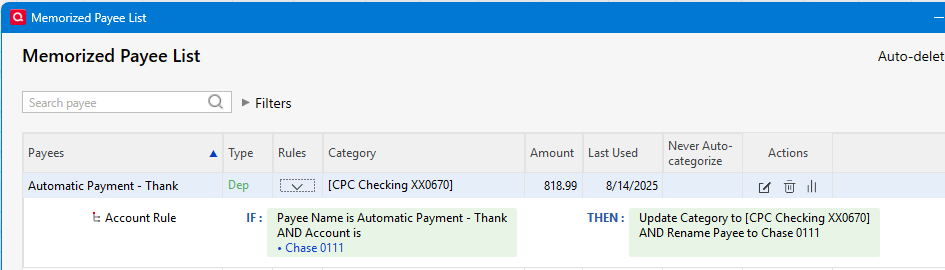
- Up until recently (and the reason I switched practices) memorized payees couldn't be used for this purpose because all memorized payees were global. Say you setup a memorized payee with the idea that it would be a transfer from your checking account to your credit card account. You set it the reminder in the credit card account with a category of [checking account]. And the payee is the same in both accounts. Well, if both transactions download at the same time, you don't know which Quicken is going to process first. If Quicken sees the payee in the checking account, it would in fact use [checking account] for the category because that is what the memorized payee says to do. Recently though they added the ability to restrict a memorized payee to a given account (see the memorized payee list for changing this). This has been my approach for a while, and it has been working pretty well.
- Switch to not using the automatic add to register preference so that you can catch this and change the category in the first part/transaction of the transfer while accepting the transfer into the register. The drawback to this is now you will have to enter transactions one at a time into the register (Don't use Accept All, you will be back to blindly accepting what Quicken guesses at)
As you can see above, they are basically avoiding transfer detection. I do use transfer detection for transfers that are "irregular" and are at the same financial institution so that they will both be in the same download. But if you do frequent transfers for the same amount, it might mess up.
Here is an example of one of my transfer memorized payees.
 0
0 -
Thanks. I will look at those approaches. The larger problem is less the credit card matches than it is the transfers between accounts. I have several that are recurring transfers as I have accounts to do my own escrow for property tax, insurance, etc. It is how we budget for that.
The rule idea is interesting. I will also look at that.
Quicken for Windows Premiere
Always the latest version0 -
If you have existing scheduled reminders for transfers, make sure these reminders are correctly categorized and recorded into your register on or before the Due Date and BEFORE you download transactions containing the transfer confirmations. This will allow Quicken to match the downloaded confirmation to the already existing register transaction and not create bad transfers.
1 -
What works "best" is usually dependent on the actual transfer.
For "repeating" transfers, nothing is better than setting up a reminder that gets that transfer put into the register before the downloaded transaction will show up. The key here is that this is a fixed amount.
When you have transfers where the amount isn't known in advanced that is where it gets tricky.
A prime example of this is a credit card payment. And I will say that I have not found a perfect solution to this. But this might apply to other payments where you don't know the amount until a statement comes in.
First let's start with the "in between one". Which may or may not apply to your credit card payment. One approach that I used before Quicken added the filtering of memorized payees by account is to setup a reminder with some kind of approximation of the amount, and then when the statement comes in change the next instance to the right amount. This allows some prediction in the budget and projected balance. You can also, link a payment to an online bill for this (I don't like this because I have had problems with the bill presentment system, but it might be something that works for you)
Now on my credit card payments, they are seldom the amount on the statement. The reason are returns. If you have a return between the statement date and the payment date, that amount will be removed from what you have to pay (but purchases will not be added to the statement balance). So, basically, I don't know what the payment will be until it actually done on the payment date.
This is where the memorized payee with account filtering comes in. This allows me to not put in a reminder that I will have to update and match to the downloaded transaction. But it does mean I don't have a reminder for this payment and as such my budget and projected balances lose this prediction ability. I suppose I could put in a reminder with an approximation and then just do skip on that reminder every time it comes in. But I don't use the budget, and I have a policy of having plenty in my checking account to cover what comes in, so I just don't need it.
1


Categories
- All Categories
- 6 Product Ideas
- 34 Announcements
- 249 Alerts, Online Banking & Known Product Issues
- 19 Product Alerts
- 266 Welcome to the Community!
- 301 Before you Buy
- 1.5K Product Ideas
- 55.8K Quicken Classic for Windows
- 16.9K Quicken Classic for Mac
- 1K Quicken Mobile
- 834 Quicken on the Web
- 129 Quicken LifeHub