Fidelity EWC+ conversion - which account for core MMF selection pop-up?

The pop-up requesting selection of core MMF does not state for which account the selection is. It is impossible to know of the correct selection was made. Furthermore, there is no ability to change the selection to just cash. Please make the pop-up user-friendly to be able to know to which Fidelity account it refers.
Deluxe R66.23, Windows 11 Pro
Answers
-
Hello @leishirsute,
Thank you for sharing your feedback. I forwarded it internally to my team.
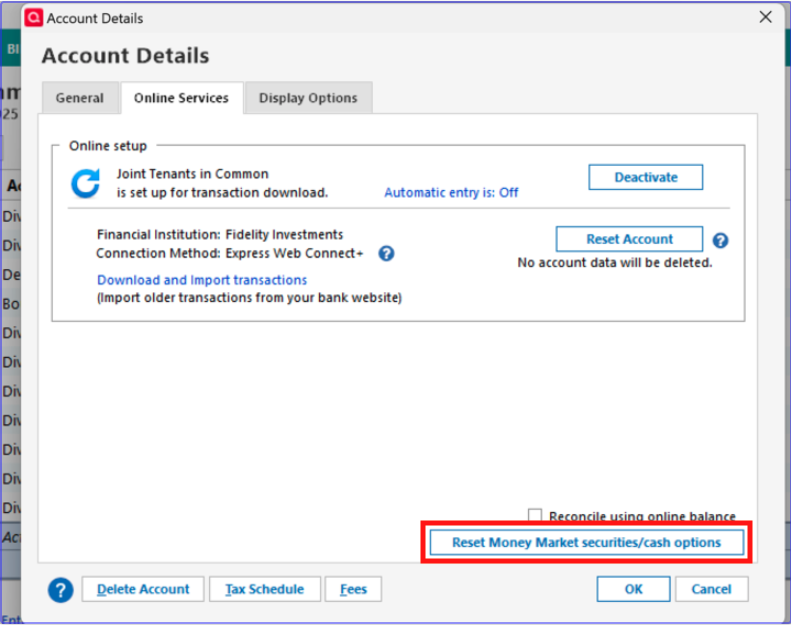
In the meantime, for accounts that support it, if you accidentally pick the wrong option, you should be able to navigate to Tools>Account List, click the Edit button next to the problem account, then go to the Online Services tab and click option to reset Money Market cash.
I hope this helps!
Quicken Kristina
Make sure to sign up for the email digest to see a round up of your top posts.
0 -
I can't determine if it helps. It seems that setting is for new DIV from the fund and does not correct the way prior dividends where entered.
Also, that option is not available for most of my Fidelity accounts and the Cash Representation selection has a way of disappearing after being selected once.
When doing the EWC+ conversion on a test datafile, I was given the option to use FDRXX as core cash. That is the fund for 2 accounts. The other accounts use SPAXX or FDIC. I was never given an option for the other accounts. They were updated and treat the core MMF for SPAXX as a separate secruity. It looks like the one selection of FDRXX was used for all accounts so that the correct corre MMF was never set for other than the 2 accounts.
Is there a way to force the pop-up on how to handle core MMF to reappear and allow selection of a MMF?
Deluxe R66.23, Windows 11 Pro
0 -
Thank you for your reply,
The issue with the option not being available for all accounts has already been reported to our teams for further investigation and resolution.
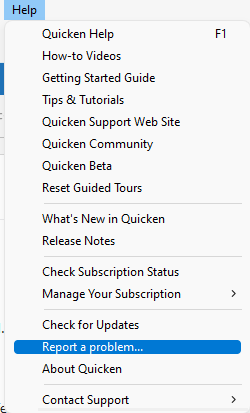
The issue with the pop up not letting you know which account(s) it applies to hasn't been reported yet, but I will forward it to our teams for further investigation and resolution. If you haven't already done so, please navigate to Help>Report a Problem and send a problem report with log files attached. If you were able to get a screenshot of the pop up, please provide the screenshot as well.
Thank you!
(CBT-820)
Quicken Kristina
Make sure to sign up for the email digest to see a round up of your top posts.
0 -
Also, if you can report that there does not seem to be a way to force the selection again once a selection has been made. The Cash Representation selection appears sporadically and usually isn't present.
Deluxe R66.23, Windows 11 Pro
1 -
I just noticed that Quicken is stating that for one of my accounts the register Cash balance = the total amount of all money market funds in an account, which happens to be the amount in the Available cash listed in the Online section of Quicken, and not just the account that is the designated core MMF. The end result is that the register cash balance does not equal the core MMF cash balance. It still seems work in Quicken is needed is dealing with Fidelity cash balances.
It appears Quicken is incorrectly using Available Cash from the Online section as the account register's cash balance instead of using the core cash position (MMF or FDIC) .
Deluxe R66.23, Windows 11 Pro
0 -
Thank you for your replies,
The team looking into the issue would like a bit more information.
The money market fund pop up should appear when you navigate to the account register, which is why it doesn't list an account number. Did you get the pop-up when you were in a Fidelity account register? If not, what screen were you on when you saw it?
You mentioned that one of the accounts has an incorrect amount. So that our teams can look into it, please provide the account name and the balance (you can send that information via problem report or DM, if you don't want to post it to this discussion).
According to our team, we take the amount reported by Fidelity, which they told us equals the total of all Money Markets. We remove all money markets.
You mentioned it's inconsistent whether you have the option to reset the Money Market securities/cash. To clarify, when you say it appears sporadically, do you mean it appears/disappears from the same account, or do you mean there are very few accounts where you see the option?
I look forward to your reply!
Quicken Kristina
Make sure to sign up for the email digest to see a round up of your top posts.
0 -
The money market pop-up displayed several times during the first OSU after converting to EWC+ and not when selecting an account. It displayed multiple times with different core MMF selection recommendations but with no account identification.
However, I have had it unpredicatably display when selecting an account as well, but I can't tell when that is going to happen. It seems inconsistent, or maybe there should be some instruction as to how to make it happen or when to expect it to happen.
The account was the only Fidelity linked cash non-IRA account in the datafile but I've already manually fixed incorrect transactions generated from the core MMF selection. I had to correct transactions in the investment register and the cash register for that account.
"According to our team, we take the amount reported by Fidelity, which they told us equals the total of all Money Markets. We remove all money markets."
Does this mean that the Cash balance link in the register doesn't really equal the value of the core MMF?
For example, I have multiple transactions from multiple MMF's in one account. They total in value to more than the current core MMF value.
I rechecked all the Fidelity accounts and they all now show the reset cash position option. That is different from prior runs when some accounts showed the option and then didn't show when revisiting account details. However, according the pop-up description, this option does not fix past transactions, only future downloaded transactions. Correct?
Deluxe R66.23, Windows 11 Pro
1 -
"The money market fund pop up should appear when you navigate to the account register, which is why it doesn't list an account number. Did you get the pop-up when you were in a Fidelity account register? If not, what screen were you on when you saw it?"
I get the pop-up mostly when I navigate to the account bar.
AFter the EWC+ conversion, I got the pop-up several times (for each account I guess) after OSU.
It would be most helpful to identify the account to which the pop-up refers in its description.
After the OSU I was having to guess for which account Quicken was trying to update core cash selection.Deluxe R66.23, Windows 11 Pro
0 -
Thank you for your reply,
I rechecked all the Fidelity accounts and they all now show the reset cash position option. That is different from prior runs when some accounts showed the option and then didn't show when revisiting account details. However, according the pop-up description, this option does not fix past transactions, only future downloaded transactions. Correct?
That is correct. We don't remove the older transactions. We will remove the balance of the money market security and turn it to cash balance. Going forward you will not see Buy and Sell transactions for the sweep to the money market and will see a Dividend transaction for income earned.
Does this mean that the Cash balance link in the register doesn't really equal the value of the core MMF?
Fidelity will keep the money in cash until transactions settle. It will be pending sweep to the Money Market Fund. This is why it is the total of cash plus the money market. Generally one can say 99.9% of the time the cash balance is equal to the money market security.
I sent you a DM. To check your inbox, please click the envelope icon near the upper right corner of the page.

Thank you!
Quicken Kristina
Make sure to sign up for the email digest to see a round up of your top posts.
0
