Bill reminders return after being skipped, marked as entered, or edited to later date

R64.24 Build 27.1.64.24 and R64.25 Build 27.1.64.25, Windows Q Classic.
Recurring bill reminder for quarterly estimated tax payments keep returning to the Bills and Income Tab.
I have marked the payments as "paid" and when I refresh the bills the payments return as still due.
I mark the payments as "skip". While this does change the due date in "Manage Bills and Income Reminders", the bills return as due in this year on the "Bills and Income Tab".
I manually move the date in the bill reminders on the "Manage Bills and Income Reminders" page to next year in the 3rd Quarter, the bills return to the "Bills and Income Tab" and to the "Manage Bill Reminders" page to this year.
I am out of ideas, except to just ignore the reminders because the bill is paid. I do not think deleting the reminder is prudent, either.
Any ideas or help would be awesome.
Steve
Quicken user since 1988.
Steve
Quicken user since 1988
Comments
-
Hello @Steve Horrocks,
Thank you for letting us know you're seeing this issue. When did the problem first start? Do you recall which version of Quicken you were using when it started? Is this happening exclusively with quarterly estimated tax payments, or are you seeing this happening with other reminders also?
You mentioned that skipping the reminders and manually editing the date seems to work until bills are refreshed. Are the problem reminders duplicating (multiple instances of the same reminder in the future), or is it more like the changes you made aren't being saved, and the reminder you skipped/edited is back to the state it was previously?
I look forward to your response!
Quicken Kristina
Make sure to sign up for the email digest to see a round up of your top posts.
0 -
The problem stated in R64.24, continues in R64.25, and appears isolated to the two quarterly estimated tax payments. I am unsure if the 4th Q estimated payment reminders are effected.
I have made specific reminders for each quarter which repeat annually, i.e., every 1st Q annually and every follow quarter. None of the quarterly specific reminders are repeated, i.e., there are no repeated reminders for 2025 or future.
The likelihood of failing to save the reminders is low. I double checked my reminders to ensure they were not saving. The verification process has occurred several times.Steve
Quicken user since 19880 -
Similar experience. Past due Reminders for multiple transactions, in multiple account ledgers, have been repopulated, even though the transactions are already in the register. (checking)
Multiple future transactions have autopopulated in 2 credit card card ledgers, several iterations up to 6 months in the future.
I typically have Reminders set up for autopopulate 30 - 45 days ahead of the due date.
These reminders vary in recurrence, as monthly, every 4 weeks, and quarterly type.
I have removed them 3 different times from the reminders section of the ledger by 1. entering them into the ledger and then deleting the duplicate. 2. I have skipped them to remove them, and the Third time deleted them. The subsequent step I performed was to update the next transaction due dates in the Bill and Income page.
The problem started with the most recent update.
My version is R6425 Build 27.1.64.250 -
I am having a similar but different problem. I have 2 bill reminders that I delete that are no longer needed. After a One Step Update they reappear. I have deleted them multiple times and they keep reappearing after OSU. I am on V R64.29, Build 27.164.29. I believe the problem started on the previous build.
Bills marked as paid are working as expected.
1 -
Thank you for your replies,
Do you have cloud sync on? You can check this by navigating to Edit>Preferences>Mobile & Web.
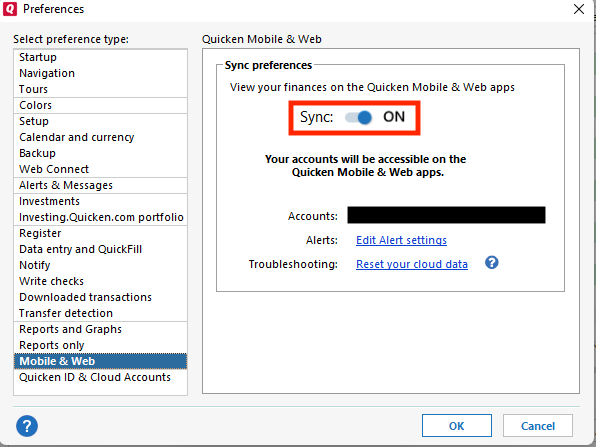
If Sync is on, please try turning it off and test to see if the issue persists.
Please let me know how it goes!
Quicken Kristina
Make sure to sign up for the email digest to see a round up of your top posts.
0 -
Cloud Sync seems to be the root of many problems. I turned it off and solved this problem as well for me.
1 -
Cloud Sync was broken from the start — mobile & web caused different transactions to show up depending on whether you were using Quicken Classic vs. mobile version. Different balances displayed on the same account, and transactions would just be skipped. I seriously had to spend DAYS fixing these anomalies and coming to the conclusion that the ONE time I clicked on mobile & web, it destroyed my data. Avoid mobile & web at all costs. [Removed - Rant]
Quicken user since the DOS days back in 1986, when I graduated from UCLA's MBA program. Struggling but still using Windows 11 Enterprise RPM to manage my 50-space mobile home park…so far. :-/
1 -
Thank you for the follow-up @Paul Schubert,
I'm glad to hear that turning off cloud sync resolved this issue!
If you need further assistance, please feel free to reach out!
Quicken Kristina
Make sure to sign up for the email digest to see a round up of your top posts.
0

