Quick Pay Payment issues with dates?

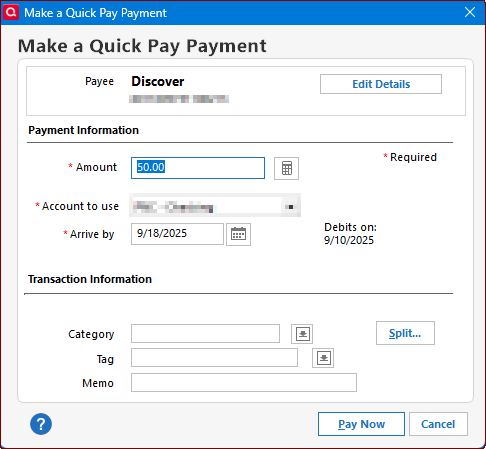
I'm on Version R64.23, Build 27.1.64.23 of Quicken Premier Classic. When attempting to use Quick Pay, I get these dates appearing. When is the bill actually being paid? It shows a date of DEBITS ON of 9/10/2025 and an ARRIVE BY DATE of 9/18/2025. That's a 10 day difference. Had the same issue with AMX and I opted to pay online since this new update is confusing and I have no idea when it gets paid. Why the two dates? I also cannot change the Arrive by date to an earlier date. The help (? icon) doesn't give me any information. Link is dead. I'm about to totally give up on Quick Pay!
Answers
-
Hello @kaneuge,
Thank you for reaching out! I can definitely understand the confusion about the two dates shown. Here’s what they mean:
- Debits On Date (9/10/2025 in your example): This is the date Quicken submits your payment and your bank account is debited (money leaves your account).
- Arrive By Date (9/18/2025 in your example): This is the latest date by which the biller is expected to receive and post the payment on their end.
Quick Pay payments are sent electronically via the ACH (Automated Clearing House) network. While the debit happens right away, some billers take additional days to process and post the payment, which is why you see a gap between the two dates.
You won’t be able to change the “Arrive By” date since it’s based on the biller’s processing times. The important thing to know is that your bank account is debited on the Debits On date, and the biller should reflect the payment on or before the Arrive By date.
If you need faster posting, you may want to continue paying directly through your biller’s website as you did with AMX, but Quick Pay is working as designed here.
I hope this clears things up!
-Quicken Anja
Make sure to sign up for the email digest to see a round up of your top posts.0 -
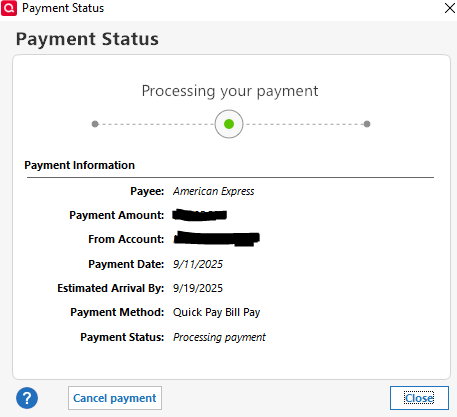
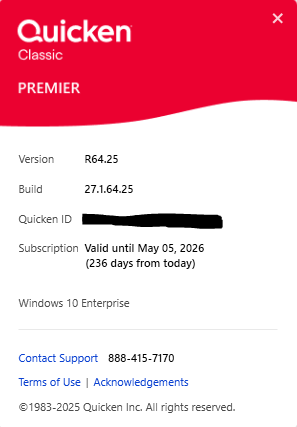
The "Quick Pay" feature and dates does not appear to be working for an existing bill payment account and existing online billers since the latest release was installed on September 11 (see below). I created an Amex "Quick Pay" on Sept 11, the payment status is still at "processing payment" as of today, and a debit has not yet occurred in my payment account.
What should I expect the outcome of this payment to be?
 0
0 -
I entered QuickPay payment to two different billers on 9/12/25, scheduled for payment 9/15/25. Quicken said that the payment will be debited on 9/15/25 and actual payment made 9/23/25. Quicken indicates the payment is "Processing". At this time (9/17} no debit has been made at my bank and no indication of payment on payee's website. Is the system actually working or is this what we should expect with R64.23? If so, why the slow payment. The previous system paid within 24 hours. A check mailed by the bank can be faster than 8 days.
0 -
Sorry, I meant to type R64.25.
0 -
Hello @Stripedbass411 & @jznwhite,
Thank you both for sharing these details. With Quick Pay, Quicken will first debit the enabled account, review the payment (which may take up to two business days), and then send it to the biller.
Since your payments still show as “Processing” beyond the expected timeframe, this will need a closer look from our Support team to ensure the payments are moving as they should. Please contact Quicken Support directly for further assistance.
Thank you!
-Quicken Anja
Make sure to sign up for the email digest to see a round up of your top posts.0 -
Thank you, Quicken Anja. Here is an update. I did contact Quicken Support, and they were unable to make any progress in solving the problem. The said they were referring the problem to Program Development. I deleted one of the payments and resubmitted to see if it would go through and it did not. It is still sitting on "Processing". I left the other payment as originally scheduled (9/15) and it now has been posted as a payment in my bank account this morning (9/20), but Quicken Bill & Income still shows it as "Processing". It never showed as a pending charge in my bank account. My guess is that this is development problems including initial bumps along the way.
0 -
PS: The payee does not show the payment yet. I hope this info will give you some insights as to what may be happening. Thank you for your help.
0 -
@jznwhite Thanks for the detailed update.
I wasn’t able to find any support interactions beyond December 2024 using the email associated with your Community profile, and I also didn’t see a ticket confirming that this issue was sent to our development team. So, I just want to double-check—did Support provide you with a case or ticket number for your interaction? Having that number will help me verify that the escalation went through properly and ensure it’s being tracked.
Thank you!
-Quicken Anja
Make sure to sign up for the email digest to see a round up of your top posts.0 -
Quicken Anja, you should be commended for how you track and give good service. It is much appreciated! The number that I was given in email was referred to as a case number. I hope this is the one you need:
11955750
If not, I have saved a text copy of the exchange that i would be glad to share with you. However, it would not be appropriate to post here as there is personal info in it. Just let me know how to get it to you.
Thank you so much.
0 -
@jznwhite Thank you for the kind words and for providing the case number—it allowed me to locate your support ticket. After reviewing it, I saw in the ticket notes that it was passed along to development as feedback, but there wasn’t an actual escalation ticket created. So, I went ahead and created a ticket myself to ensure this issue is tracked properly and have forwarded this issue to the appropriate channels for further investigation.
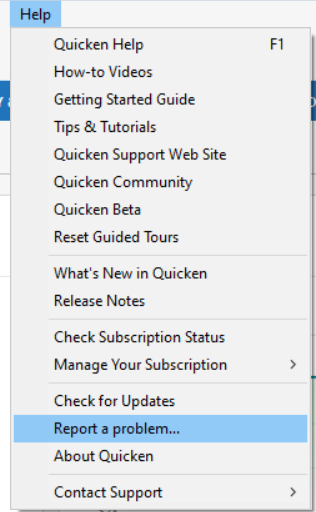
To help with that, please navigate to Help > Report a Problem within your Quicken program and submit a problem report with log files and screenshots attached.
It would also aid the investigation if you could include a sanitized file with your submission. A sanitized file removes personally identifiable information, allowing you to comfortably share it with the team.
While you won’t receive a direct response through this submission, these reports are critical in helping our teams investigate and resolve the issue.
We apologize for any inconvenience in the meantime, and thank you again for your patience and assistance!
(CBT-823)-Quicken Anja
Make sure to sign up for the email digest to see a round up of your top posts.0

