Planning (Budget) navigation enhancement

Hi! I love the Quicken planning functions. I just have some ideas for the main planning screen navigation.
I have a lot of budget categories, and scrolling down takes a while. First, I am not sure why scrolling is so slow. You could probably fix that easily.
Second, when I update a budget item, why does the entire screen have to refresh? This puts me back up at the top of the budget, and I must locate the category again. Could you please just refresh the individual budget item and leave me where I was on the screen.
Third, I would like for you to either 1) default the budget groups to collapsed or 2) retain the last setting I had the last time I was on the screen (possibly some collapsed and some open). This would allow me to quickly locate the budget group and categories I am looking for without having to scroll up and down the entire screen. Instead, I can focus on the budget group I care about at the moment.
Finally, if you could add a search field at the top that would filter the categories that would be awesome. For example, I would type 'Rental Prop' and my rental property categories would be the only one showing. For example: Rental Property Repairs, Rental Property Marketing, Rental Property Cleaning, etc.
Thank you!
Comments
-
Hello @celrod,
Thank you so much for your thoughtful suggestions — I’m happy to hear how much you enjoy the Planning functions in Quicken!
I took a look in my own Quicken file to try and replicate the scrolling and navigation issues you mentioned. Scrolling through budget categories is very fast on my end, so I haven’t been able to recreate that behavior — it’s possible you simply have a much larger number of categories than I do, which could be affecting performance.
I also tested the issue where editing a budget takes you back to the top of the list, but in my case, Quicken keeps my place after making changes. That said, maybe there are some other things we should be looking at for general performance.
- Where is your file located?
- Have you restarted your computer recently?
- Is your file being synced or backed up by third-party cloud services like iCloud, Dropbox, OneDrive, etc?
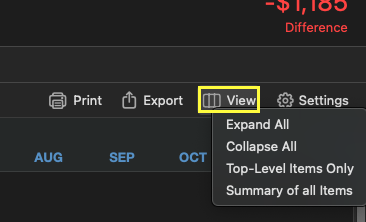
Regarding collapsing categories, there are a few built-in options under the View menu that might help:
- Expand All
- Collapse All
- Top-level Categories Only
- Summary of All Items
Lastly, I think your suggestion for a search bar in the budget view is a great idea. The best way to get this on our product team’s radar is to create an Idea post here in the Community. That allows other users to vote on it and helps give it more visibility for future consideration.
Thanks again for sharing your feedback!
Quicken Alyssa
Make sure to sign up for the email digest to see a round up of your top posts.
0

Categories
- All Categories
- 15 Product Ideas
- 34 Announcements
- 248 Alerts, Online Banking & Known Product Issues
- 20 Product Alerts
- 516 Welcome to the Community!
- 680 Before you Buy
- 1.5K Product Ideas
- 55.6K Quicken Classic for Windows
- 16.8K Quicken Classic for Mac
- 1K Quicken Mobile
- 834 Quicken on the Web
- 126 Quicken LifeHub