Why won't my Spectrum Charter and Verizon accounts sync with the new online biller system?

I have tried several times to link my Spectrum Charter and Verizon accounts to have my bills updated in the "Bills and Income" tab in Quicken. It tells me after entering all requested info that the account is being verified. A couple of days later I return to check the status and it says failed
I click on "Fix It" enter all of the same information that I was asked for before and keep getting the same resultR64.25s. I have deleted the biller then restarted my computer several times but this continues to happen.
Version R64.25, Build 27.1.64.25
Windows 11 Home
Does anyone know of a fix for this issue?
Answers
-
I have the same exact problem.
0 -
Hello @Jim Driscoll & @thorn5,
Thank you for letting us know you're encountering this issue. What is the exact message you are seeing when the connection fails? If you are seeing "Unexpected error occurred" with type "NullPointerException", then it is a known issue. For more information, please see this Community Alert:
If you are not seeing the error message mentioned above, then I recommend following this work around posted by another user, to see if it will help you get connected:
I hope this helps!
Quicken Kristina
Make sure to sign up for the email digest to see a round up of your top posts.
0 -
I'm not seeing an error code. When I click on check status the Spectrum Charter bill pops up a box that says some of my information may be incorrect.
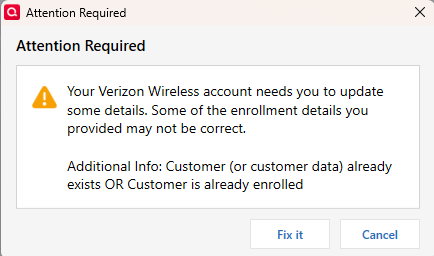
The Verizon bill says I am already a user of this service.
I've tried doing what "Bob" posted but continue to get the same messages from the billers.
0 -
I just tried both billers again. It hasn't even been 15 minutes and Verizon has already returned a "failed" response. Below is a screen shot of the exact message I have received over and over when trying to add the biller. I click on fix, re-enter the info and I keep getting the same message! ARGH!!!
No reply from Spectrum yet.
 0
0 -
Thank you for your reply @Jim Driscoll,
Do you have any other services set up to connect to Verizon as a biller? If so, that may be the reason for the error message you're seeing. If not, please let me know!
Thank you!
Quicken Kristina
Make sure to sign up for the email digest to see a round up of your top posts.
0 -
Hi Kristina, I do not have any other services set up to connect to Verizon but I did notice that in the box that asks for your apt. number there is a "C" that keeps showing up in the box even if I leave the box empty.
I do not have an apartment number, and when I click "fix it", verify the information I have seen the letter "C" in the box, deleted it. confirmed the box is empty and resubmitted the info just to get the same error message again! I have removed/deleted Verizon from my online billers and I have deleted the manual reminder as suggested by Bob but still no luck. Pretty sure now that is has something to do with the phantom apt number that keeps showing up.
Still no luck with Spectrum/Charter either!
0 -
@Jim Driscoll, I too have had no success with Spectrum/Charter after 4+ attempts.
1 -
Thank you for your reply @Jim Driscoll,
That phantom apartment letter may be the issue. Just in case it's being caused by a file-specific problem, I suggest that you try validating your data file. Please save a backup file prior to performing these steps.
Validate:
- File
- Validate and Repair File...
- Validate File
- Click OK
- Close the Data Log
- Close Quicken (leave it closed for at least 5 secs)
- Reopen Quicken and see if the issue persists.
Please let me know how it goes!
Quicken Kristina
Make sure to sign up for the email digest to see a round up of your top posts.
0 -
The apt letter disappeared after doing the validate file but registering still failed.
Still have had no luck with Spectrum either.
0 -
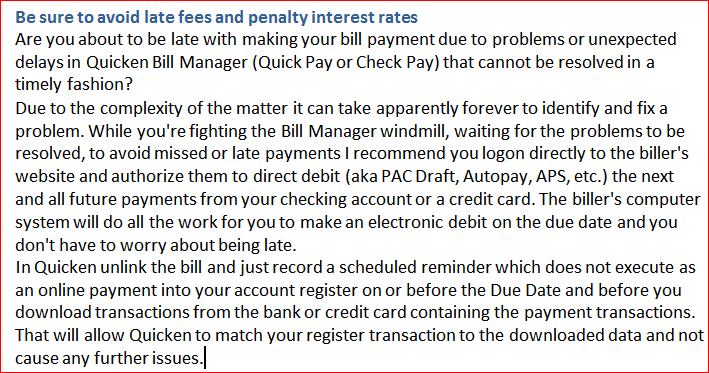
This problem appears to have been going on for a while, without a solution in sight …
 0
0 -
Thank you for your reply @Jim Driscoll,
In addition to the information @UKR provided about paying through alternate means, if needed, to make sure your payments are on time while working to resolve this issue, I recommend that you contact Quicken Support directly for further assistance. They have access to tools that we can't access on the Community and they're able to escalate the issue as needed. The Quicken Support phone number can be found through this link here. Phone support is available from 5:00 am PT to 5:00 pm PT, Monday through Friday.
I apologize that I could not be of more assistance!
Quicken Kristina
Make sure to sign up for the email digest to see a round up of your top posts.
0


Categories
- All Categories
- 17 Product Ideas
- 34 Announcements
- 248 Alerts, Online Banking & Known Product Issues
- 20 Product Alerts
- 517 Welcome to the Community!
- 682 Before you Buy
- 1.5K Product Ideas
- 55.6K Quicken Classic for Windows
- 16.8K Quicken Classic for Mac
- 1K Quicken Mobile
- 834 Quicken on the Web
- 126 Quicken LifeHub