FirstTech FCU stopped downloading transactions on 9/3/2025

I took the Quicken update for R64.23 build 27.1.64.23 on 9/3/2025 at 8:53am PDT, and since then I've been unable to download any new transactions into quicken for FirstTech. I attempted to "Reset Account" in online services for one of my FirstTech accounts and continue to get the same results.
It would seem that this was tied to the Quicken Update I took, as prior to that I received daily updates from FirstTech when I processed updates.
Is this a known issue and is there a planned or known fix?
Comments
-
Hi @Kenandjeff,
Try deactivating and reactivating you First Tech accounts. I am also a First Tech member, and after installing R64.19 (the N-1 release) I had to do this. The R64.xx releases have a lot of issues that have required this kind of fix. All of our First Tech accounts are now downloading transactions correctly.
BTW, if you also download online bills in the Bills & Income tab, you're in for a whole lot more work. See
My experience, issues and questions after update to R64.19 — Quicken
for the details.
All the best,
0 -
Thanks @Carl Davidson,
I did just that and now it's working. Such a pain to have to do that. I have to deactivate 8 accounts from First Tech in Quicken, and then reactivate and relink the whole bunch. If I don't deactivate them all manually, I've had problems in the past where they get cross-wired.
All-in-all, it's working now. Appreciate the guidance.
Jeff
0 -
0
-
Thank you for sharing @Carl Davidson,
Hopefully this will help others who encounter this issue!
Quicken Kristina
Make sure to sign up for the email digest to see a round up of your top posts.
0 -
Tried this and it does not work for me, still not downloading transactions.
1 -
I have been having the same issue. I tried deactivating and reactivating as suggested above, but it didn't help.
0 -
Hello @markjp & @saintjarna,
Thank you for letting us know you're seeing this issue. If you haven't already done so, I recommend that you troubleshoot the missing transactions issue by following the steps in this article on missing transactions/transactions not downloading:
Please let me know how it goes!
Quicken Kristina
Make sure to sign up for the email digest to see a round up of your top posts.
0 -
I checked these out and they were all OK. Interestingly the download started working again this evening. Something appears to have gotten fixed either at FirstTech or in the Quicken download process.
1 -
I thought this was resolved, and yet the last two mornings when I run the One Step Update (for all accounts) from the icon in the menu bar on the upper left, my last 6 transactions at First Tech would not download to my Quicken register.
I'm running Quicken Classic Deluxe on the most recent version on a Windows 11 PC.
I then tried the "Update Now" selection from the gear icon in the right-hand corner of the First Tech account register and my new transactions downloaded to my register for that account.
Thought I'd share this discrepancy between the two tools in case it helps to find the bug or at least helps others get their data in the short run.
0 -
Thank you for the follow-up @markjp,
I'm glad to hear it started downloading again.
Thank you for sharing your experience! I'm glad to hear that using the "Update Now" option got it to update correctly. Do you have to do that every time, or is it now updating correctly when you run One Step Update?
Thank you!
Quicken Kristina
Make sure to sign up for the email digest to see a round up of your top posts.
0 -
@Quicken Kristina, tried it again this morning, 9/20/2025, and now neither one is working. I'm on R64.29 now as well.
I have First Tech transactions that are not downloading today. I then attempted to 'Reset account" from account details page which royally messed up my connection to first tech for all my first tech accounts. Then I had to deactivate the online services for my 8 first tech accounts again (did this previously on 9/7/2025.)
I attempted One Step Update, as well as Update Now, and unfortunately neither is working now.
Regards,
Jeff
0 -
It seems like I am having the same issue.
While there are no errors, and the "online balance" is being reported correctly, new transactions are still not being downloaded.0 -
Thank you for your replies,
If the troubleshooting in our article on missing transactions/transactions not downloading did not correct the issue, then I recommend that you contact Quicken Support directly for further assistance, as they have access to tools that we can't access on the Community and they're able to escalate the issue as needed. The Quicken Support phone number can be found through this link here. Phone support is available from 5:00 am PT to 5:00 pm PT, Monday through Friday.
I apologize that I could not be of more assistance!
Quicken Kristina
Make sure to sign up for the email digest to see a round up of your top posts.
0 -
I'm on R64.29 usign Quicken Classic Deluxe - accounts other than 1st tech download fine but 1st tech has been broken since the 1st week of september. No errors, just 0 transactions download. I wonder if this is really Quicken or if this is something to do with NECU buying 1st tech and taking over/transitioning the backend…
0 -
I ran into this again today. I'm now running R64.29. I don't know when it stopped working, but to fix it this time I had to deactivate the affected accounts (in the Account Details → Online Services tab) and then set them up again. There were only two accounts out of our eight that were affected. It's clearly still not stable.
1 -
Thank you for the follow-up @Carl Davidson,
Thank you for letting us know that the problem returned and you were able to resolve it again.
Is this happening with every program update, or did it happen only with R64.19 and R64.29?
Thank you!
Quicken Kristina
Make sure to sign up for the email digest to see a round up of your top posts.
0 -
After deactivating and reactivating my First Tech accounts it worked twice and died again. No longer downloading transactions. Online balance is correct but nothing coming down anymore. I'm not going to go through the pain of deactivating and reactivating all these accounts again, this just needs to get fixed, something has clearly changed since the update.
0 -
I also had the same issue and went round and round with the quicken support x2, saying it was my banks problem and trying to blow me off. I wouldn't let them off the phone until we worked on the solution . We then downloaded and older version of quicken 8.2.1 and restored a backed up version of the data file. All my new transactions on the older program downloaded fine. The support then admitted the problem was with the quicken update. I asked them to open a ticket so I could track the issue and let me know how the ticket progress with the resolution. They said they would not let me know when it was resolved. I had to chase that down. If you want to resolve this issue as of now you need to go to an older version and the support can help you download that and set it up. But beware of thier attitude that the customer is never right. I knew the problem was with the update but I guess too much pride never allows the customer to be right. Good luck all of you working this issue. It was frustrating and I am still a little peeved.
2 -
@Quicken Kristina I can confirm that this first started happening with R64.23 and did not get fixed with the R64.29 update that I took. It continues to provide the current correct balance from First Tech, but sporadically does not download transactions. As with @Carl Davidson situation, I've deactivated and reactivated each of my First Tech accounts. It will download maybe once after that, and then the next day stops working.
Prior to release R64.23 I was able to retrieve new transactions daily without issue. This is clearly an issue with that release.
1 -
Hello @MACBookPro,
Thank you for your feedback, though I'm sorry to hear Support was not helpful. It's interesting to hear that it works properly in 8.2.1, but not in 8.3.
In 8.3, do you see any error messages/codes, or does it just fail to download transactions?
I look forward to your reply!
Thank you for your reply @Kenandjeff,
To test if this issue is being caused by the update, please backup your Quicken file and try rolling back to R64.19 or R63.21. For instructions on downloading and installing one of those update patches, please use this article:
Please let me know how it goes!
Quicken Kristina
Make sure to sign up for the email digest to see a round up of your top posts.
1 -
No there are no error codes with the problem because the connection works fine. it just doesn't download transactions
1 -
Thank you for confirming.
@MACBookPro, @Kenandjeff, @markjp, @Carl Davidson, @chetl, @r-e-l, & @saintjarna,
I forwarded this issue to the proper channels to be further investigated. In the meantime, if you haven't already done so, please navigate to Help > Report a problem and submit a problem report with log files attached and (if you are willing) a sanitized copy of your data file in order to contribute to the investigation. Since this is an issue with missing transactions, please include at least 3 samples of transactions that are posted on the financial institution website, but did not download into your Quicken (date, payee, and amount), and a screenshot of those transactions on the financial institution website with the problem report.
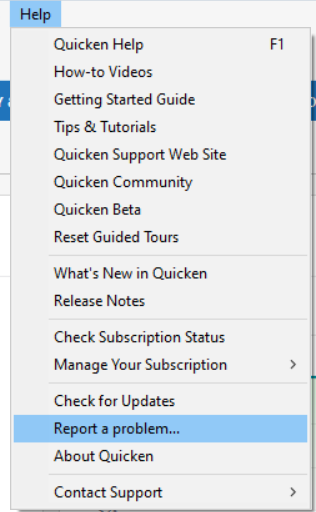
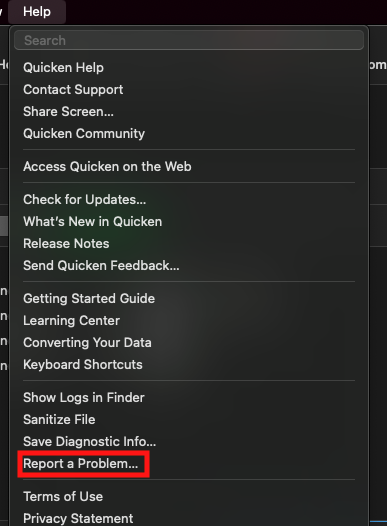
Note - Problem reports are limited to 10 attachments. If you need to send more than 10, please send the extras in a 2nd problem report.
While you will not receive a response through this submission, these reports will help our teams in further investigating the issue. The more problem reports we receive, the better.
We apologize for any inconvenience!
Thank you.
(CBT-830)
Quicken Kristina
Make sure to sign up for the email digest to see a round up of your top posts.
0 -
@Quicken Kristina confirming that I did use the report a problem from within the app and sent the appropriate files.
Additionally, I went through the process of patching back to release R64.19. I attempted an update but nothing downloaded. However, I tried it again using the one step update and my first tech transactions downloaded. I did not have to reset online services, which is good.
I will try again later today or tomorrow if there are any new transactions and confirm that it will download on the first try.
1 -
@Quicken Kristina I've confirmed with R64.19 this afternoon that I successfully pulled down 3 new transactions that occurred today. So it appears that rolling back to that release fixed the issue, but also confirms that the next release may have a bug.
2 -
[Removed - Disruptive/Speculation] I will attempt to revert back to the older version of the software until someone from the company can confirm that this issue has been resolved.
1 -
Is there an ETA to get this fixed for good? [Removed - Disruptive]
2 -
Hello @Miga,
Thank you for letting us know you're also impacted by this issue. To contribute to the investigation, please navigate to Help > Report a problem and submit a problem report with log files attached and (if you are willing) a sanitized copy of your data file in order to contribute to the investigation. Since this is an issue with missing transactions, please include at least 3 samples of transactions that are posted on the financial institution website, but did not download into your Quicken (date, payee, and amount), and a screenshot of those transactions on the financial institution website with the problem report.
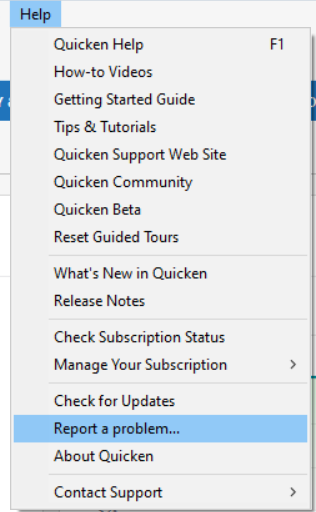
Our teams do not provide ETAs, however, the issue has been reported, and the more people who contribute the requested information, the more data our teams will have available to track down the cause of the issue and resolve it.
Thank you!
Quicken Kristina
Make sure to sign up for the email digest to see a round up of your top posts.
0 -
Same problem here. Transactions appearing on the web do not download to Quicken, and there's no error. Broken since 9/15. Tried all suggestions here. Makes it kind of difficult to know what my available balance is, don't you agree?
2 -
I wanted to update this as I tried to update today and the problem still exists. I connected but still no transactions have downloaded. Even tough I down graded the software as Quicken support asked me too. The solution worked for a day or two but I am back to the same issue and it stopped working on 9/24
1 -
Thank you for the update @MACBookPro,
I'll update the ticket to let our teams know it stopped working in version 8.2.1.
Thank you!
Quicken Kristina
Make sure to sign up for the email digest to see a round up of your top posts.
0
