R64.29 still failing when adding online bills

Windows 11. Quicken Classic. R64.29 updated this AM (9/20).
I attempted to reconnect to two of my previous online billers: Verizon Wireless and Dominion Energy Virginia.
I proceeded through the steps to add the online bill adding all the prompted information.
After pressing "continue" for the Verizon bill, Quicken crashed. I sent a crash report.
I waited about 15 min or so prior to reopening Quicken.
Upon reopening, the Bills & Income tab showed that Verizon Wireless had failed.
I attempted to reconnect to Dominion Energy Virginia. The connection seemed to be working, but shortly went from "pending" to "failed".
Steve
Quicken user since DOS 3
Steve
Quicken user since 1988
Comments
-
Hello @Steve Horrocks,
Thanks for providing all the details—I can see how frustrating it must be to have Quicken crash when trying to add your online bills.
To start, I suggest first saving a backup of your data file, just to be safe. Then, try the Review and Repair Online Billers tool:
- Go to the Bills & Income tab.
- Click the gear icon in the top-right corner.
- Select Review and Repair > Review and Repair Online Billers from the dropdown menu.
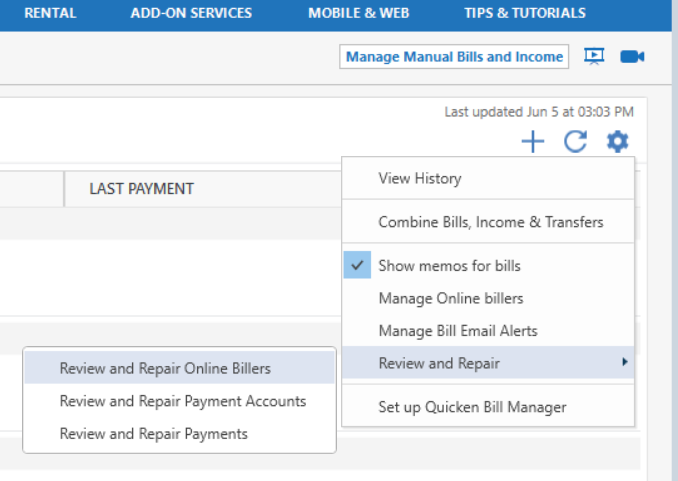
Once that’s completed, try reconnecting your online billers again and see if the issue persists.
Let us know how it goes!
-Quicken Anja
Make sure to sign up for the email digest to see a round up of your top posts.0 -
I have tried that. Did not work!
I truly believe this all started in R64.19 when ya'll changed your billing services and rolled out a buggy patch.I think i will keep plodding along with manual bill reminders until you figure this out and release a patch to repair online billing.
Steve
Quicken user since DOS 3Steve
Quicken user since 19880 -
Each update gets a little worse. I upgraded to R64.29 and now when I try to use QuickPay, instead of asking for my identifying information and then getting the "Can't do this now. Please try again later" message I get an immediate "Verification failed" message. It never even asks me for my identifying information. Should I call customer support or just keep waiting for a few more weeks. I've been using and recommending Quicken since the DOS days, but this is just getting ridiculous.
0 -
I am PRETTY sure Quicken CS is keenly aware of the issues with their patches R64.19-R64.29.
Their response when I called was (I paraphrase):
We know.
We are working on it
No, sorry. You can't talk to Tech Support. They do not accept incoming calls.
Here is a ticket number.
I have reverted to manual bill reminders and paying through my bank (which I have done since CheckFree folded up).
Fingers crossed.
Steve
ALSO Quicken user since the old days of DOS.Steve
Quicken user since 19880 -
I thought I was going crazy. I have been able to reconnect 1 of 7 online billers. This new update (R64.29) makes online bill management worthless
0 -
NOPE!
Not crazy. [Removed - Rant]
Manual bill reminders all the way. Oh, except my Discover card shows up as an online biller.
Steve
Quicken user since DOS 3.Steve
Quicken user since 19880 -
Now that they resolved the "Can't complete your request now. Please try again later" problem in the new Bill Pay system, I still get an immediate "Identity Verification Failed" message when attempting a QuickPay. So, I went through the autobot chat system which requested I deactivate and reactivate my Bill Pay account to re-authenticate myself. I did that successfully and it shows Bill Pay is on for that account. Still can't get past the "Identity Verification Failed" message when I attempt a QuickPay. The help for that message says Quicken Support cannot assist if you get that message. So, my only option is for me to downgrade to Deluxe so I'm not paying for something I can't use. I still love Quicken for the other things it does well - but the Bill Pay feature is <censored>.
0
