Credit Card Account total doesn't match CC statement - only 7 transactions, do not add up

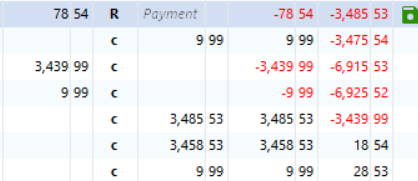
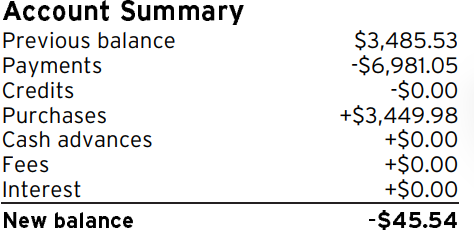
Here is a screen shot of the QUICKEN account and CC statement - they both match the 3485.53, but after that the sum does not match ??? The CC statement is correct. I ran a file validation, but still get the same issue. IT is so simple, but does not match hand calculations.
Answers
-
Hello @StephenK,
I can see how confusing it must be when the totals look like they should add up but don’t. Let’s try narrowing it down.
The best next step is to compare your credit card statement and your Quicken register line by line. Make sure each transaction matches on both sides in date, amount, and type (charge vs. payment). Even one duplicate, missing, or mis-categorized transaction can throw the running balance off.
Once you’ve checked that, let us know what you find!
-Quicken Anja
Make sure to sign up for the email digest to see a round up of your top posts.0 -
If I am understanding this correctly, this is what I am seeing:
Your have a prior balance of $3485.53
You have new purhases of…..$3449.98
Total Owing………………………….$6935.51
You made a payment of ………$6981.05
Your overpaid the amount you owed by $45.54 so you now have a -$45.54 credit
0 -
You may also want to verify that the Opening Balance transaction (OB) is still correct. Under certain, as yet unresolved conditions, the OB transaction may be incorrectly changed, causing your register balance to become incorrect.
Verify, if necessary, edit and correct the OB amount.Ensure that the account register is correctly sorted by Date in ascending order, with newest transactions at the bottom of the register.
This may be off topic … I couldn't help but notice that your register uses three columns for transaction amounts.
IMHO, depending on your personal preference you should use
• either the traditional pair of Charge and Payment columns together
or
• the newer Amount column only (where you have to enter negative amounts with a Minus sign and positive amounts with a plus sign)
but you really don't need all three of them.
Please decide which columns to use and remove the other one(s) from the view.
Q Windows: To add / delete columns in your register click the Register Columns gear icon located next to the Balance column header.
Q Mac: there's a Columns button at the bottom right of the register view0


