My Fidelity connection date did not work correctly

I am on Windows 11, Quicken Version R64.25 Build 27.1.64.25
I have two issues with the update of my fidelity connection. The first issue is that in the Fidelity in my account uses two symbols that collect cash (QPCBQ and QUSCQ). During the transition the kept QPCBQ as a symbol and as an item like a fund but for cash added the two together. The account total is overstated by the amount in QPCBQ.
The second issue is that I own 2 annuities through fidelity. The connect update appeared to look like I could now get updates on those items. Before I updated these manually. When I tried to link these annuities to my existing account, it deleted all the information I had put in before and took the accounts to zero.
I need some help getting this resolved. If I have to keep managing the annuities manually, I can deal with that, but I need to know how to make that happen.
Answers
-
I wrote this question yesterday, but the question disappeared from my discussions.
0 -
I just noticed that the double counting of the cash accounts is not happening in the Web Quicken Classic but is happening in the application on my desktop.
0 -
Hello @nuttika,
Thank you for reaching out!
Sometimes that happens because a post is flagged for additional review. It would have vanished until it was approved, then it would have reappeared.
To clarify, cash is being double counted because one money market fund, QPCBQ, is showing as both cash and a money market fund?
For the issue with annuities, when you say it deleted everything and took the amount to $0, do you mean that transactions are no longer available and it's showing a balance of $0? If that's the case, then it sounds like the accounts got switched to Simple investing when you connected them. To check this, please navigate to Tools>Account List, then click the Edit button next to the problem account. On the General tab, it should show you the investment tracking method.
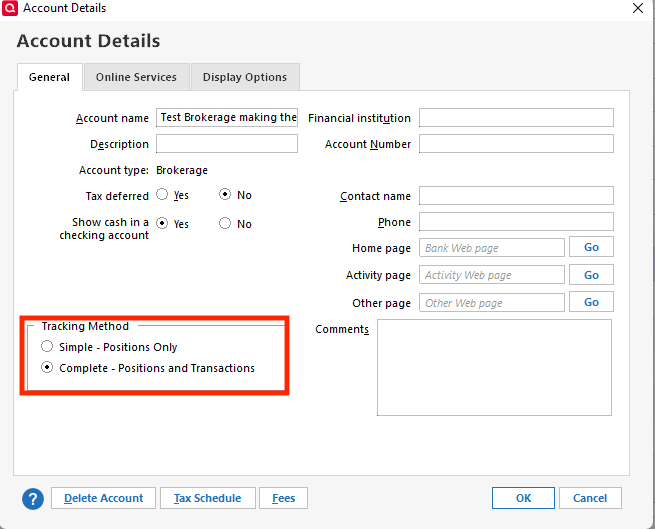
I look forward to your reply!
Quicken Kristina
Make sure to sign up for the email digest to see a round up of your top posts.
0 -
I did the edit and it did appear to fix one account but the other account I had to delete a zeroing transaction to get the account to display correctly. I will update tomorrow and see if it clears things up.
0 -
Thank you for the follow up,
I'm glad to hear that both accounts are displaying correctly. Please let me know if they remain correct after you update your accounts!
Thank you!
Quicken Kristina
Make sure to sign up for the email digest to see a round up of your top posts.
0 -
I did an update but it didn't update the values so they match what is on fidelities web site. I did see transactions when I
changed the account to complete but know transactions don't seem to be showing up?
0 -
Thank you for your response,
To clarify, the accounts are not updating and you're not seeing any transactions downloading? Are you seeing any error messages/codes when you update your accounts? Have you checked Fidelity's website to confirm that there are new transactions to download?
Thank you!
Quicken Kristina
Make sure to sign up for the email digest to see a round up of your top posts.
0 -
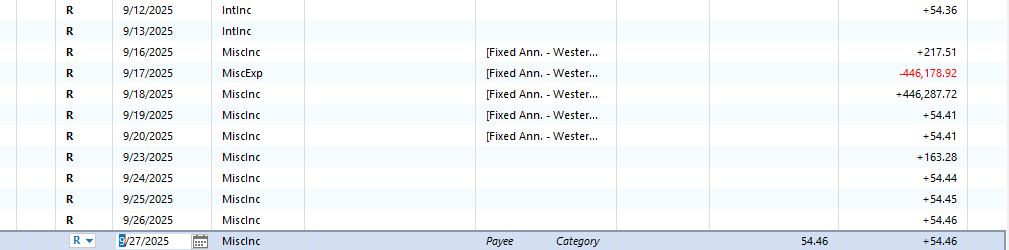
With these annuity accounts, I don't see anything in activity, but the balances are updated Tuesday-Saturday. I don't normally see changes in balance on other days. I am seeing no error messages/codes when I update. These accounts are managed by NY Life and Western Southern and those entities probably feed updated balances to Fidelity, which Fidelity then updates the accounts in their system. It is just odd that while I had it in simple mode, it appears to be downloading transactions but wasn't showing the balance, not when I changed to complete a balance shows but new transactions don't show up to update balance. See attachment. 9-16 - 9-20 were in simple mode and since 9-20 I have been entering manually.
 0
0 -
Did rolling back to a backup clear up the annuity wipe??
0 -
Thank you for your reply,
Since you said the accounts get updates Tuesday through Saturday, I recommend wait for when the next update should arrive. If updated information does not download, then before entering the transactions manually, I recommend doing some troubleshooting.
First, double check that the accounts are connected. You can check this by navigating to Tools>Account List. In the Transaction Download column next to the problem accounts, if they're connected, you should see the word Yes and the connection type.
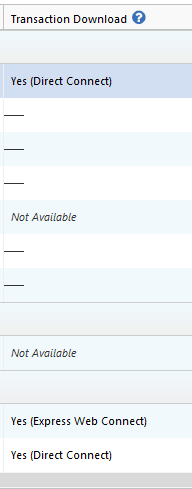
Next, while you're in the account list screen, also check for any duplicate accounts that the transactions may be downloading into.
If the accounts are connected and the transactions aren't downloading into the wrong place, then the next step is to check the logs. To do this, navigate to Help>Report a Problem and send a problem report with log files attached. Include information for at least 3 of the missing transactions (date, payee, and amount) that are not in your Quicken register at all, not even entered manually (if they're entered manually, they'll show up in the logs). Please also include a screenshot of those missing transactions as they appear on the financial institution website. Once the problem report is sent, please let me know.
Please let me know how it goes!
Quicken Kristina
Make sure to sign up for the email digest to see a round up of your top posts.
0 -
Both show yes. I also tried to reset one of them and it brought it back in as simple no transactions and updating the balance to zero. I moved back to complete, and it is back to how I left it. It is not downloading to another account. The Fidelity account never shows transactions for these accounts; the balances just change on those days.
0
