Entries made with One Step Updates disappearing

After last two updates of Quicken Classic Premier, entries made in three of my credit card accounts have disappeared and are being reentered during One Step Updates as new records. It is the same 4 records in these accounts. These records were initially entered manually. This is happening repeatedly with the same records. Also, there is an internal error when syncing; "internal sync error. Please try again later." My current version is R64.29, Build 27.164.29. Has anyone else had this problem and is there a solution?
Best Answer
-
Hi @BigTem,
Thanks for providing that information, and I am happy you are satisfied with the support I have provided. Yep, I am here on Sundays! Hope you are enjoying your weekend.
I do understand your concern with syncing, as it seems to have been an issue for you in the past. However, syncing to the Quicken Cloud should not cause your data file to become damaged. Syncing the file to other third-party cloud services is where damage can occur. That being said, it's really up to you if you want to use the mobile and web features or not.
As far as archiving, I understand the need for previous years of data so you can include it in your reporting. When copying your data file, you do have the option to specify a time frame that you would like to copy. I think this is the easiest way to keep some history, whatever amount you think you need, and then reconnect accounts like you did in your current copy. A year-end archive isn't a bad choice either, you just can't specify the date range with this option.
Overall, I do think that trimming down the file is a good idea. At least for now, you know that you have a working file with all of your history. On the side, you can work on creating your smaller file at your own pace. Of course, you would still always have the original file if you needed to go back to it for whatever reason.
Hope that addresses what you were asking, if not, let me know and I will do my best to provide more answers!
Quicken Alyssa
Make sure to sign up for the email digest to see a round up of your top posts.
0

Answers
-
Hello @BigTem,
Thank you for your question — I can imagine how frustrating it must be to see transactions disappear after a One Step Update.
To help narrow this down, can you let me know where your Quicken data file is stored? Also, is it being synced or backed up by any third-party cloud services like Dropbox, iCloud, OneDrive, etc.? These services can sometimes interfere and lead to unexpected behaviors.
As a next step, I recommend running a file validation to check for any data integrity issues. Here's how:
Go to File > Validate and Repair File >Check the "Validate file" box >Click OK.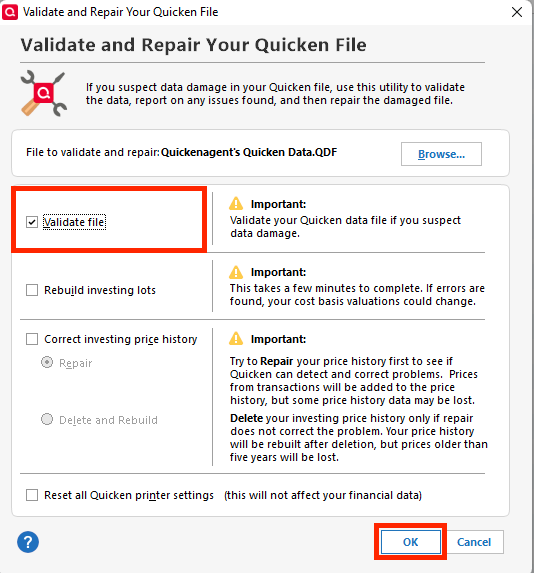
Once the process completes, Quicken will generate a data log that may provide more insight into what's going on. Take note of the end result. Does it return no errors? Were there damaged transactions that were repaired?
Let me know how it goes!
Quicken Alyssa
Make sure to sign up for the email digest to see a round up of your top posts.
0 -
My Quicken data file is stored on my hard drive at C:\Users\moody\DESKTOP-Q64UQ99\Documents\Quicken\MOODY.QDF
My data is being synced with my Quicken Mobile using the Quicken Desktop app.
My data is also being synced with my account at Quicken on the Web.
My date is being backed up on an external hard drive using Quicken backup on exit.
When I run the One Step Update these transactions are no longer showing in the register when the updates completes and they show up as “New” transactions in the One Step Update summary.
I ran One Step Update just now (9/22 10pm) and watched the CITI Costco register, behind the One Step Progress image. The curser/hourglass jumped around like crazy. It took a long time to complete the update. During the crazy update I could see that the 2 transactions in the Costco credit card register disappeared before the update finished. I had to use the Task Manager “End task” to stop the update.
Chase – Amazon 1076
9/19/2025 Amazon.com $15.06
ITI Costco
9/15/2025 Costco whse $3.25
9/15/2025 Costco whse $82.56
9/15/2025 Costco $17.17 not affected during updates
Discover
9/16/2025 HCTR EZ Tag $10.00
USAA Signature Visa
9/16/2025 Perissos Vineyards $30.00 (was not affected in this last update)
Present online after update 9/22/2025
Present in Quicken Classic Premier desktop after update showing "cleared"
Present on Quicken Mobile after update & sync
I ran file validation on 9/15 and 17. No errors were reported.
I ran file validation just now. No errors.
Copies of validation reports attached.
0 -
This morning (9/23) I ran One Step Update and stopped it using Task Manager as soon as the cursor/hourglass began doing crazy things and the bottom date (for new entry) in the date column kept flashing. All the accounts showed "completed" and those records that had been previously deleted in earlier updates were still in the register showing "cleared". I restarted Quicken and there were some "match" entries for previously entered records on several accounts. The One Step Update Summary for this update did not pop up but, when I pulled it down from the menu, it showed "Errors during Quicken Cloud sync", "60 of 63 quotes and existing headlines updated" and "Currency exchange rates updated". These showed a faint date of 9/23/2025 8:02am. Do you think uninstalling Quicken and reinstalling might solve the problem? Thanks.
0 -
Hello @BigTem,
Thank you for following up and providing detailed information.
Uninstalling/Reinstalling wouldn't be my next thought, just because this issue seems more file-related than software-related. That being said, there's nothing wrong with trying it if you would like.
After reviewing the screenshots you provided, I see that while it returned "no errors", it does also mention that "the old file was corrupt and only some of the data was recovered". It also shows the corrections it made within the file.
When did this issue start? I think we should try restoring a backup from before the issue started. If that doesn't work, copying your file would be the next step. More detailed steps on this can be found in this Help Article.
Let me know how it goes!
Quicken Alyssa
Make sure to sign up for the email digest to see a round up of your top posts.
0 -
I reinstalled Quicken, on the 3rd try. Had to delete installation folder. Ran Validation & Repair after reinstalling, report attached. Then I ran One Step Update and it finished after a long wait. It showed "Errors during Quicken Cloud sync". Records deleted during earlier One Step Updates were not affected and still showed "cleared".
"The old file was corrupt and only some of the data has been recovered" is still there. It has been there for some time and I'm not sure I have a backup going back far enough to predate it. My data goes back to 1997. I should have archived it long ago. I'm thinking about possible options now. Keep the "Moody" data file without updating it, for reference later, and starting a new data file from the first of this year. Will my One Step updating add records from investing, credit and banking accounts or will I have to manually enter them? I saw something about copying the file. I haven't looked closely at that. Do you have any suggestions? Thanks.
0 -
Hello @BigTem,
Thank you for following up with your progress!
I do think copying you file is a good option. Another bonus of going that route is that it will let you specify a date range to copy. So you can bring over the last five years, for example, or whatever amount of time you specify.
You also mentioned that you had considered starting a new file. Also, not a bad option at all. This might actually be the best option, just to ensure you aren't carrying over any corruption from the old file. That being said, I know how hard it is to start over after all the work you have in the current file. But, like you pointed out, you can keep the file for historical data.
You asked if your One Step Update will add records if you chose the new file route. In short, yes! You would add all of your accounts, like new, and Quicken will pull in transactions. The number of transactions received differs depending on the financial institution. For instance, one of my banks only sends 90 days of transactions, and I have another that sent over a year's worth. For the investment transactions, you will have placeholder entries that you will need to manually enter data for.
I hope this information is helpful in making your decision. Let me know if you have more questions.
I am happy to help!
Quicken Alyssa
Make sure to sign up for the email digest to see a round up of your top posts.
0 -
Hi Quicken Alyssa,
Still trying to decide which route to take, If I copy from one year ago and the corruption occurred more than a year ago, is there a chance that the corruption will not be carried over? There is a possibility that the corruption occurred 2 or 3 years ago. At my age, I guess it is time to quit procrastinating. Thank you for your suggestions.
0 -
I tried COPY back to 1/1/2020. Opened the copied data file and ran Validation.
[Sat Sep 27 09:33:59 2025]
File: "C:\Users\moody\DESKTOP-Q64UQ99\Documents\Quicken\MOODY2020Cpy"
QDF:
Validating your data.
No errors.QEL:
No read errors.QEL:
All internal consistency checks passed.[Sat Sep 27 09:34:08 2025]
Maximum security reference: 166, number of securities: 166.
Analyzing securities.
All security references are within the normal range.Validation has completed.
No corruption is showing in this report. Would it be prudent to save this data file and try to COPY back further from the original data file?
0 -
Well, I took a chance and copied the original file back to 1976, which was the default beginning date. Then I opened the copied file and ran Validation.
[Sat Sep 27 09:56:28 2025]
File: "C:\Users\moody\DESKTOP-Q64UQ99\Documents\Quicken\MOODY1997Cpy"
QDF:
Validating your data.
No errors.QEL:
No read errors.QEL:
All internal consistency checks passed.[Sat Sep 27 09:56:40 2025]
Maximum security reference: 166, number of securities: 166.
Analyzing securities.
All security references are within the normal range.Validation has completed.
I tried doing a One Step Update with the new data file and realized I have to reestablish the online connection with each account. That will be the next step. The last time I did the One Step Update earlier today, with the original data file, it showed errors during Quicken Cloud sync. There seems to be a problem with Cloud syncing. I am going to quit syncing my Quicken Mobile. I turned off all syncing with the web and mobile.
I am now working with the COPY of my original data file from 1976 up to the current date. I have turned off all syncing. I will now try to reestablish the links for updating my accounts. Validation below is with syncing turned off. For now, this will be my working data file.
[Sat Sep 27 11:35:46 2025]
File: "C:\Users\moody\DESKTOP-Q64UQ99\Documents\Quicken\MOODY1976Cpy"
QDF:
Validating your data.
No errors.QEL:
No read errors.QEL:
All internal consistency checks passed.[Sat Sep 27 11:35:58 2025]
Maximum security reference: 166, number of securities: 166.
Analyzing securities.
All security references are within the normal range.Validation has completed.
Hoping for the best.
0 -
Success. I have successfully reestablished links with my online accounts and a One Step Update. Also validated the data file.
[Sat Sep 27 22:41:37 2025]
File: "C:\Users\moody\DESKTOP-Q64UQ99\Documents\Quicken\MOODY1976Cpy"
QDF:
Validating your data.
No errors.QEL:
No read errors.QEL:
All internal consistency checks passed.[Sat Sep 27 22:41:47 2025]
Maximum security reference: 166, number of securities: 166.
Analyzing securities.
All security references are within the normal range.Validation has completed.
I am not syncing with the cloud. I believe that was my problem. Any thoughts or questions? Thanks for all your suggestions and help.
0 -
Hello @BigTem,
Thank you for sharing the process you went through. This could be helpful for others in the future.
I am happy to hear that you got everything copied and reconnected! The steps you took look good to me, it sounds like you followed the help article suggestions.
As for syncing with the cloud, that allows you to use the mobile and web features. If you don't plan on using either of those, then I don't see anything wrong with leaving the sync turned off.
If you run into any more issues down the road, don't hesitate to reach out!
Thank you!
Quicken Alyssa
Make sure to sign up for the email digest to see a round up of your top posts.
0 -
I did follow the help article suggestions. I have been using Quicken Mobile, however, if syncing is causing the problem, it is not worth it. Next, I will think about reducing the size of my working data file. I plan to look at End of Year Archive or some other archive. I liked the capability of searching and creating reports of previous years data all at one time. It may not be worth keeping such a large date file. Thoughts? Your help has been invaluable! Didn't expect to see you here on the weekend. Have a great day.
0 -
Hi @BigTem,
Thanks for providing that information, and I am happy you are satisfied with the support I have provided. Yep, I am here on Sundays! Hope you are enjoying your weekend.
I do understand your concern with syncing, as it seems to have been an issue for you in the past. However, syncing to the Quicken Cloud should not cause your data file to become damaged. Syncing the file to other third-party cloud services is where damage can occur. That being said, it's really up to you if you want to use the mobile and web features or not.
As far as archiving, I understand the need for previous years of data so you can include it in your reporting. When copying your data file, you do have the option to specify a time frame that you would like to copy. I think this is the easiest way to keep some history, whatever amount you think you need, and then reconnect accounts like you did in your current copy. A year-end archive isn't a bad choice either, you just can't specify the date range with this option.
Overall, I do think that trimming down the file is a good idea. At least for now, you know that you have a working file with all of your history. On the side, you can work on creating your smaller file at your own pace. Of course, you would still always have the original file if you needed to go back to it for whatever reason.
Hope that addresses what you were asking, if not, let me know and I will do my best to provide more answers!
Quicken Alyssa
Make sure to sign up for the email digest to see a round up of your top posts.
0


