BUG: After hours stock quotes are updating today's prices even when not selected!

I ensured Preferences → Investments → Real-time Quotes was unchecked; I even toggled it on, clicked ok, then went and toggled it back off. I also exited and restarted Quicken.
Here is what happens - I have 5 stocks in a Schwab account, the rest are mutual funds from other places. In the morning, pre-market, if I do a OSU with just 'Download quotes and investment information" checked, I get no updated prices for the new day - because the markets are not open.
But if I also check "Download transactions and balances" for all the investments I have, whether or not a new transaction comes down, the 5 stocks have a real-time pre-market price updated, that I do not want and have not selected! This does not happen to the mutual funds, but I think they do not have any published pre-market prices - they only publish prices once a day about 2-3 hours after market close.
This behavior has only started happening recently. I am sorry I do not know when it started, I noticed it but didn't look at it closely until today. It's maybe been happening for a week?
This seems to be a bug - why are the premarket prices coming down for stocks only if Download transactions and balances" is selected?
PS - I did a "Report a problem" from within Quicken for this.
Best Answers
-
@Don Awalt When you select "Download Transactions and balances" you get share prices from the FI, Schwab in your case. These are not affected by the Real Time Quotes setting or even the Download Quotes settings in the Security List.
You would have to check with Schwab to see if there is a way you can disable downloading of after hours quotes at their end.
Otherwise, you can tell Quicken to ignore prices from the FI for particular securities. In the Security List, click on the security name, then select Edit details and Other info. At the bottom of the window that is displayed, check the "Ignore prices from broker download" box. Luckily, it sounds you would only need to do this for the 5 stocks you hold at Schwab.
Also if you do an OSU after the markets open or after they close at the end of the day, you will get prices from the quote provider that over-ride the FI's prices.
QWin Premier subscription1 -
Will they update during the day, when the market is open?
Yes, if "Ignore priced from broker downloads" is checked for a security and the global "Real time quotes" option is un-checked, you will get quotes that are delayed by 15+ minutes, and no after hours quotes.
On days when the markets are open, you should not get any quotes until about 9:45 AM Eastern time. After the markets close at 4:00 Eastern, you should get the closing quotes for stocks and ETFs after 4:15 pm. Mutual fund prices update once per day, usually by around 7:30 PM. On days when the markets are closed, no prices will be downloaded.
QWin Premier subscription1

Answers
-
Hello @Don Awalt,
Thanks for sharing all of those details — it really helps clarify what’s going on.
To start, I’d like to confirm a couple of things:
- Where is your Quicken data file stored (local drive, network share, etc.)?
- Is your file being synced using any third‑party cloud service like Dropbox, iCloud, OneDrive, etc.?
Since you said this issue only started in the past week or so, one option would be restoring a backup from before it began. Then see if the issue still exists even in the backup.
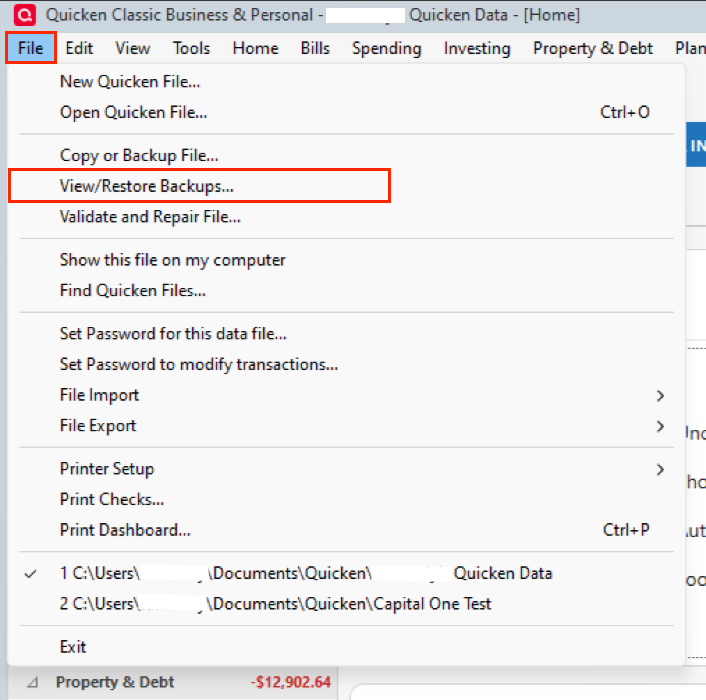
Let me know how it goes.
Quicken Alyssa
Make sure to sign up for the email digest to see a round up of your top posts.
0 -
@Don Awalt When you select "Download Transactions and balances" you get share prices from the FI, Schwab in your case. These are not affected by the Real Time Quotes setting or even the Download Quotes settings in the Security List.
You would have to check with Schwab to see if there is a way you can disable downloading of after hours quotes at their end.
Otherwise, you can tell Quicken to ignore prices from the FI for particular securities. In the Security List, click on the security name, then select Edit details and Other info. At the bottom of the window that is displayed, check the "Ignore prices from broker download" box. Luckily, it sounds you would only need to do this for the 5 stocks you hold at Schwab.
Also if you do an OSU after the markets open or after they close at the end of the day, you will get prices from the quote provider that over-ride the FI's prices.
QWin Premier subscription1 -
Thanks @Jim_Harman I changed that - I'll test it tmorrow morning! Will that just suppress after hours quotes for the stocks because it gets them from somewhere besides the FI? Historically I could get quotes any time during when the market was open (unlike mutual funds). I noticed just now I got updated prices after hours, how does this work - are the prices coming from somewhere else not the FI (Schwab)?
0 -
@Jim_Harman I read your post closer, I think you are saying with the setting changed to ignore prices from the FI, I will only get prices from Quicken's quote provider, which is fine. Will they update during the day, when the market is open?
0 -
Will they update during the day, when the market is open?
Yes, if "Ignore priced from broker downloads" is checked for a security and the global "Real time quotes" option is un-checked, you will get quotes that are delayed by 15+ minutes, and no after hours quotes.
On days when the markets are open, you should not get any quotes until about 9:45 AM Eastern time. After the markets close at 4:00 Eastern, you should get the closing quotes for stocks and ETFs after 4:15 pm. Mutual fund prices update once per day, usually by around 7:30 PM. On days when the markets are closed, no prices will be downloaded.
QWin Premier subscription1 -
thank you @Jim_Harman !
0 -
I have found that the best time to Match my Investments is on Sunday, when there has been no activity. I have several investment accounts at multiple Brokers, and they seem to work best on Sunday.
0

