Automatic categorization - selectively? (part deux)

In this post I asked about adding a category to certain downloaded transactions, and got a reply that sometimes works perfectly.
But what if I want to categorize all transactions where the PAYEE NAME CONTAINS a certain string? The charges for a certain payee all start with the same 7 characters but vary after that. Is there a way to do this for a non-exact payee name?
Quicken Classic Premier (Windows) R65.29 Build 27.1.65.29
Best Answers
-
I think if you are willing to rename all the variations of that particular payee to be the same, then yes it can be done.
For example if you shop at five different Trader Joe's, you will have have different payees: TRADER JOE S #110, TRADER JOE S #111, TRADER JOE S #112, and so on. So
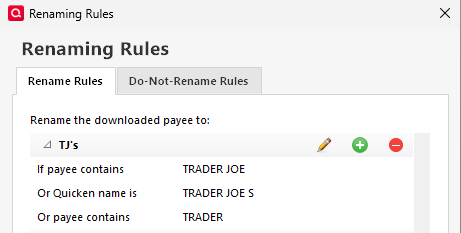
(a) First you will create a renaming rule where if the payee contains "TRADER JOE", rename it to "TJ's" (or whatever you like). This rule will rename all variations of that grocery chain to a simple TJ's.
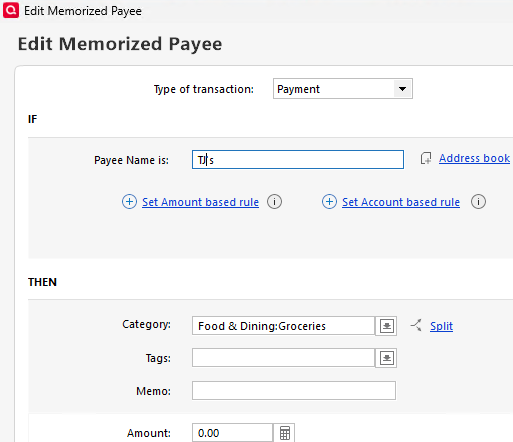
(b) Then create a memorized payee to match exactly what you created in the prior step (TJ's in this example) to be categorized as grocery.
- Q Win Deluxe user since 2010, US Subscription
- I don't use Cloud Sync, Mobile & Web, Bill Pay0 -
@EmKay OK I misunderstood what you wanted. You want them all to get the same category but not change the payee's name.
Currently, Quicken isn't able to do that.
I suggest that you go to the Home page and select New Post → New Idea and create an idea stating this so that people can vote on it.
1


Answers
-
I think if you are willing to rename all the variations of that particular payee to be the same, then yes it can be done.
For example if you shop at five different Trader Joe's, you will have have different payees: TRADER JOE S #110, TRADER JOE S #111, TRADER JOE S #112, and so on. So
(a) First you will create a renaming rule where if the payee contains "TRADER JOE", rename it to "TJ's" (or whatever you like). This rule will rename all variations of that grocery chain to a simple TJ's.
(b) Then create a memorized payee to match exactly what you created in the prior step (TJ's in this example) to be categorized as grocery.
- Q Win Deluxe user since 2010, US Subscription
- I don't use Cloud Sync, Mobile & Web, Bill Pay0 -
That doesn't help me, as my downloaded transactions are from a charity donation clearinghouse and, though they all start with the same name, the ending of the name distinguishes which charity was paid - and I need to keep that and not rename them, unfortunately.
But the info is definitely helpful for some other situations, where I can use it, so thanks!Quicken Classic Premier (Windows) R65.29 Build 27.1.65.29
0 -
It sounds like you want to do exactly the opposite of the standard flow where one wants to "normalize" the payee's name to match a given memorized payee to get a given category.
You want each of these different payees to match to a different memorized payee so that you can give them different categories. This is what would happen if you memorized each of these payees without any kind of renaming rule.
For instance:
Charity donation Jim
Charity donation Kim
Should have memorized payees that match these each with whatever category you want.
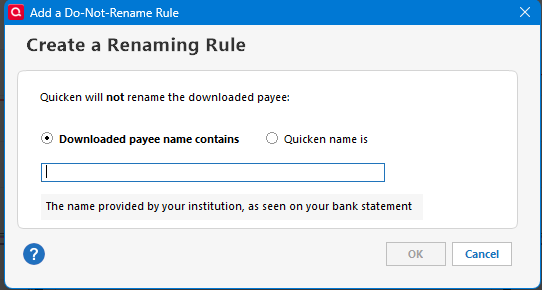
Check that you don't have any Renaming Rules that are looking for parts for the payee names and changing them like a Renaming Rule of "Charity donation". Also, you would want to create a Do-Not-Rename rule for "Charity donation" in Tools → Renaming Rules → Do-Not-Rename Rules (tab)
 0
0 -
@Chris_QPW , Not sure I understand.
»"You want each of these different payees to match to a different memorized payee so that you can give them different categories."
What I'm really wishing existed was "categorization rules" that didn't require memorized payees at all. I want all payees containing the string (for example) "DONATE_HERE" to be categorized as "Donations," but I don't want the payee name (which could be "DONATE_HERE_candidate1", "DONATE_HERE_candidate2", etc.) changed at all. And, because these payee names can vary frequently, depending on who I'm donating to, I don't want to have to set up and manage memorized payees.Quicken Classic Premier (Windows) R65.29 Build 27.1.65.29
0 -
@EmKay OK I misunderstood what you wanted. You want them all to get the same category but not change the payee's name.
Currently, Quicken isn't able to do that.
I suggest that you go to the Home page and select New Post → New Idea and create an idea stating this so that people can vote on it.
1
Categories
- All Categories
- 15 Product Ideas
- 34 Announcements
- 248 Alerts, Online Banking & Known Product Issues
- 20 Product Alerts
- 516 Welcome to the Community!
- 680 Before you Buy
- 1.5K Product Ideas
- 55.6K Quicken Classic for Windows
- 16.8K Quicken Classic for Mac
- 1K Quicken Mobile
- 834 Quicken on the Web
- 126 Quicken LifeHub