Wells Fargo Advisors won't download transations

This has been working for years, but now my WFB brokerage account will only conect with "simple" download. This may be from the recent QW Sept 2025 upgrade, but disconnecting rebooting, reconnecting changes nothing.
I have had to deactive just to keep my transactions.
Comments
-
Hello @mhsherman461,
Thank you for letting us know you're seeing this issue. Aside from the program update, did anything change with the connection recently? Did you need to reconnect or reauthorize any financial institutions? The most likely thing that would trigger the account to suddenly support only Simple investing would be if the connection option the account was connected to got changed.
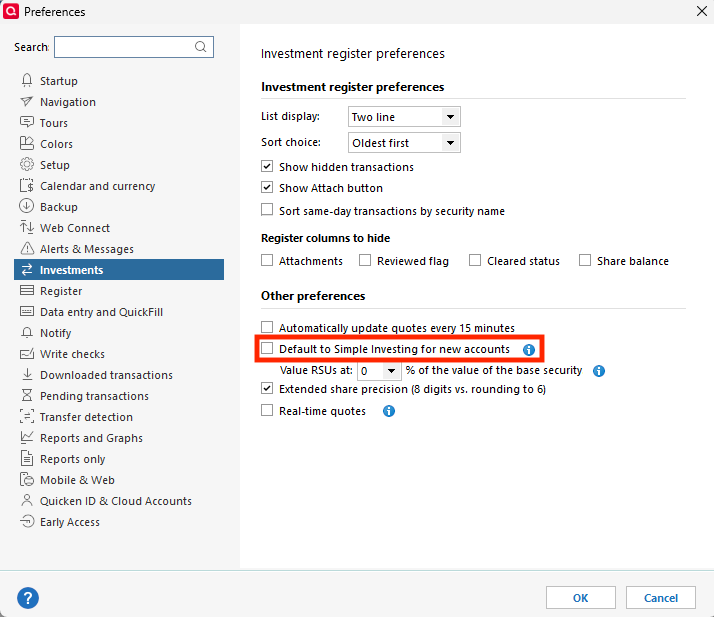
To troubleshoot, please backup your Quicken file, then navigate to Edit>Preferences>Investments and make sure "Default to Simple investing for new accounts" is not selected. If it is selected, unselect it and click OK.
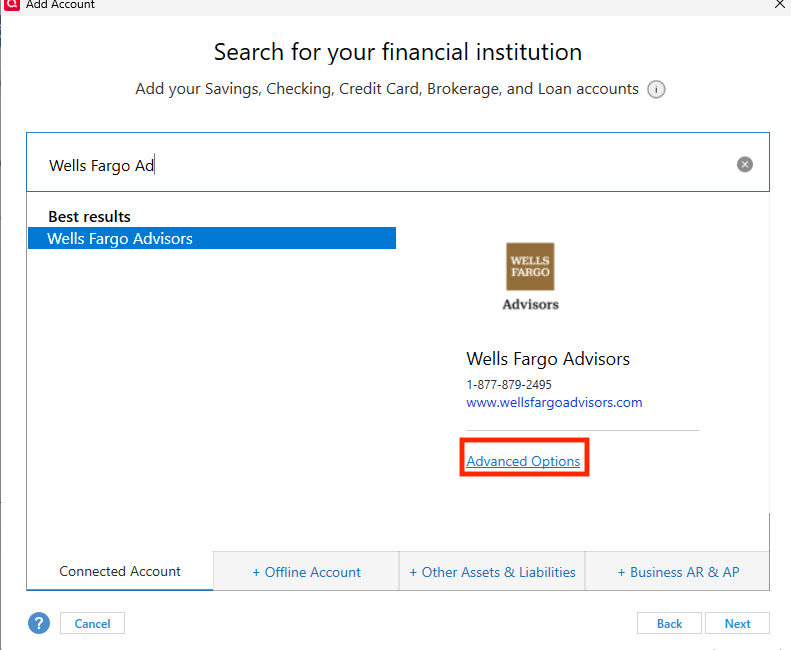
Next, navigate to Tools>Add Account and search for Wells Fargo Advisors. Click the Advanced Options link.
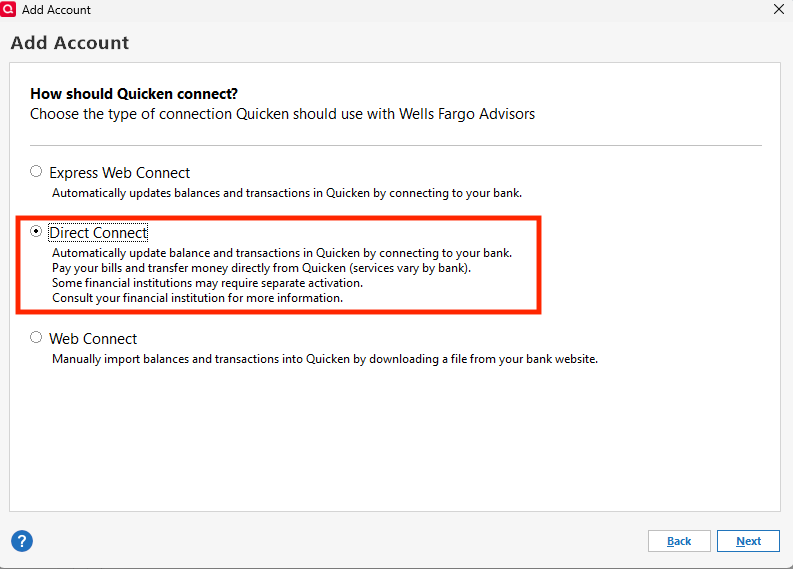
Read the information screen and click Continue. On the next screen, make sure that Direct Connect is selected, then click Next.
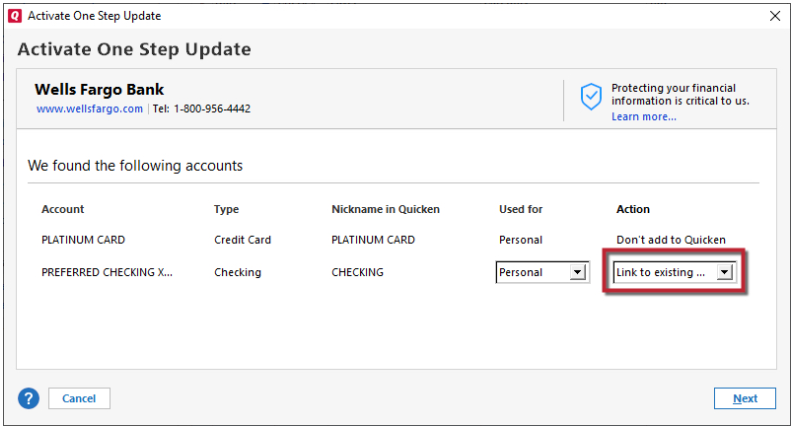
Follow the prompts. When you get to the Add/Link screen, make sure to carefully link the account with the correct nickname in Quicken.
Please let me know how it goes!
Quicken Kristina
Make sure to sign up for the email digest to see a round up of your top posts.
1 -
That precise set of operations worked. Thanks. But other ways did not:
- I have Wells checking accounts and when I went through WFB, it found both the investment and checking accounts, but did not connect the brokerage account correctly, even though it thought it did
- I deactivated and tried using the "set up" on the existing account. That did not work either
0 -
Thank you for the follow-up,
I'm glad to hear that those instructions corrected the issue. Regarding the two other ways you tried:
- Wells Fargo Advisors accounts may be visible under the regular Wells Fargo Bank connection, but you will get better results using the Wells Fargo Advisors connection option.
- Using Add Account tends to work better than using Set Up because it allows you to verify that you have selected the correct connection option and type.
I hope this helps!
Quicken Kristina
Make sure to sign up for the email digest to see a round up of your top posts.
1 -
I noticed today that my wells fargo advisor (WFA) investment account will not update. The investment prices update but I keep getting an error (301-A) message that quicken is not linking with WFA. Never happend in recent memory. I seems interested in linking my WFA account linked to retail purchase (which is true) but It keeps asking me for my four investiment accounts to relink, which it does and then the error message appears.
0 -
Hello @Aweisman,
Thank you for letting us know you're seeing this issue. To clarify, you have 1 investment account under Wells Fargo Advisors, but are linking 4 others under that connection also? If that is the case, that may be the source of the problem you're encountering. If those other 4 investment accounts are with Wells Fargo, but not with Wells Fargo Advisors, I'd recommend that you backup your Quicken file, deactivate those accounts, then navigate to Tools>Add Account and follow the prompts, making sure to carefully link them to the proper nickname in Quicken, and if the Wells Fargo Advisors account is visible in the Add/Link screen, make sure it is set to Don't add to Quicken (since that will leave it on it's current connection instead of moving it to the new connection).
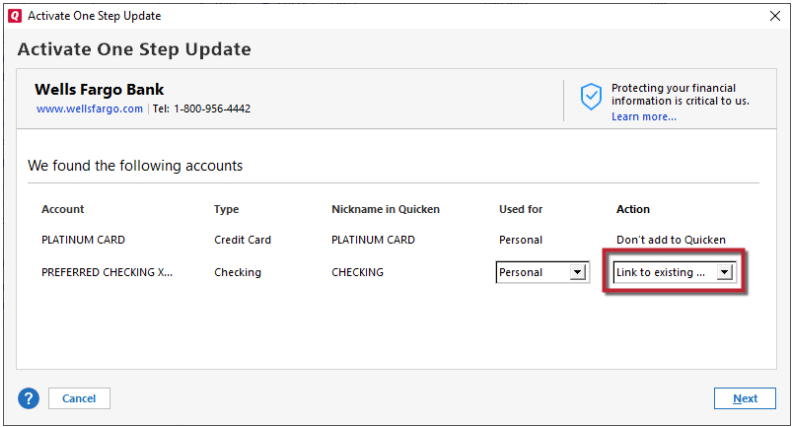
Please let me know how it goes!
Quicken Kristina
Make sure to sign up for the email digest to see a round up of your top posts.
0 -
The issue regarding my WF credit card for a term payment for appliances was eventually resolved. The other four accounts are investment accounts. The investment accounts could not be updated until they were made Express Web Connect format, rather than Direct Accounts. So I have lost the ability to examine the register for these accounts. When I am informed of changes within the account, I have to examine each of the securities to figure out which increased due to a dividend or other matter. I do not want to try to move these accounts back to the original format, and I've been reading that WF is now using EWF (although Quicken Support ticket 11983110) and WF support were unaware of this transition.
0 -
Ticket 11983110. I guess the matter is still unresolved. I have four (4) investment accounts with WF Advisors and one (1) Retail credit card with WF CC. It seems that when one group is corrected the other become detatched and unlinked through quicken. This began approximately 2-3 weeks ago after quicken issued an program update. However, this may be just WF making corrections to their system (something they deny) so their aggregator works. The old updates were via Direct Correct. Now they only work with Express Web Connect. But changing that makes the credit card fall off the auto update-and when you try to correct the credit card, the investments revert back to Direct Correct and claim my account name/password are wrong (which is what happended 2-3 weeks ago after the last release update. WF is not helping when I call them, claiming their system is fine. Historically, a system pattern occurred when Empower decided to not work with Quicken in one step updating files-claiming their in-house aggregator would set the new standard. WF may be trying to control the one step update rule for their data too, from direct connect to Express Web Connect. IMO.
0 -
Thank you for your reply,
When I check on ticket 11983110, I can see that ticket is closed with the stated resolution being that they referred you to the financial institution. Based on your post today, it sounds like you have spoken to Wells Fargo, and they're not helpful.
To further troubleshoot this issue, please create a new "test" file, and try connecting your Wells Fargo Advisor accounts via Direct Connect in that new file. To create a new file, please follow these directions from our article on creating a new Quicken file:
1. Choose File menu > New Quicken File.

2. Select New Quicken File.

3. Click OK.
4. In the File name field, enter the name of the new file then click Save.

Don't use any of these characters: * ? < > | " : \ / (asterisk, question mark, left and right angle bracket, pipe, straight quotation marks, colon, BACKSLASH, FORWARD SLASH). Also, don't add the .qdf extension; Quicken does that for you.
5. Sign in with your Quicken ID. If you are prompted to create a Quicken ID but already have one, click Sign In under the Create Account prompt.

6. Select to not use Mobile.
7. Click Add Account to start adding accounts to the new file.
Once you have determined if you are able to connect your Wells Fargo Advisors accounts in the new "test" file, you can return to your main file. For instructions on how to switch between Quicken files, please click here.
Please let me know if you're able to connect in the test file or not.
Thank you!
Quicken Kristina
Make sure to sign up for the email digest to see a round up of your top posts.
0 -
Kristina,
cCould not follow your steps. Once I set up My New Quicken File, it did not ask me to log in and then told me I could not move forward. I tried to open Wells Fargo Advisors. It asked me to log in. Then it said, Quicken is having trouble connecting to Wells Fargo Advisors. It gave the typical message from WFA "user has enterred an invalid user id or password" and asked me to start the registration process from the start. Then it gave me 3 options: try it again, visit brokerage website and download transactions myself, or enter transcations manually. The first option did not work. I am not ready to go into the other 2 options. Trying just Wells Fargo (sans Advisors) led to the same dead end.
Wells Fargo Credit Accounts got me into the heart of the Wells Fargo main web site, and exposed all five accounts possible. But, alas, in the end, it only added the credit card file.
0 -
Thank you for your reply,
To clarify, did what you described with Wells Fargo Advisors happen in the new file, or your original file? If it happened in the new file, then we can rule out file-specific issues.
I can see that you sent logs earlier in the month. When I review the log files for more information on the connection error, it shows "If registering for the first time, please login to https://www.wellsfargo.com/fmssetup to start the registration process". Have you navigated to that site to authorize the connection? If you haven't done that, I recommend giving it a try. Some financial institutions that offer Direct Connect require that you authorize on their site prior to connecting your accounts.
Thank you!
Quicken Kristina
Make sure to sign up for the email digest to see a round up of your top posts.
0 -
Kristina,
The Quicken expert at Wells Fargo Bank took me through the system and informed me they are using web express now because Direct Connect has inherent fees to them they want to eliminate. So now the investment accounts have web express and the bank-credit card account also has web express. And I am just awaiting a payment posting through the credit card account through my bank-to verify there is connections. Unfortunately, with this connection change, I have lost exposure to the register, which was viewed until last month when everything changed.
0 -
Thank you for the follow-up,
I'm sorry to hear that Wells Fargo decided to no longer support Direct Connect for that connection.
Thank you!
Quicken Kristina
Make sure to sign up for the email digest to see a round up of your top posts.
0
