"The associated accounts can't update right now. We are investigating the issue" after OSU

Over the last few months, this message keeps coming up on and off after OSU, primarily with the citibank account.
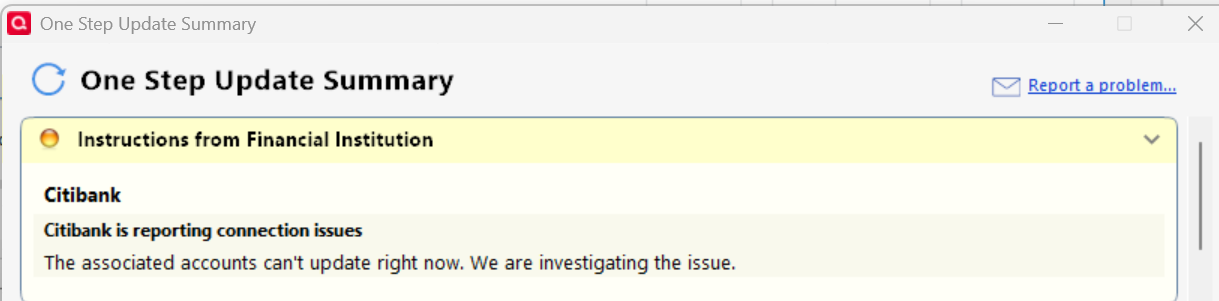
I don't know what caused it. Sometimes it shows up after OSU, and sometimes it doesn't. It has been a mystery to me.
Comments
-
Hello @Patrick,
Thanks for reporting this!
Several users in the past few months have reported that the steps below have resolved this error for them:
- Run One Step Update (OSU) first to see if the issue resolves.
- If the issue persists, close Quicken
- Using Windows File Manager to rename the runtime.dat file located at:
C:\ProgramData\Quicken\Inet\FILENAME\ where FILENAME is the name of your current Quicken data file, e.g. My Quicken Data 2024 as seen in the image below. There usually is an \Inet\… subfolder for each Quicken data file in existence.- (For example, add a 1 at the beginning of the file name so it reads 1runtime.dat.)

- (For example, add a 1 at the beginning of the file name so it reads 1runtime.dat.)
- Start Quicken and run One Step Update again to check if the problem is resolved.
- Close and restart Quicken to ensure changes take effect.
📌 Note: The ProgramData folder is hidden by default. If you need help accessing it, Microsoft's support site has instructions on how to unhide folders.
Additionally, this is also considered a known issue, particularly with Citi, and has been escalated internally. To assist in our investigation, please provide the following and let us know once you have done so, so they can be added to the open ticket:
- Logs (Help > Report a Problem)
- Screenshots (excluding personal data)
- A sanitized copy of your Quicken data file (with personal details removed)
Thank you!
(CTP-14158)-Quicken Anja
Make sure to sign up for the email digest to see a round up of your top posts.0 -
I followed the above steps and it resolved it ONCE. Then when I run the OSU a few times later, this message came right back, not only to Citibank but also to Charles Schwab then.
0 -
@Patrick Thanks for the update and for trying the steps! Since the issue only resolved temporarily, the best next step is to submit your logs, screenshots, and a sanitized copy of your Quicken file. This will ensure your experience is added to the open ticket (CTP-14158) for further investigation.
There’s no ETA on a resolution at this time, but please let us know once your files are submitted.
Thank you!
-Quicken Anja
Make sure to sign up for the email digest to see a round up of your top posts.0
