Fidelity Cash Management Account keeps having Placeholders added

This discussion was created from comments split from:
Fidelity Adding Placeholder Transactions EVERY TIME
.
Comments
-
It is doing the same for me upon forced re-authorization. Not on my 401k, but my Fidelity Cash Management account. There has never been any transactions in the actual Cash Management Account, they all go to a linked checking account. Ever since I had to re-authorize, it puts the transactions into the linked account like normal, but it puts a placeholder entry in the Cash Management investment account to match the balance every time I update, essentially doubling up the total between the two accounts. Everyday since I have to manually delete the placeholder.
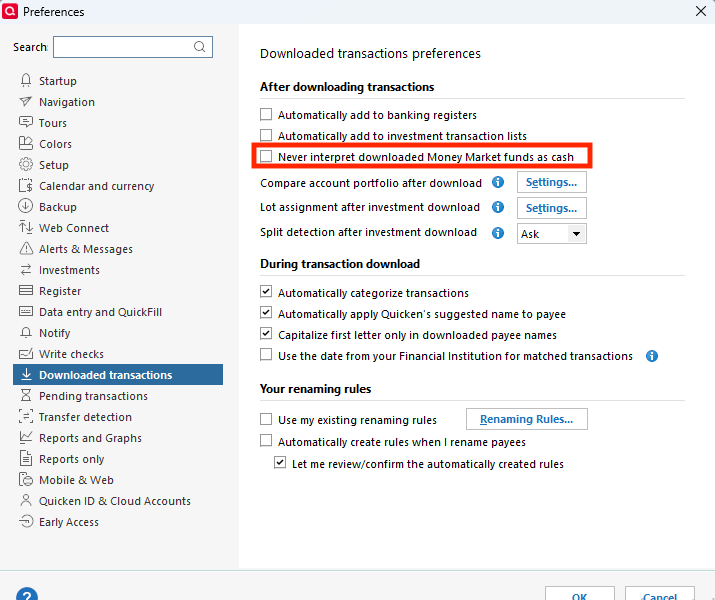
I went into the settings and unchecked the account to NOT have placeholder entries for that specific account, but they still come up. Edit→Preferences→Downloaded Transactions→Settings next to Compare account portfolio after download.
0 -
Hello @thebone,
Thank you for sharing your experience! To help troubleshoot, please provide more information. You mentioned that placeholders keep appearing. What fund/holding is Quicken adding with that placeholder? Is it a core position that should be represented as cash?
If you haven't already done so, please navigate to Edit>Preferences>Downloaded Transactions and make sure that "Never interpret downloaded Money Market funds as cash" is not selected.
I look forward to your reply!
Quicken Kristina
Make sure to sign up for the email digest to see a round up of your top posts.
0

