Deleted manual bills return again and again?

I recently started seeing a couple manual bill reminders show up after they had been paid and entered. I subsequently deleted them, only to see them show up again when when I reopened Quicken. To make matters worse, Quicken made them repeating weekly, which throws predicted balances way off. I have deleted the bill and all further instances repeatedly, validated, supervalidated, etc., with no relief. Has anyone seen this and can you offer a solution? Thank you.
Comments
-
Hello @Warhawk,
I can understand how frustrating it must be to keep seeing those manual bills reappear, especially when they’re affecting your predicted balances.
To start, could you let me know where your Quicken data file is stored? Is it on your local hard drive (C: Drive) or a cloud-based/external drive (e.g., OneDrive, DropBox, USB, etc.)?
If your data file is stored on your local hard drive, and given all the troubleshooting you’ve already tried, have you attempted restoring from a backup? That’s usually a good first step. If you've already done that, and that didn’t resolve the issue, the next thing I’d suggest is creating a copy of your data file, which rebuilds all internal lists and database tables. Here’s how:
- Go to File > Copy or Backup File… > Create a copy or template.
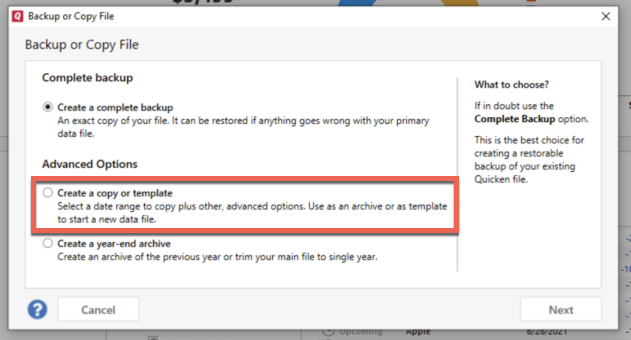
- Select the date range you want to carry forward. If you want your entire data file, make sure to select the full date range to avoid “shrinking” your file.
A couple things to note about using a copied file:
- All online services will be disconnected in the copy. You’ll need to sign back in with your Quicken ID and reconnect any online accounts, billers, or Quicken Bill Manager services.
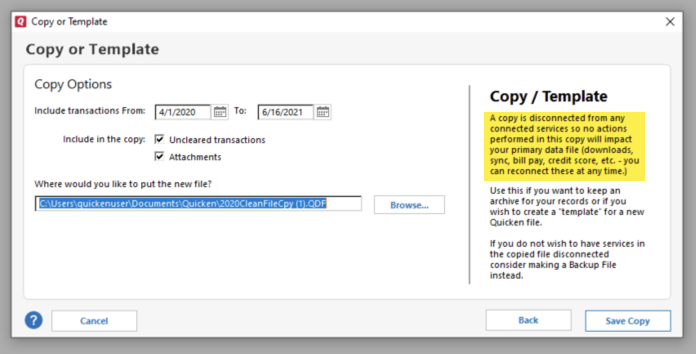
- The new copy creates a separate dataset ID. If the issue isn’t resolved in the copied file, you can always switch back to your original file.
Hope this helps!
-Quicken Anja
Make sure to sign up for the email digest to see a round up of your top posts.0 - Go to File > Copy or Backup File… > Create a copy or template.
-
Same thing is happening to me. Just noticed it starting last week.
0 -
Hello @Zeus,
Thanks for letting us know you’re experiencing the same issue. To better understand what’s happening, could you please share a bit more detail:
- Where is your Quicken data file stored? Is it on your local hard drive (C: Drive) or a cloud-based/external drive (e.g.: OneDrive, DropBox, USB, etc.)?
- Have you attempted any troubleshooting steps so far? If so, what were they?
- When did this issue first start occurring?
- Were there any significant changes to your system or software before the issue began (updates, new installations, etc.)?
Once we have that information, the first step I’d recommend is restoring from a recent backup of your data file to see if the issue still occurs.
Thank you!
-Quicken Anja
Make sure to sign up for the email digest to see a round up of your top posts.0 -
@Quicken Anja Hi Anja, my file is stored on my hard drive but backed up through iCloud. When it's being accessed though, it's a local file.
Before seeing your reply, I opened all the reappearing bills, set their frequency to only once, entered them, and then deleted them. So far this has resulted in them no longer reappearing. If it helps, I had previously restored from a backup. Thank you.
1 -
@Warhawk Thank you for the update and for sharing what worked for you! I’m glad to hear that adjusting the frequency and re-entering the bills resolved the issue, and they’re no longer reappearing.
Thank you—it’ll definitely help others who might encounter the same problem.
-Quicken Anja
Make sure to sign up for the email digest to see a round up of your top posts.0 -
@Quicken Anja Okay, correction: all the bills reappeared after I did a One Step Update. I'm back at square one.
0 -
@Warhawk Thanks for following up, though I’m sorry to hear the bills reappeared after the One Step Update—that's frustrating.
Just to clarify, did you have a chance to try creating a copy of your data file as I suggested earlier (File > Copy or Backup File… > Create a copy or template)? This step rebuilds internal lists and database tables, and sometimes resolves issues like this.
Please let me know if you tried that, and we can go from there.
-Quicken Anja
Make sure to sign up for the email digest to see a round up of your top posts.0 -
@Quicken Anja I haven't but will try that now. It's very frustrating that a resolution requires me to reconnect all of my accounts…
0 -
@Warhawk there is an issue with OSU bringing back old and/or corrupted reminders even after repairing them. My experience is below. Based on your description, I would first delete QW.rmd. No harm can come from that it will get recreated. The super-validate. If you get a clean report then reset cloud file. If not repeat super-validate. Then reset cloud file. Sync needs to be on for that option to appear.
I cannot break reminders with splits as of yesterday. I waited until this morning after a new day's OSU to see if the reminders remained uncorrupted and they did.
I cannot pin down exactly what happened but have a couple of candidates. I went from reliably being able to break the reminder after OSU as verified by seeing changed values and anomalous behavior in tax planner and also "corrected scheduled reminders" in super-validate reports to not being able to break it.
Three things I did but really cannot pin down if any one of them are responsible.
First, I deleted QW.rmd, a legacy file from BillMinder that is still used somehow in Quicken and which has been implicated in the past for bad behavior in reminders. I had not looked at it in a while and it was rather large. It's now only about 40 kb. The file is found under C:\Users\UserName\AppData\Roaming\Quicken\Data
Second, I reset the cloud file after a super-validate and then made no accounts selected for mobile sync.
Third, after a super-validate (holding Ctrl+Shift while clicking File Validation), I would always go back to the problem reminder(s) and check them to see if anything changed. I would then resave them. The next OSU would result in corruption, sometimes even before the next OSU, I'd notice Tax Planner shift from using scheduled reminders to YTD use to date. After the last 2x super-validate, to verify a clean file, I performed OSU immediately and Tax Planner values remain as expected.
Some form of corruption was being spawned using Quicken and being perpetuated by the OSU process. It seems for now, one of the steps I took (or a back-end change in the OSU process) corrected the corruption and the file is now behaving as expected. Several others are reporting this type of issue with reminders containing splits. Hopefully, thru trial and error, a specific set of steps that can be taken to restore the file will be identified.
0 -
@markus1957 Thank you for all the info.
@Quicken Anja I made a copy today and reconnected all of my online services (DEAR LORD). I will run a number of One Step Updates and come back here with the results after a few days. Hoping it works. If it does, I would sure appreciate you explaining why this would fix the problem, and what would have caused the problem in the first place if this is the correct fix. Thank you.
0 -
@Warhawk Thanks for the update, and I completely understand how tedious reconnecting all your accounts can be—especially after going through multiple One Step Updates.
Just to clarify, the explanation for why creating a copy often resolves this issue was included in my earlier post, but I’m happy to summarize again: creating a copy rebuilds all internal lists and database tables in your file. Any corruption or inconsistencies that may have been causing the manual bills to reappear can get resolved in this process. That’s also why all online accounts and services need to be reconnected—the copy starts fresh with a new dataset ID.
Once you run a few One Step Updates in the copied file, you should see whether the issue is truly resolved. If anything unexpected happens or if the issue returns, we recommend contacting Quicken Support so our agents can investigate further and escalate if needed.
Hope this helps!
-Quicken Anja
Make sure to sign up for the email digest to see a round up of your top posts.0 -
I am also experiencing this issue in the past few days. That makes at least three of us (@Zeus and @Warhawk) that are all experiencing the same issue that started around the same time. I too will follow your instructions to create a copy but like Warhawk I shudder at having to re-establish the multiple online services. In the meantime, is IT looking at the latest updates as a cause for this problem given it's affecting multiple users at the same time?
0 -
@Quicken Anja I have reestablished all of my online services within the copied file. It downloaded copies of old transactions within my investing accounts, which I have to now hunt down and delete. This has been an extremely frustrating process, and it would be kind of you to explain what is going, why this happened, what the company has done about it, etc. Thank you.
0 -
@Quicken Anja I have the same issue and it started a few days ago so obviously something in a recent update is causing this to happen. These bills definitely come back after doing an online update. I doubt it has anything to do with a corrupted database given the fact that multiple people are experiencing it now so please ask the engineers to take a look and hopefully they can reproduce the bug and fix it. My guess is that it is related to this change in the release notes: "FIXED An issue where an Online Bill could not be deleted."
0 -
Seems like this might be the same as
I guess just turn off features and some things might start working again! It would be spectacular if the underlying issue was actually fixed.
0 -
I have reset my Cloud Data and that seems to be working to not bring back deleted bills. I would give that a try for anyone experiencing this issue.
0 -
I am experiencing the same problem. This sounds like a Quicken problem, not an individual user problem.
0 -
Hello All,
Thank you for taking the time to report this issue.
We have forwarded this issue to the proper channels to have this further investigated. However, we request that you please navigate to Help > Report a problem within your Quicken program and submit a problem report with log files and screenshots attached in order to contribute to the investigation.
It would also aid the investigation to include a sanitized file when submitting the problem report. A sanitized file is a data file that removes personally identifiable information so you can comfortably share this file with the Quicken team.
While you will not receive a response through this submission, these reports will help our teams in further investigating the issue. The more problem reports we receive, the better.
We apologize for any inconvenience in the meantime! Thank you.
(CBT-858)-Quicken Anja
Make sure to sign up for the email digest to see a round up of your top posts.0

