Now my Fidelity Managed Account is no longer downloading transactions

Right after the latest update to QW (R64.30) to handle money market funds like SPAAX as cash, one Fidelity account that happens to be an IRA that is Fidelity managed and holds multiple Fidelity unique funds, no longer downloads transactions. On 9/23 Fidelity rebalanced and bought / sold funds but those transactions simply aren't downloading. I've been successfully downloading transactions for a year or more. The Direct Connect worked fine and I believe the EWC+ has been working fine (after cleaning up CMA issues). I reported this through Quicken also.
Any ideas?
Comments
-
Below are the specific funds that are not downloading for my Fidelity Managed Account. These are just a few of the many funds Fidelity Strategic Advisors Inc uses for the wealth management accounts. all of the prior transactions using Direct Connect downloaded perfectly.
FZOLX FIDELITY SAI LOW DURATION BOND FUND
FZOMX FIDELITY SAI SHORT TERM BOND FUND
FGOMX STRATEGIC ADVISERS FID EMERGING MARKETS
FIWGX STRATEGIC ADVISERS FIDELITY CORE INCOME
FUSIX STRATEGIC ADVISERS FIDELITY INTL FUND0 -
Hello @bbuckley,
Thank you for sharing your experience and for providing those additional details.
To clarify, this issue is only occurring in one account, correct? Is the IRA account not updating at all, or is it just missing the data you mentioned above?
Looking forward to your response.
Quicken Alyssa
Make sure to sign up for the email digest to see a round up of your top posts.
0 -
As far as I can determine this particular account isn't downloading at all, but to be fair there have only been 10 transactions since I converted to EWC+ and they were all on the same day. Also, even though the transactions didn't download the account balance was correct. I don't know why. In the other accounts dividends have downloaded correctly since I converted to EWC+ but there haven't been any trades made since then. I did report this in Quicken help report a problem so maybe the logs tell a story?
[Edited-Readability]
0 -
Hello @bbuckley,
Thank you for following up with that information.
Please follow the recommendations in this Support Article for missing transactions. If you still need assistance after doing so, please contact Quicken Support, so they can take a look at those logs you sent in.
Thank you.
Quicken Alyssa
Make sure to sign up for the email digest to see a round up of your top posts.
0 -
Thanks. The support article is VERY basic and would probably only help relatively inexperienced users. I’ve been using Quicken for over 30 years and have successfully been tacking many investment accounts over those years and I track my complete net worth by updating daily.
This current issue is almost certainly due to the Fidelity EWC+ conversion and / or the recent Quicken change to treat money market funds as cash if desired. That is a great change btw, and things like SPAAX now get treated as a cash balance to coincide with the way it is treated by Fidelity. But I suspect that the Fidelity Wealth Management unique funds are mistakenly being treated the same way. I’ll contact support but how do I reference the report I sent in through Quicken?
0 -
Hello again @bbuckley,
Thank you for adding more information to the thread.
I agree that this issue is almost certainly due to the Fidelity migration, and by contacting support, they can take a closer look and escalate if needed.
You can reference the report you sent simply by letting them know that you submitted your logs to Quicken. They will be able to see that you have done so.
I hope they are able to get this resolved or escalated for you.
Let us know how it goes!
Quicken Alyssa
Make sure to sign up for the email digest to see a round up of your top posts.
0 -
Will do, thanks so much for your help!
0 -
Quicken Alyssa
Make sure to sign up for the email digest to see a round up of your top posts.
0 -
bbuckley - my connection with Fidelity and that of others in this community has not worked for a couple of weeks now. I have tried everything suggested by experts on the community site and nothing has worked. Hope Quicken finds a fix. I have not called customer service yet, leaving that for a last resort.
0 -
Hello @ha_amin,
Thank you for sharing your comments and concerns.
If you would like to share more specifics on what issues you are seeing, I would be happy to provide guidance. Are your Fidelity accounts not downloading as well?
Hope to hear from you.
Quicken Alyssa
Make sure to sign up for the email digest to see a round up of your top posts.
0 -
I deactivated ALL my Fidelity accounts then re-authorized the currently active ones and today transactions correctly downloaded from all of them using the EWC+ connection. Only 1 data point but encouraging.
Related issue is some "money market funds" that are premium cash accounts like FZDXX are not being treated as cash like SPAAX. - Different discussion topic applies…
0 -
Hello @bbuckley,
Thank you for following up and providing additional details. I am happy to hear that the initial issue seems to be resolved.
Regarding your money market funds. Please do the following:
- Go to Edit.
- Select Preferences.
- Click on Downloaded transactions.
- Check to see if you have "Never interpret downloaded money market funds as cash" checked off.
- Uncheck it if it is checked off.
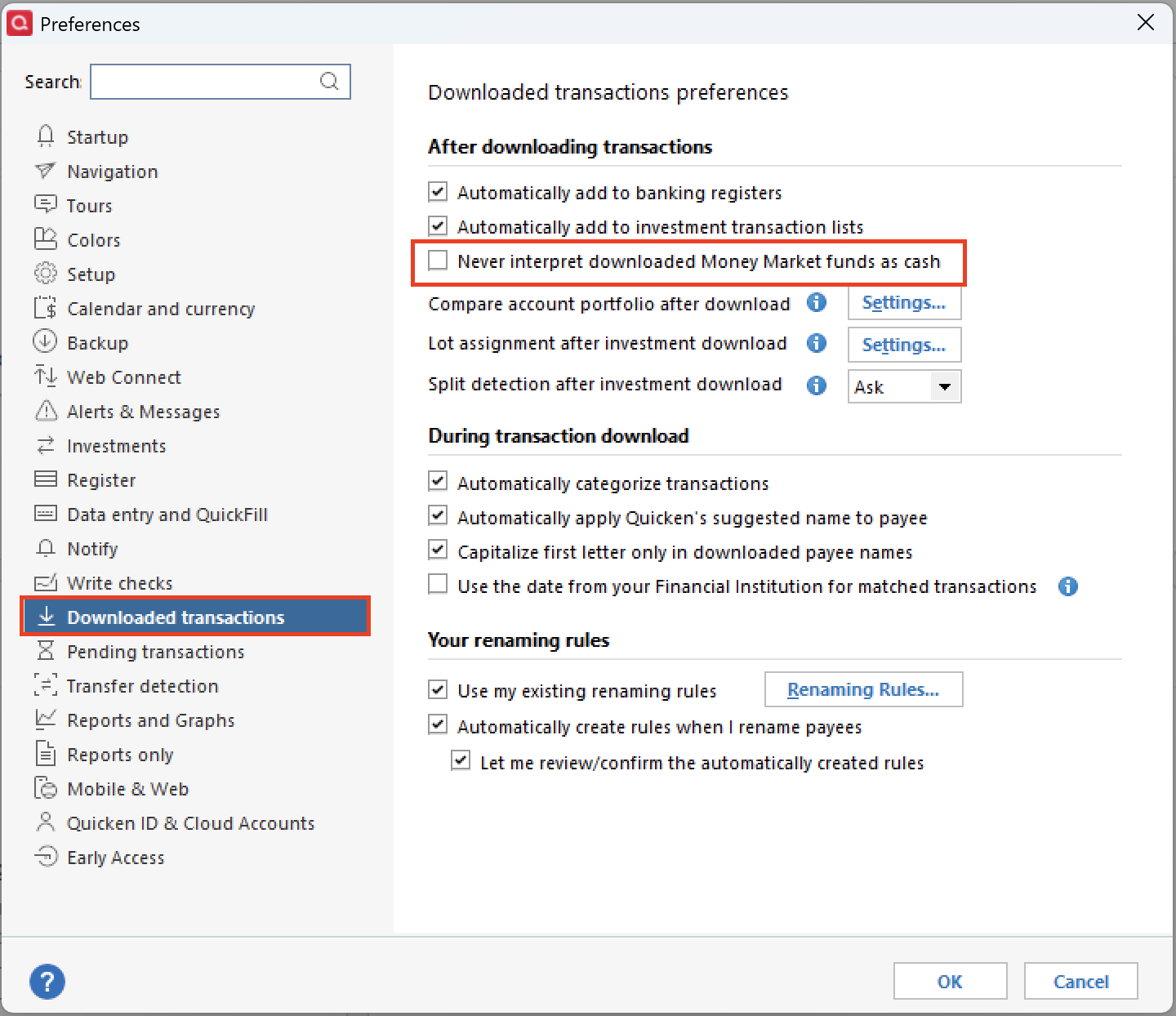
Hope this helps!
Quicken Alyssa
Make sure to sign up for the email digest to see a round up of your top posts.
0 -
Yes, I had already made sure it was unchecked and other accounts that have SPAAX are working fine with the cash representation.
Thanks!
Bruce
0 -
Hello @bbuckley,
Thank you for checking that setting and following up!
At this point, I think the best option is for you to contact Quicken Support directly, so they can take a closer look at what is occurring.
I hope they are able to get it all sorted out for you.
Thank you!
Quicken Alyssa
Make sure to sign up for the email digest to see a round up of your top posts.
0 -
What error messages or codes are you getting when you try to download?
Which Q product are you running and what BUILD of that product? This info is at HELP, About Quicken.
Also, when you do TOOLS, Account List, what shows in the "Transaction Download" column adjacent to your Fidelity accounts. What shows in the "Financial Institution" column for those accounts?
"Tried everything" doesn't provide us with anything that we can use to make suggestions re: your issue.
Q user since February, 1990. DOS Version 4
Now running Quicken Windows Subscription, Business & Personal
Retired "Certified Information Systems Auditor" & Bank Audit VP0 -
I am also having issues with Fidelity. No transactions have downloaded in any of my accounts (brokerage, IRA, 401k) since Sept 19. I have deactivated and reactivated and tried everything listed in the help article.
[Edited-Readability]
0 -
As a test, open Quicken and close your regular file and create a new file called Test and save it to your desktop. Then close it and reopen. In Quicken open the Accounts list and Add a new Fidelity account. When it takes you to Fidelity to authorize only select one account to authorize. Pick one you know has had transactions in the past 90 days. Complete the download and see if the transactions you were expecting all downloaded. If they did you know the EWC+ connection is working. It won’t impact your original file at all.
If it does download go to the original file and unhide all accounts in the account list and deactivate EVERY Fidelity account. Then pick an active Fidelity account and activate downloads. This time when your in Fidelity to authorize, only authorize accounts that are currently active. I had older closed Fidelity accounts. Then see if they download.
0 -
As of Oct 5, Fidelity transactions are downloading, but don't get too happy. It is duplicating old transactions again, mishandling cash as short sales (in one account), reporting dividends for some securities as deposits. I had transactions in 2 of my 4 accounts duplicate going back to July in my Oct 5 update. My Roth account started reporting short sales for cash transactions, causing a major discrepancy in my cash balance. I deleted them. For unit trusts from Nuveen, dividends were reported as deposits. I tried changing it to DIV, and it erased the name of the security and the amount. I had to delete the transactions and re-enter manually.
Furthermore, I suspect there was a reason for the Fidelity download pause. Unfortunately, the problems I'm experiencing are getting worse, rather than better. For the near future, I plan on doing a backup before every download.
0 -
Hello All,
Thank you for chiming in on this thread!
Does this 401k account show up when you are reauthorizing accounts in Quicken, but doesn't get added in after the steps are done? Or does it not show up at all throughout the process?
Thank you for adding to the discussion to help others!
Thank you for providing those details.
It sounds like you may have resolved the issues you were having on your own for the most part. Keep in mind that after the initial switch to the new connection method, some duplicates are to be expected. It should only be a one-time thing as long as you stay on the new connection method, and it should not continue happening.
However, if you are experiencing continued duplicates each time you download, that is definitely something you will want to contact Quicken Support for, as stated in this Support Article.
Thank you!
Quicken Alyssa
Make sure to sign up for the email digest to see a round up of your top posts.
0 -
I echo everyone's frustrations. I have followed all recommended fixes and none have worked. Quicken is aware of the issue, but they have not addressed it.
-1 -
Quicken can't fix Fidelity's screw-ups. And Fidelity (I'm their customer also) is driving this change.
Q user since February, 1990. DOS Version 4
Now running Quicken Windows Subscription, Business & Personal
Retired "Certified Information Systems Auditor" & Bank Audit VP0 -
I spoke to Fidelity yesterday and according to them, nothing has been resolved. Unless you know something that they don't know, they claimed they are getting a lot of calls with people complaining about the Quicken's link to Fidelity. He said Fidelity was working collaboratively with Quicken programmers to reestablish the connection. Fidelity changed its connection requirements to Web Connect +, to be more secure, which threw everything into disarray. It would have been nice to know this from day one, as opposed to be given solutions that clearly don't work. Fidelity gave an ETA of months end and said the change was rolled out over time and didn't impact every Quicken account at the same time. I have had problems since 9/12. We'll give it some more time. If the connection doesn't get fixed, the value of Quicken won't be there for me.
0

