Bank of America Discontinued Importing of QFX Files - CC-885 (QMAC)
Answers
-
I ran into the same thing, got the same error message. After reading all these comments, I made a backup then I selected one of my BOA accounts, changed the Account Settings/Downloads/Change Connection. It went through the same steps as it has for brokerage accounts I have in Quicken (login, etc.) then Quicken asked to Link to each of my existing BOA accounts. Every transaction came through just fine for each account. So far so good.
2 -
I called B of A technical support and provided feedback (complained) about the problems this is causing. I think the only way to resolve is if lots of others provide feedback/complain as well. Phone number for B of A technical support is: 1.800.933.6262.
0 -
Im experiencing the same issue and same timing. I called BOA twice now and spoke with two differect tech agents. Both agents had no knowledge of this supposed change nor could not find any information which their BOA access about any policy changes regarding QFX files or discontinued support of these files or anything else as it relates to Quicken use. The option is still available to download a WEB connect .QFX file on their on-line banking. I am able to download this file as I have done for years. The issue comes when importing this file from Quicken. I then get the error. Does't seem to point to a BOA issue.
0 -
BofA told Intuit that it no longer wants to support Web Connect. Quicken Inc pays Intuit for “connected services”. Intuit maintains the relationships with the financial institutions and the list that Quicken uses to tell which financial institutions are participating partners and what services they support.
It is a mistake on BofA’s part to still allow downloading the QFX file.
The file for Quicken Mac is:
if you look up the INTU.BID number in that file (first number on the line) you will see that it doesn’t have WEB-CONNECT on it.
BofA's end goal is to go to Quicken Connect only.
0 -
All your data are belong to us.
Quicken user since 1994.
Quicken Forum/Community Contributor since 2005.0 -
Error message when attemtping to download bank activity. States Web Connect disabled or revoked. Checked and contacted Bank. Am active. Quiken pointing finger to Bank - Bank states is set up properly. Have shut down, rebooted and confimred Quiken software is up to date.
0 -
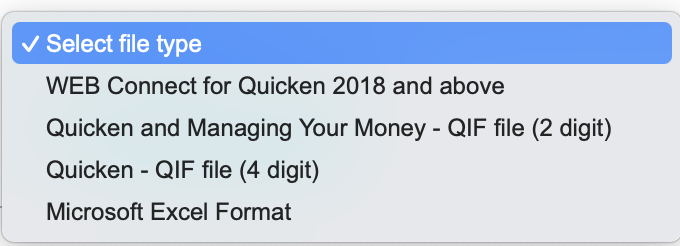
I use Quicken 2018. I have same problem with BofA, QFX files are blocked from upload to Quicken. Bank of America download options do not list "Quicken Connect" or EWC+ yet. Only options are QFX (still available- they are on my computer download file), Quicken QIF + Manage Money 2 digit, QIF 4 digit, MS Excel, and .CVS I downloaded Quicken QIF Current Transaction file today and want to know if anyone has tried a converter? I see a "QIF2QFX" converter online. Right now I am stuck with entering all my transactions by hand, and switching to a different, non-BofA credit card so I don't have so many to enter. The other FI accounts I use do not have this problem, thank goodness.
Has anyone tried Softpedia QIF2QFX converter and figured out how to import into Quicken? Or some other work-around? Thank you!
0 -
Your profile says "Quicken Windows Other". Are you using Quicken Windows or Quicken Mac.
Note that BofA should be supported for both Quicken Connect/Quicken Mac, and Quicken Windows/Express Web Connect +. It is Web Connect/QFX file that has been disabled.
0 -
I have been using BofA and Quicken download for 25 years. After I realized this week's decision to only support quick connect, I was advised by Quicken employees that I will see issues with duplicates and balance errors. How do I keep on top of new information? A second person at Quicken told me last night to try Quick Connect in a few days, that now would be a bad time.
0 -
You will only see duplicate transactions the first time you connect with a new method. That's because every transaction carries a unique transaction ID number assigned by the financial institution, and there are typically different numbers assigned if a bank provides different connection methods like Quicken Connect and Web Connect. So before you switch connections, be sure to record your account balance an the opening balance entry (if any) in your account, which will help you if Quicken's first download via Quicken Connect changes anything. It may take you a little time to delete the duplicates and get your balance adjusted to be correct, but it's a one-time annoyance and then you should be good moving forward.
Quicken Mac Subscription • Quicken user since 19931 -
Another thing that will help you identify duplicate transactions is if you reconcile your account to the most recent statement (if you haven't already been doing that). Spotting unreconciled duplicate transactions in amongst the reconciled transactions is easy.
1 -
Smells of Quicken forcing upgrades or worse grabbing more of your data with this new format.. if BofA no longer supports the format it makes zero sense why those options are still available to download files from their website. Wouldn't BofA take those options away on 9/30? I mean who else uses QIF formats aside from Quicken? And the export of data is allowed in that format so again Bank of America is not stopping you from downloading it's the import that fails.
I've used Quicken and bank of America for 20+years. If this holds it will force me to drop one of them and I'm leaning towards Quicken. I see no value in paying a subscription for something that makes me manually enter all my bank transactions.
1 -
Smells of Quicken forcing upgrades or worse grabbing more of your data with this new format.
@heider3 Nope. Quicken still supports Direct Connect for any financial institutions which offers it. It's entirely BoA's decision to discontinue Direct Connect and require users to switch to Quicken Connect/EWC+. Only BoA can why they decided not stop supporting importing of downloaded files (Web Connect) any longer; there are thousands of financial institutions which still offer Web Connect for Quicken. My guess is that on some upcoming cycle of updates to their website, the option to download OFX/QFX files will quietly disappear.
Quicken doesn't gain additional data by users switching from Web Connect to Quicken Connect. What many users aren't aware of is that when you import a Web Connect file, some of the data is still passed up to a Quicken server in order to perform automatic renaming and automatic categorization. That data is not stored in the Quicken server, but if there is anything they are wanting to do with aggregated anonymized data, they could do it whether you use Web Connect or Quicken Connect. By the way, which institutions support which connection methods is arranged between each financial institution and Intuit, which provides connectivity services for Quicken; Quicken isn't even involved in updates to the directory of which financial institutions offer which connection methods.
I see no value in paying a subscription for something that makes me manually enter all my bank transactions.
But Quicken isn't forcing you to enter transactions manually; you have the option to download from BoA like many thousands of other Quicken users. If you don't want to allow Quicken to download from the financial institution, that's your decision, not Quicken's.
Quicken Mac Subscription • Quicken user since 19931 -
I followed your suggestion and reinitiated the connection. I was able to select my accounts and the data for Checking, CC, and a Merrill account downloaded automatically.
1 -
I just had a conversation with a BOA representative who said this was happening on the Quicken side and not BOA. This is pretty distressing that something like this would change without giving warning. Really leaves those of us who use the web connect qfx downloads in a bad spot.
0 -
Many times financial institution representatives don’t know what they are talking about, this one of those cases.
0 -
Thanks, Chris. I'm planning to call Quicken tomorrow, but either way, I wasn't notified of this upcoming change by BOA or Quicken. Did they notify their subscribers? The only thing I'm getting regular emails about from Quicken is their LifeHub.
0 -
Unfortunately the only notifications I have seen from Quicken Inc on things like this is on this website. Sometimes the financial institutions put out their own notices on their website but that is very hit or miss depending on the financial institution.
0 -
When I googled the problem, this is the answer I got. It tells how to fix the problem but I have not tried it yet. I am not that tech savvy.
The error message (CC-885) and the accompanying text indicate that Bank of America has discontinued its support for the "Web Connect" connection method in Quicken.
Here's a breakdown of what that likely means and what you should do:
- The Issue: Bank of America (including Merrill Lynch) has recently discontinued all OFX (Open Financial Exchange) services, which includes both Direct Connect and Web Connect connection methods for Quicken. The error CC-885 is the code Quicken uses when a financial institution stops supporting a connection type.
- New Connection Method: The new, supported connection method for Bank of America in Quicken is Express Web Connect+ (EWC+).
- Your Next Step: You will need to switch your Bank of America accounts in Quicken from Web Connect to Express Web Connect+.
How to switch your connection method:
- Backup your Quicken file first.
- In Quicken, go to Account Settings (or similar menu depending on your Quicken version, usually by right-clicking the account or going to the gear icon/settings).
- Look for an option to Change Connection Type or Set Up Online Services.
- You will likely need to re-authorize the connection, which will involve signing in to your Bank of America account through Quicken's secure process.
- When prompted, make sure to LINK the downloaded Bank of America account to your existing account in Quicken, rather than adding it as a new one.
If you have trouble with the change, you should contact Quicken Support for step-by-step guidance on migrating your account to the Express Web Connect+ method.
1 -
As noted previously there is use of your data. Read the privacy statements carefully. Ask questions in the Community Forum for answers or clarity.
And if in CA
The EWC+ connections ask for a lot. Below is a sample.
"We may create and use de-identified information for our business purposes, including to analyze the effectiveness of our products and services, to improve and add features to our services, and to analyze the general behavior and characteristics of users of our services. We may use this anonymous, aggregated, or de-identified data and share it with third parties for our lawful business purposes."
Quicken user since 1994.
Quicken Forum/Community Contributor since 2005.0 -
No change. Reset my connections, reauthorized with BOA, then verified that I had Quicken Connect/EWC+ enabled. Did the classic reboot of Windows 11 OS laptop, then restarted Quicken. Same outcome, please seel the following.
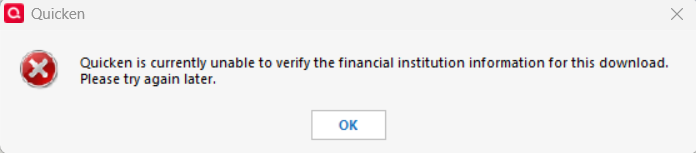
If I need to manually need to enter items, I will go to Excel and let my subscription expire.
0 -
Has anyone noticed as a result of this change, you can only track investments using the Simple "positions only" method and not the "COMPLETE" - positions and transactions?
0 -
Entering my info manually is getting old fast. Will there be an update to Quicken at some point to accommodate the banks change or is this it then?
0 -
I've read through all this and the linked article from 9/30. So BofA has discontinued the use of Web Connect, and now requires Express Web Connect+. Does anyone know how I can download my transactions using Express Web Connect+? It does not show up on the BofA website as a download option. I still only see Web Connect, QIF or Excel as formats.
 0
0 -
@WendyBird EWC+ connections are not performed on the BoA web site. You set them up inside Quicken and then Quicken pulls the information from BoA without you having to log in to BoA every time. If you don't know how to set those up in Quicken Windows, I suggest asking for help over in one of the Quicken Windows forums.
1 -
Ahh. Thank you. That's very helpful. I'll check it out and see if I can get my transactions downloaded that way. (I'm not sure how it works, but I'm just wary of "automatic" downloads. I have had dupes come in that way.) Anyway, I'll play around with it.
0 -
(I'm not sure how it works, but I'm just wary of "automatic" downloads. I have had dupes come in that way.) Anyway, I'll play around with it.
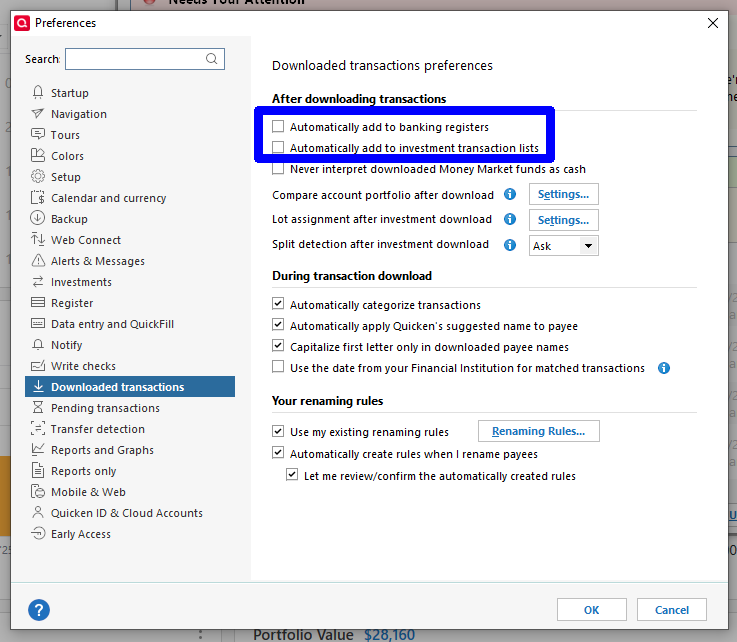
Understandable, but I prefer the automatic downloads. Be sure you have the option to automatically apply downloaded transactions OFF. That way you get a list of the downloaded transactions, a flag indicating whether they match an already known transaction (frequently but not 100% correct), and you get the choice whether to apply the transaction (supplying category as you do), modify a manually entered transaction to match (maybe forgot to include a tip when entering a restaurant charge), or delete the downloaded transaction because it is a duplicate (or zero value).
 1
1 -
hey folks, there are various windows users that are posting on this thread. This is a quicken Mac thread and the procedures and dialogues are different.
0 -
I believe it is up to Quicken to fix the problem by setting up BOA's file to be imported into Quicken with their new format.
0 -
Can’t be done.
The format of BofA’s QFX file didn’t change, that isn’t the problem.
Here is how the system works.
Quicken Inc pays Intuit for “connection services”. Intuit provides all the direct connections/communications with the financial institutions.
The financial institution decides what connection methods they want to support and tells Intuit.
In the case of Web Connect/QFX files Intuit communicates that through three files to Quicken:
Quicken Windows US:
Quicken Mac:
Quicken Windows Canadian:
It would be a contract violation if Quicken Inc ignored these files and imported a QFX file that is not authorized in these files.
It was BofA that told Intuit (through them Quicken Inc) that they don’t want to support Web Connect/QFX files anymore. If you want it back you need to complain to BofA.
1


